Inicio de sesión requerido
Inicia sesión con tu cuenta de iOSGods para continuar.
Inicia sesión con tu cuenta de iOSGods para continuar.

- Unlimited Gold
- Unlimited Gems
- Pro Enabled
Esta app también incluye iGameGod, que te ofrece acceso a Auto Touch para automatizar tareas repetitivas, App Speed Manager para ajustar la velocidad del juego, edición de valores con Memory Engine y más potentes herramientas para juegos de iOS.
Descarga Towerlands - tower defense TD Hack modded IPA desde los enlaces de arriba. Toca el botón de instalación y sigue las instrucciones para instalar este hack iOS en tu iPhone, iPad o Mac con Apple Silicon.
¿Necesitas más ayuda? Consulta nuestras Preguntas frecuentes de la app iOSGods para respuestas detalladas y consejos de solución de problemas.
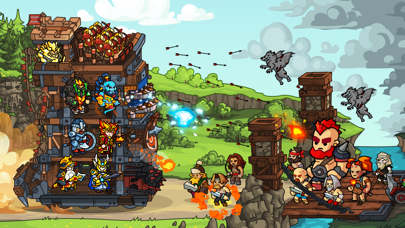
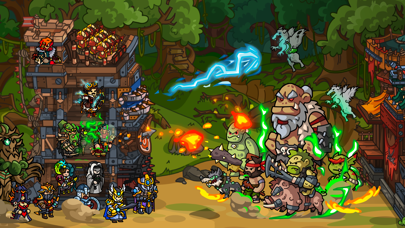
Towerlands is a fascinating strategy game that combines the Tower Defense genre with RPG elements. Feel like a Lord in the vast fantasy world, where you have to defend your fortress from enemies, as well as capture new lands.
Build a variety of buildings in the city to train your army and provide it with quality weapons. Upgrade the Tower to protect your fortress from raids by brigands and monster attacks. Recruit and train new warriors to build up a powerful army, and rank at the top of the rankings. Plan your own tactics in battle, capture cities, castles, and caravans of your enemies, and earn more gold. Create or join a Clan to play with friends, fight other Clans, and earn more gold and resources.
Features strategy Towerlands:
- Over 15,000 waves of enemies to protect your City from;
- Over 100 different characters with three levels of evolution;
- Over 30 types of Towers and 40 unique combat modules;
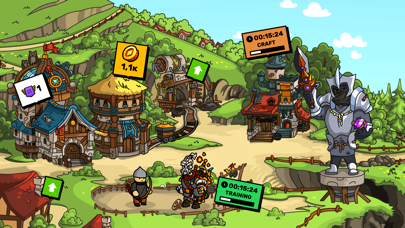
- 6 different buildings in the City, which affect the strength of your Tower and army, as well as resource extraction. Increase the efficiency of your game through artifact crafting and military prowess;
- 4 enemy races: bandits, orcs, undead, and goblins;
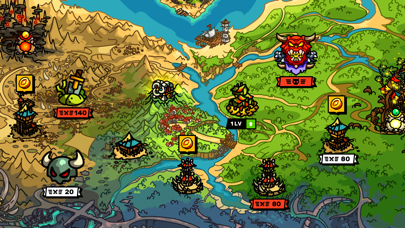
- Large World Map with a variety of points of interest;
- Clan System. Unite with friends and have real battles for the Island in clan events;
- PvP-Tournament. Battle with other players in real-time and gain even more resources and gold;
- A unique approach to each battle: combine and combine heroes, Tower types, and modules to fight against other players or hordes of monsters!
- Take the lead in three world rankings: Clan Rankings, Player Rankings, and PvP Rankings;
- You can play Towerlands without an Internet connection.
Make your Castle bigger and build an empire!
If you have troubles with the game, write to:
- [email protected]
- https://www.facebook.com/blackbearsgames
Auto-Renewal Subscription. Payment will be charged to iTunes Account at confirmation of purchase. Subscription automatically renews unless auto-renew is turned off at least 24-hours before the end of the current period. Account will be charged for renewal within 24-hours prior to the end of the current period, and identify the cost of the renewal. Subscriptions may be managed by the user and auto-renewal may be turned off by going to the user's Account Settings after purchase. Any unused portion of a free trial period, if offered, will be forfeited when the user purchases a subscription to that publication, where applicable.
Terms of Use & Privacy Policy:
https://blackbears.mobi/legal/us/terms
https://blackbears.mobi/legal/us/privacy
- iPhone o iPad con o sin Jailbreak.
- Sideloadly u otras alternativas.
- Ordenador con Windows/macOS/Linux e iTunes instalado.
PASO 1: Descargue el archivo .IPA pre-modificado desde el enlace de arriba a su ordenador. Para descargarlo desde la iOSGods App, consulte nuestro Tutorial de descarga del IPA desde la iOSGods App, que incluye un ejemplo en vídeo.
PASO 2: Descargue Sideloadly e instálelo en su Windows o Mac.
PASO 3: Abra Sideloadly en su ordenador, conecte su dispositivo iOS y espere hasta que el nombre del dispositivo aparezca en Sideloadly.
PASO 4: Una vez que su iDevice sea reconocido, arrastre el archivo .IPA modificado que descargó y suéltelo en la aplicación Sideloadly.
PASO 5: Introduzca el correo electrónico de su Apple Account y, a continuación, pulse «Start». Le pedirá que introduzca su contraseña. Proporcione la información solicitada.
PASO 6: Espere a que Sideloadly termine de hacer sideload/instalar el IPA modificado. Si surgen problemas durante la instalación, por favor lea la nota a continuación.
PASO 7: Una vez completada la instalación y al ver la app en la pantalla de inicio, deberá ir a Ajustes → General → Perfiles / VPN y Gestión de Dispositivos. Una vez allí, toque el correo electrónico que introdujo en el paso 6 y, después, toque en «Confiar en [email protected]».
PASO 8: Ahora vaya a la pantalla de inicio y abra la app recién instalada; todo debería funcionar correctamente. Es posible que tenga que seguir instrucciones adicionales específicas de cada app dentro del popup del hack en el juego.
NOTA: En iOS/iPadOS 16 y posteriores, debe activar el Modo Desarrollador. Para cuentas gratuitas de Apple Developer, deberá repetir este proceso cada 7 días. Si tiene alguna pregunta o problema, lea nuestra sección de Preguntas Frecuentes de Sideloadly del tema.




![[Project Springfield] The Simpsons™: Tapped Out](https://is1-ssl.mzstatic.com/image/thumb/Purple211/v4/8e/9d/53/8e9d530e-9421-3ab6-c52e-90d7b786dd30/AppIcon-1x_U007emarketing-0-7-0-85-220-0.png/100x100bb.jpg)






![[ Kyoutou Kotoba RPG: Kotodaman ] コトダマン-共闘ことばRPG Hack](https://is1-ssl.mzstatic.com/image/thumb/Purple126/v4/1a/00/95/1a009543-5a2c-8f8e-8c58-3ac74d754a1e/AppIcon-1x_U007emarketing-0-7-0-85-220.png/100x100bb.jpg)

![[ SAOIF ] ソードアート・オンライン インテグラル・ファクター Hack](https://is1-ssl.mzstatic.com/image/thumb/Purple116/v4/90/1e/5c/901e5cc2-988d-8c41-bb74-494cbd07a495/AppIcon-1x_U007emarketing-0-7-0-85-220.png/100x100bb.jpg)
![[VIP] SwordArtOnline: IntegralFactor SAOIF Hack](https://is1-ssl.mzstatic.com/image/thumb/Purple116/v4/6d/2b/48/6d2b4890-100a-afff-6286-f7af91d94529/AppIcon-1x_U007emarketing-0-7-0-85-220.png/100x100bb.jpg)





![[ Danmachi TW ] 地城邂逅〜記憶憧憬~ Hack](https://is5-ssl.mzstatic.com/image/thumb/Purple116/v4/c1/a8/bf/c1a8bf8c-d7df-8fd3-db2c-fc7041a97d1d/AppIcon-0-0-1x_U007emarketing-0-0-0-8-0-0-sRGB-0-0-0-GLES2_U002c0-512MB-85-220-0-0.png/100x100bb.jpg)
![[VIP] DanMachi - MEMORIA FREESE Hack](https://is5-ssl.mzstatic.com/image/thumb/Purple116/v4/6d/bc/2e/6dbc2ef8-7245-4b95-63e2-90c405b64020/AppIcon-0-0-1x_U007emarketing-0-0-0-8-0-0-sRGB-0-0-0-GLES2_U002c0-512MB-85-220-0-0.png/100x100bb.jpg)