Inloggen vereist
Log in met je iOSGods-account om door te gaan.
Log in met je iOSGods-account om door te gaan.

Hack Features:
- Purchased & Cracked
Deze app bevat ook iGameGod, waarmee je toegang krijgt tot Auto Touch om repetitieve taken te automatiseren, App Speed Manager voor een aanpasbare spelsnelheid, het bewerken van waarden met Memory Engine en andere krachtige iOS-gametools.
Download LEGO Batman: DC Super Heroes - Purchased & Cracked modded IPA via de bovenstaande links. Tik op de installatieknop en volg de instructies om deze iOS-app-hack op je iPhone, iPad of Apple Silicon te installeren.
Meer hulp nodig? Bekijk onze Veelgestelde vragen over de iOSGods-app voor uitgebreide antwoorden en probleemoplossingstips.
***Please ensure iCloud is enabled in advance in order for purchases to be restored. To enable iCloud, go to your device’s “Settings,” then “iCloud,” then “Documents & Data.” If you are experiencing difficulties, please contact us at support.wbgames.com.***
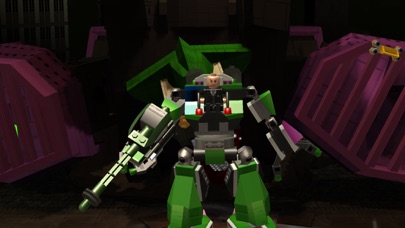
Legends Unite! Batman and Robin join forces with other famous DC super heroes including Superman, Wonder Woman, Green Lantern and more to stop the notorious villains Lex Luthor and The Joker from destroying Gotham City. Batman fans everywhere will enjoy this original story that’s filled with classic LEGO videogame action and humor as players fight to put the bad guys back behind bars!
FEATURES:
80 PLAYABLE CHARACTERS
Justice League favorites such as Superman, Wonder Woman, Green Lantern, and The Flash can be unlocked as you progress through the game or accessed at any time through purchase via our in-game store. Have Aquaman, Green Arrow, Cyborg and Hawkman help keep Harley Quinn, Poison Ivy, Penguin, and Catwoman in check!
SUITS, GADGETS AND SUPER ABILITIES
Master abilities of suits such as Robin’s Hazard Suit equipped with a Pressure Cannon, gadgets such as Batman’s Batarang, and soar through the air with Superman as he fights crime with his Freeze-Breath and Heat Vision!
RETINA GRAPHICS
iPad Retina display compatibility takes LEGO games on the iOS platform to the next level.
DYNAMIC CONTROL STYLES
Switch between “Classic” and “Touch Screen” controls to find the play-style that suits you best.
TALKING MINI-FIGS
For the first time in a LEGO game for iOS, mini-figs talk and bring even more life to this original story!
ACHIEVEMENTS & GAME CENTER
Unlock achievements and connect through Game Center to get the full experience from your Gotham City adventure.
If you enjoy LEGO games, be sure to check out LEGO Star Wars: The Complete Saga, LEGO The Lord of the Rings, LEGO Harry Potter: Years 1-4 and Years 5-7, and LEGO Friends.
- Niet-jailbroken/jailed of jailbroken iPhone of iPad.
- Sideloadly of alternatieven.
- Computer met Windows/macOS/Linux en iTunes geïnstalleerd.
STAP 1: Download het vooraf gehackte .IPA-bestand via de link hierboven naar uw computer. Om het te downloaden vanuit de iOSGods App, bekijk onze iOSGods App IPA-downloadhandleiding met een videovoorbeeld.
STAP 2: Download Sideloadly en installeer het op uw Windows of Mac.
STAP 3: Open Sideloadly op uw computer, sluit uw iOS-apparaat aan en wacht tot de naam van uw apparaat in Sideloadly verschijnt.
STAP 4: Zodra uw iDevice is herkend, sleept u het gedownloade gemodde .IPA-bestand naar de Sideloadly-applicatie.
STAP 5: Voer het e-mailadres van uw Apple Account in en druk op “Start”. U wordt vervolgens gevraagd om uw wachtwoord in te voeren. Geef de gevraagde informatie op.
STAP 6: Wacht tot Sideloadly het sideloaden/installeren van de gehackte IPA heeft voltooid. Als er problemen zijn tijdens de installatie, lees dan onderstaande opmerking.
STAP 7: Zodra de installatie is voltooid en u de app op uw beginscherm ziet, gaat u naar Instellingen → Algemeen → Profielen / VPN- en apparaatbeheer. Tik daar op het e-mailadres dat u in stap 6 hebt ingevoerd en tik vervolgens op “Vertrouw [email protected]”.
STAP 8: Ga nu naar uw beginscherm en open de zojuist geïnstalleerde app; alles zou correct moeten werken. Mogelijk moet u verdere app-specifieke instructies volgen in de hack-popup in het spel.
OPMERKING: Op iOS/iPadOS 16 en later moet u Ontwikkelaarsmodus inschakelen. Voor gratis Apple Developer-accounts moet u dit proces elke 7 dagen herhalen. Als u vragen of problemen hebt, lees dan onze Sideloadly FAQ-sectie van het onderwerp.