需要登入
請使用您的 iOSGods 帳戶登入以繼續。
請使用您的 iOSGods 帳戶登入以繼續。
在這個 This War of Mine Mod IPA 中凍結資源並解鎖免費 DLC,這是一款備受讚譽的生存策略遊戲,你需要帶領平民度過被圍困的城市。管理你的團隊在食物、藥物和安全方面的匱乏,同時應對戰時生存的道德重量,現在配備了改進的資源控制和所有可訪問的 DLC 內容。
- 凍結資源 → 將你的補給品鎖定在原位
- 免費 DLC → 訪問所有 DLC 內容
注意:你無法丟棄資源,所以只取你想要的數量,否則會破壞遊戲平衡
此應用程式也內建 iGameGod,讓你可以使用 Auto Touch 自動執行重複操作、透過 App Speed Manager 調整遊戲速度、使用 Memory Engine 修改記憶體數值,以及更多強大的 iOS 遊戲工具。
從上方連結下載 This War of Mine Hack modded IPA。點選安裝按鈕並依照畫面指示在 iPhone、iPad 或 Apple Silicon 上安裝此 iOS 應用程式修改版。
需要更多協助?請查看我們的 iOSGods 應用程式常見問題 以獲得詳細解答與疑難排解。
"If you've not already played this brilliant, heart-wrenching game, then mobile is as good a place as any to let it completely destroy you." - , 9/10, Pocket Gamer UK
"This War of Mine isn’t exactly “fun,” but it’s definitely a game worth playing." , 9/10, 148apps
"I'm really excited to go home and download 11 bit studios' title on my iPad" , Game Informer
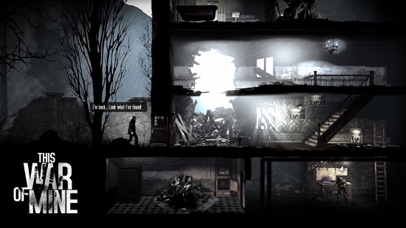
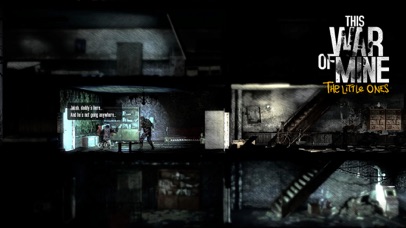
In This War Of Mine you do not play as an elite soldier, rather a group of civilians trying to survive in a besieged city; struggling with lack of food, medicine and constant danger from snipers and hostile scavengers. The game provides an experience of war seen from an entirely new angle.
The pace of This War of Mine is imposed by the day and night cycle. During the day snipers outside stop you from leaving your refuge, so you need to focus on maintaining your hideout: crafting, trading and taking care of your survivors. At night, take one of your civilians on a mission to scavenge through a set of unique locations for items that will help you stay alive.
Make life-and-death decisions driven by your conscience. Try to protect everybody from your shelter or sacrifice some of them for longer-term survival. During war, there are no good or bad decisions; there is only survival. The sooner you realize that, the better.
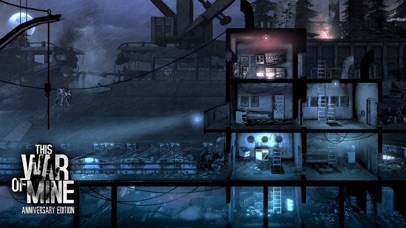
This War of Mine: Anniversary Edition
It's been two years since This War of Mine global release and we're still expanding the experience. This new free DLC, created especially for the Anniversary Edition, adds new characters, new locations to explore, and most importantly - a whole new ending, leading to a different outcome to the game. The dilemma though remains the same – how far will you go, to protect the ones you care about?
Key Features:
• Inspired by real-life events
• Control your survivors and manage your shelter
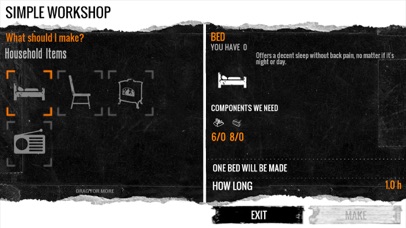
• Craft weapons, alcohol, beds or stoves – anything that helps you survive
• Make decisions - an often unforgiving and emotionally difficult experience
• Randomized world and characters every time you start a new game
• Charcoal-stylized aesthetics to complement the game's theme
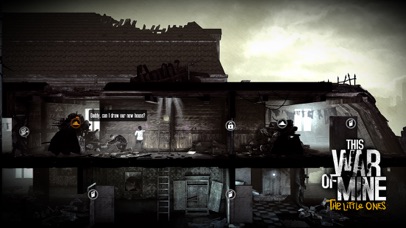
This War of Mine experience is now broadened with "The Little Ones" expansion. "The Little Ones" explores the hardships of wartime survival as seen from an entirely new perspective―that of a child. This DLC puts you in charge of a group of adults and children stuck in a besieged city, struggling with basic necessities. TWoM: The Little Ones focuses not only on the reality of enduring war, but also on how even in times of conflict, kids are still kids: they laugh, cry, play, and see the world differently. In addition to thinking about survival, you'll have to summon your inner child to understand how to protect the little ones. Their youth, and their future, are in your hands.
• Experience the biggest expansion to This War of Mine
• Protect innocent children
• Craft toys, play with kids, and be the caretaker they need
• Meet new adult civilians in scenarios with children
PLEASE NOTE: This game is optimized for latest devices. While playing on older devices such as iPhone 4s or iPad 2 you might experience lower frame rates.
- 未越獄/受限或已越獄的 iPhone 或 iPad。
- Sideloadly 或替代方案。
- 執行 Windows/macOS/Linux 且已安裝 iTunes 的電腦。
步驟 1: 透過上方連結將已破解的 .IPA 檔案下載到您的電腦。若要從 iOSGods App 下載,請參閱我們的 iOSGods App IPA 下載教學,其中包含影片範例。
步驟 2: 下載 Sideloadly 並將其安裝在您的 Windows 或 Mac 上。
步驟 3: 在電腦上開啟 Sideloadly,連接您的 iOS 裝置,並等待裝置名稱出現在 Sideloadly 中。
步驟 4: 當 Sideloadly 辨識到您的 iOS 裝置後,將下載好的修改版 .IPA 檔案拖曳並放到 Sideloadly 應用程式中。
步驟 5: 輸入您的 Apple Account 電子郵件,然後按下「Start」。系統會要求您輸入密碼,請依指示提供所需資訊。
步驟 6: 等待 Sideloadly 完成已破解 IPA 的旁載/安裝。如果安裝過程中發生問題,請閱讀下方的注意事項。
步驟 7: 安裝完成並在主畫面上看到該應用程式後,您需要前往 設定 → 一般 → 描述檔 / VPN 與裝置管理。進入後,點選您在步驟 6 中輸入的電子郵件,然後點選「信任 [email protected]」。
步驟 8: 現在回到主畫面並開啟新安裝的應用程式,一切應該都能正常運作。您可能需要依照遊戲內破解彈出視窗中的進一步指示操作。
注意: 在 iOS/iPadOS 16 及更新版本上,您必須 啟用開發者模式。若使用免費的 Apple Developer 帳號,您將需要每 7 天重複此程序。如有任何疑問或問題,請閱讀我們的 主題中的 Sideloadly 常見問題區段。