Требуется вход
Войдите в учётную запись iOSGods, чтобы продолжить.
A tweak that's try to recreate features like in YTLite as much as possible
Скачайте YouMod for YouTube modded IPA по ссылкам выше. Нажмите кнопку установки и следуйте инструкциям, чтобы установить этот хак iOS на iPhone, iPad или Mac с Apple Silicon.
Нужна помощь? Посмотрите наши Часто задаваемые вопросы по приложению iOSGods, чтобы получить подробные ответы и советы по устранению неполадок.
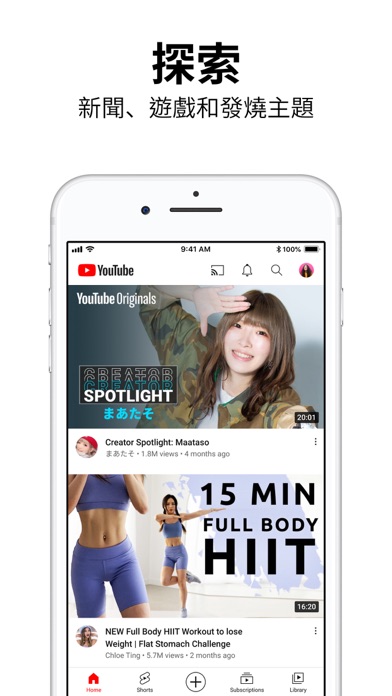
Get the official YouTube app on iPhones and iPads. See what the world is watching -- from the hottest music videos to what’s popular in gaming, fashion, beauty, news, learning and more. Subscribe to channels you love, create content of your own, share with friends, and watch on any device.
Watch and subscribe
● Browse personal recommendations on Home
● See the latest from your favorite channels in Subscriptions
● Look up videos you’ve watched, liked, and saved for later in Library
Explore different topics, what’s popular, and on the rise (available in select countries)
● Stay up to date on what’s popular in music, gaming, beauty, news, learning and more
● See what’s trending on YouTube and around the world on Explore
● Learn about the coolest Creators, Gamers, and Artists on the Rise (available in select countries)
Connect with the YouTube community
● Keep up with your favorites creators with Posts, Stories, Premieres, and Live streams
● Join the conversation with comments and interact with creators and other community members
Create content from your mobile device
● Create or upload your own videos directly in the app
● Engage with your audience in real time with live streaming right from the app
Find the experience that fits you and your family (available in select countries)
● Every family has their own approach to online video. Learn about your options: the YouTube Kids app or a new parent supervised experience on YouTube at youtube.com/myfamily
Support creators you love with channel memberships (available in select countries)
● Join channels that offer paid monthly memberships and support their work
● Get access to exclusive perks from the channel & become part of their members community
● Stand out in comments and live chats with a loyalty badge next to your username
Upgrade to YouTube Premium (available in select countries)
● Watch videos uninterrupted by ads, while using other apps, or when the screen is locked
● Save videos for when you really need them – like when you’re on a plane or commuting
● Get access to YouTube Music Premium as part of your benefits
Note: If you subscribe via Apple, payment will be charged to App Store Account at confirmation of purchase. Subscription automatically renews unless auto-renew is turned off at least 24 hours before the end of the current period. Account will be charged for renewal within 24 hours prior to the end of the current period at the rate of the selected plan. Subscriptions and auto-renewal may be managed by going to Account Settings after purchase.
YouTube paid service terms: https://www.youtube.com/t/terms_paidservice.
Privacy policy: https://www.google.com/policies/privacy
- iPhone или iPad без джейлбрейка/в обычном режиме или с джейлбрейком.
- Sideloadly или альтернативы.
- Компьютер с Windows/macOS/Linux и установленным iTunes.
ШАГ 1: Скачайте предварительно взломанный файл .IPA по ссылке выше на свой компьютер. Чтобы скачать его из приложения iOSGods, посмотрите наш Туториал по скачиванию IPA в приложении iOSGods, в котором есть видеопример.
ШАГ 2: Скачайте Sideloadly и установите его на Windows или Mac.
ШАГ 3: Откройте Sideloadly на компьютере, подключите iOS-устройство и дождитесь, пока его имя появится в Sideloadly.
ШАГ 4: Когда устройство будет распознано, перетащите скачанный модифицированный файл .IPA в окно Sideloadly.
ШАГ 5: Введите адрес электронной почты вашего Apple Account, затем нажмите «Start». После этого вас попросят ввести пароль. Укажите необходимые данные.
ШАГ 6: Дождитесь, пока Sideloadly завершит sideload/установку взломанного IPA. При возникновении проблем во время установки ознакомьтесь с примечанием ниже.
ШАГ 7: После завершения установки и появления приложения на главном экране перейдите в Настройки → Основные → Профили / VPN и управление устройством. Там нажмите на email, который вы ввели на шаге 6, а затем нажмите «Доверять [email protected]».
ШАГ 8: Теперь перейдите на главный экран и откройте установленное приложение — всё должно работать. Возможно, потребуется выполнить дополнительные инструкции в попапе мода внутри игры.
ПРИМЕЧАНИЕ: На iOS/iPadOS 16 и новее необходимо включить режим разработчика. Для бесплатных учётных записей Apple Developer этот процесс нужно повторять каждые 7 дней. Если возникнут вопросы или проблемы, ознакомьтесь с нашим разделом FAQ по Sideloadly в теме.