Accesso richiesto
Accedi con il tuo account iOSGods per continuare.
Hack Features:
- Damage Multiplier
- Defence Multiplier
- Speed Multiplier
Scarica Dark Throne : The Queen Rises Hack modded IPA dai link sopra. Tocca il pulsante di installazione e segui le istruzioni per installare questo hack iOS sul tuo iPhone, iPad o Mac con Apple Silicon.
Hai bisogno di altro aiuto? Consulta le nostre Domande frequenti sull'app iOSGods per risposte dettagliate e consigli per la risoluzione dei problemi.
▶Dark Throne◀
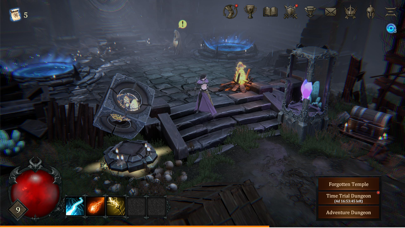
The heroes of the human world begin a great adventure to bring peace back to Izendar, the human land occupied by the Demon Realm.
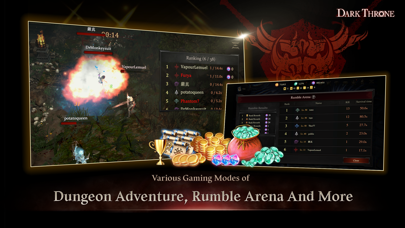
Enjoy a variety of gameplay options, such as ever-growing demons, epic items, three different game modes, etc.
■ Authentic 'hack and slash' action role-playing game with
Battles with intense actions with thrill
Exhilarating pleasure of sweeping enemies away at once with exquisite skill action!
■ Various missions and hidden traps with:
Captivating battles in the demon world imbued with intricate plots and missions to complet
New dungeons being changed with infinite combinations
Boss stages requiring unique strategies
■ Charming heroes with various characteristics
Paladin, Assassin, Demon Hunter and more
A variety of weapons and armors, and action-skills
■ AAA quality game
Jeehyung Lee as Art Director, who is also the cover artist of renowned comic books
Dark Throne OST featuring K-Pop top producer Keeproots
Sound effects that maximize the immersion of the game
■ In-depth gameplay experience with
'Stress-free' game control with simple and easy operation
Meticulous UX designs
■ Details on Subscriptions
1. Subscription Pricing & Billing
Monthly: $4.99
You can subscribe in the in-game store.
2. Subscription Content
Subscribers can enjoy the following privileges during the period:
- You can receive premium currency, Emerald, upon your first login every day.
- You can use Totems in the game, which provide various effects. (Rare grade or higher)
- You can receive Blessing Chest key, upon your first login every day.
- 8 more slots of inventory space are provided.
3. Auto Renewals
The App Store Subscription feature renews automatically via your iTunes Account. Users can manage the subscription through your iTunes/Apple ID Settings Manager. The subscription will auto-renew for the assigned billing period if the auto-renew feature is not turned off 24 hours before the current subscription expires.
4. User Agreement and Privacy Policy
Terms of Use : https://static.epicleague.io/web/docs/terms-of-use.html
User Agreement : https://static.epicleague.io/web/docs/terms-of-subscription.html
Privacy Policy : https://static.epicleague.io/web/docs/privacy-policy.html
5. Subscription Cancellation
If you would like to cancel your subscription, go to ‘Settings’ on your iOS device --> ‘iTunes & App Store’ --> tap ‘Apple ID’ and then ‘View Apple ID’. Enter ‘Account Settings’, tap ‘Subscriptions’ --> ‘Manage’ and select the subscription for ‘Dark Throne’ to cancel it.
- iPhone o iPad non jailbroken/jailed oppure jailbroken.
- Sideloadly o alternative.
- Computer con Windows/macOS/Linux con iTunes installato.
PASSO 1: Scarica il file .IPA pre-modificato dal link sopra sul tuo computer. Per scaricarlo dall'iOSGods App, consulta il nostro Tutorial download IPA dell'iOSGods App, che include un esempio video.
PASSO 2: Scarica Sideloadly e installalo sul tuo Windows o Mac.
PASSO 3: Apri Sideloadly sul tuo computer, collega il tuo dispositivo iOS e attendi finché il nome del dispositivo non appare in Sideloadly.
PASSO 4: Una volta riconosciuto il tuo iDevice, trascina il file .IPA moddato che hai scaricato e rilascialo nell'applicazione Sideloadly.
PASSO 5: Inserisci l'email del tuo Apple Account, poi premi “Start”. Ti verrà quindi chiesto di inserire la password. Procedi e fornisci le informazioni richieste.
PASSO 6: Attendi che Sideloadly completi il sideload/installazione dell'IPA modificata. Se ci sono problemi durante l'installazione, leggi la nota qui sotto.
PASSO 7: Una volta completata l'installazione e vista l'app sulla schermata Home, dovrai andare in Impostazioni → Generali → Profili / Gestione VPN e dispositivi. Una volta lì, tocca l'email inserita al passo 6 e poi tocca “Autorizza [email protected]”.
PASSO 8: Ora vai sulla schermata Home e apri l'app appena installata: tutto dovrebbe funzionare correttamente. Potrebbe essere necessario seguire ulteriori istruzioni specifiche all'interno del popup dell'hack nel gioco.
NOTA: Per iOS/iPadOS 16 e versioni successive, devi attivare la Modalità sviluppatore. Per gli account Apple Developer gratuiti, dovrai ripetere questa procedura ogni 7 giorni. Se hai domande o problemi, leggi la nostra sezione FAQ Sideloadly del topic.