ต้องเข้าสู่ระบบ
เข้าสู่ระบบด้วยบัญชี iOSGods เพื่อดำเนินการต่อ
เข้าสู่ระบบด้วยบัญชี iOSGods เพื่อดำเนินการต่อ

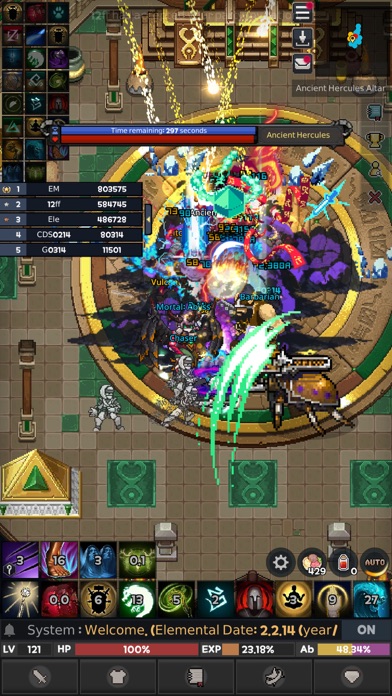
สู่การต่อสู้ในดันเจี้อนศิลปะพิกเซลและปล้นสะดมกับเพื่อนใน ELEMENTAL: 2D MMORPG Hack ซึ่งเป็นเกม RPG มัลติเพลเยอร์แบบคลาสสิกที่คุณเพิ่มระดับ รวบรวมอุปกรณ์ และเกิดใหม่เพื่อให้แข็งแกร่งขึ้น พร้อมตัวคูณความเสียหาย รางวัล ทอง และประสบการณ์ที่ปรับแต่งแล้วเพื่อเร่งการเพิ่มพลังของคุณ
ไม่ว่าคุณจะบดบังเพียงลำพังหรือร่วมทีมกับนักผจญภัยคนอื่น ๆ hack นี้จะเปลี่ยนการบดบังให้เป็นความก้าวหน้าล้วนๆ ทำให้คุณรู้สึกถึงผลกระทบของการต่อสู้และระดับทุกระดับโดยไม่มีการจำกัดเวลาตามปกติ
- ตัวคูณความเสียหาย → เพิ่มผลผลิตการต่อสู้ของคุณ
- ตัวคูณรางวัล → เพิ่มลูทจากการต่อสู้
- ตัวคูณทอง → หารายได้เร็วขึ้น
- ตัวคูณ EXP → เพิ่มระดับเร็วขึ้น
แอปนี้ยังมาพร้อมกับ iGameGod ซึ่งช่วยให้คุณเข้าถึง Auto Touch สำหรับการทำงานซ้ำ ๆ โดยอัตโนมัติ, App Speed Manager สำหรับปรับความเร็วของเกม, การแก้ไขค่าด้วย Memory Engine และเครื่องมือสำหรับเกม iOS ที่ทรงพลังอื่น ๆ อีกมากมาย
ดาวน์โหลด ELEMENTAL: 2D MMORPG Hack modded IPA จากลิงก์ด้านบน แตะปุ่มติดตั้งและทำตามคำแนะนำบนหน้าจอเพื่อติดตั้งแฮ็กแอป iOS นี้บน iPhone, iPad หรือ Apple Silicon
ต้องการความช่วยเหลือเพิ่มเติม? ดู คำถามที่พบบ่อยของแอป iOSGods สำหรับคำตอบโดยละเอียดและเคล็ดลับการแก้ไขปัญหา
是否在尋找沒有裝備抽取系統的傳統 MMORPG呢?
MMORPG 圖元界的強者!
如果懷念血汗味的正宗RPG……?!元素 2D MMORPG!
轉職系統!裝備系統!轉生系統!一路助你越來越強!
歡迎你的加入!
和其他玩家一起組隊狩獵,有了隊友,再難纏的怪物不在話下!
快來吧!喜歡圖元美術風格的人們!
可愛的圖元角色,開啟快樂的大冒險!
龐大的地圖和華麗的連續技!
可愛的圖元畫風加上華麗的技能!融入世界觀的開放世界地圖!
還是獨自一個人?不!一同即時遊戲吧!
獨樂樂,不如眾樂樂!一起來找樂子!元素 2D MMORPG!
超可愛的服裝!
多樣的裝備彰顯個性的自我!
今天就你了!
每個傭兵的預設戰鬥方式!傭兵伴你一同成長!
都來社區!快!
聯盟, 好友, 協同系統!多樣的系統提供不同的樂趣!
- iPhone หรือ iPad ที่ไม่ได้เจลเบรก/ไม่ได้เจลเบรก หรือเจลเบรกแล้ว
- Sideloadly หรือทางเลือกอื่น
- คอมพิวเตอร์ที่ใช้ Windows/macOS/Linux และติดตั้ง iTunes ไว้
ขั้นตอนที่ 1: ดาวน์โหลดไฟล์ .IPA ที่แฮกไว้ล่วงหน้าจากลิงก์ด้านบนลงในคอมพิวเตอร์ของคุณ หากต้องการดาวน์โหลดจากแอป iOSGods โปรดดู วิธีดาวน์โหลด IPA ในแอป iOSGods ซึ่งมีตัวอย่างวิดีโอประกอบ
ขั้นตอนที่ 2: ดาวน์โหลด Sideloadly แล้วติดตั้งบน Windows หรือ Mac ของคุณ
ขั้นตอนที่ 3: เปิด Sideloadly บนคอมพิวเตอร์ เชื่อมต่ออุปกรณ์ iOS แล้วรอจนกว่าชื่ออุปกรณ์ของคุณจะปรากฏใน Sideloadly
ขั้นตอนที่ 4: เมื่อ iDevice ของคุณถูกตรวจพบแล้ว ให้ลากไฟล์ .IPA ที่ม็อดมาวางลงในโปรแกรม Sideloadly
ขั้นตอนที่ 5: กรอกอีเมล Apple Account ของคุณ จากนั้นกด "Start" ระบบจะถามรหัสผ่าน กรอกข้อมูลที่จำเป็นให้เรียบร้อย
ขั้นตอนที่ 6: รอจนกว่า Sideloadly จะ sideload/ติดตั้งไฟล์ IPA ที่แฮกเสร็จ หากเกิดปัญหาระหว่างติดตั้ง โปรดอ่านหมายเหตุด้านล่าง
ขั้นตอนที่ 7: เมื่อการติดตั้งเสร็จสิ้นและเห็นแอปบนหน้าจอหลักแล้ว ให้ไปที่ การตั้งค่า → ทั่วไป → โปรไฟล์ / VPN และการจัดการอุปกรณ์ จากนั้นแตะที่อีเมลที่คุณกรอกในขั้นตอนที่ 6 แล้วแตะ "เชื่อถือ [email protected]"
ขั้นตอนที่ 8: จากนั้นไปที่หน้าจอหลักและเปิดแอปที่ติดตั้งใหม่ ทุกอย่างควรทำงานได้ปกติ คุณอาจต้องทำตามคำแนะนำเพิ่มเติมเฉพาะแอปในป๊อปอัปของม็อดในเกม
หมายเหตุ: สำหรับ iOS/iPadOS 16 ขึ้นไป คุณต้อง เปิดโหมดนักพัฒนา (Developer Mode) สำหรับบัญชี Apple Developer แบบฟรี คุณต้องทำขั้นตอนนี้ซ้ำทุก 7 วัน หากมีคำถามหรือพบปัญหา โปรดอ่าน หัวข้อ FAQ ของ Sideloadly ในกระทู้