Потрібен вхід
Увійдіть у свій обліковий запис iOSGods, щоб продовжити.
Увійдіть у свій обліковий запис iOSGods, щоб продовжити.

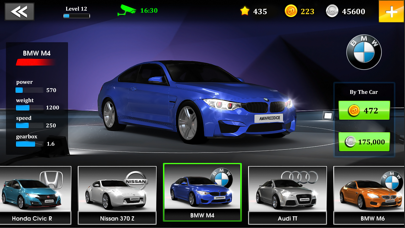
Змагайтеся проти 20 персонажів у різних районах у GT Club - Drag Racing Car Game, модифікованому iOS досвіді, де ви налаштовуєте понад 70 преміум та ностальгічних автомобілів з реалістичною фізикою керування. Цей злам розблоковує контроль користувацької валюти, дозволяючи вам збільшити ваші резерви готівки та золота, щоб прискорити ваш шлях через безплатні гонки, турніри драбини, нокаути, щоденні події та змаганння класів.
- Користувацька готівка → вільно регулюйте баланс валюти
- Користувацьке золото → змінюйте преміум-валюту за потребою
Цей застосунок також постачається з iGameGod, який надає доступ до Auto Touch для автоматизації повторюваних дій, App Speed Manager для регулювання швидкості гри, редагування значень за допомогою Memory Engine та інших потужних інструментів для iOS-ігор.
Завантажте GT Club - Drag Racing Car Game iOS Mod IPA за посиланнями вище. Натисніть кнопку встановлення та дотримуйтесь інструкцій, щоб встановити цей хак iOS на iPhone, iPad або Apple Silicon.
Потрібна додаткова допомога? Перегляньте наш Поширені запитання про застосунок iOSGods для детальних відповідей та порад з усунення несправностей.
We believe in the accelerator, not in brakes.
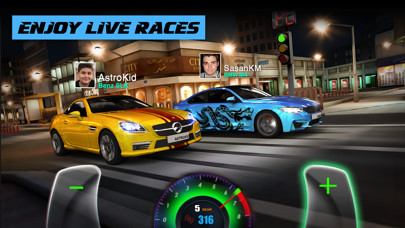
A different experience from a free racing game in the drag racing style. This time with "GT: Speed Club".
There's more:
More than 70 cars - both high-end and nostalgic ones (and more on the way)
Simulation of driving physics and the racing according to reality (test to find out)
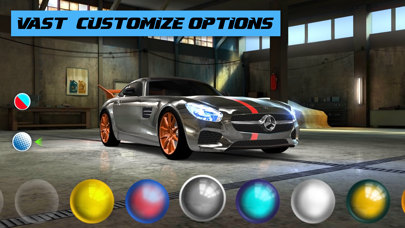
Variety and cool personalization. Decorate your car according to your personality
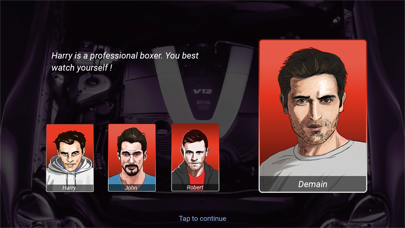
Fiction section and competition with 20 characters from different neighborhoods
Variety of tournaments ---> Free / Stairs / Knockouts / Daily / Class Eats ......
Applicable at the right performance, even on weak phones (below 1 GB)
Simple, beautiful and attractive interface
From recent user reviews:
"It is entertaining to the point that sometimes you do not stop playing"
- Player Name: hAkEr Gg (Translated from Spanish)
"Better thAn csr"
- Player Name: Andrew Mattinson
"Graphics are awesome!"
- Player Name: Brett Barbo
Contact Us
If you have any suggestions to improve the game or have any problems, please contact us by telegram or email :
Email support: [email protected]
You can follow the game's updates and headlines below
Instagram Channel: https://instagram.com/gtclubgame
- iPhone або iPad без джейлбрейку/у заводському стані або з джейлбрейком.
- Sideloadly або альтернативи.
- Комп'ютер під керуванням Windows/macOS/Linux із встановленим iTunes.
КРОК 1: Завантажте попередньо зламаний .IPA-файл за посиланням вище на свій комп'ютер. Щоб завантажити з iOSGods App, перегляньте наш Посібник із завантаження IPA в iOSGods App, який містить відеоприклад.
КРОК 2: Завантажте Sideloadly і встановіть його на своєму Windows або Mac.
КРОК 3: Відкрийте Sideloadly на комп'ютері, підключіть свій iOS-пристрій і зачекайте, поки назва пристрою з'явиться у Sideloadly.
КРОК 4: Коли ваш iDevice буде розпізнано, перетягніть завантажений модифікований .IPA-файл і відпустіть його в застосунок Sideloadly.
КРОК 5: Введіть електронну пошту вашого Apple Account, потім натисніть «Start». Після цього вас попросять ввести пароль. Введіть необхідні дані.
КРОК 6: Зачекайте, доки Sideloadly завершить sideload/встановлення зламаного IPA. Якщо під час встановлення виникнуть проблеми, прочитайте примітку нижче.
КРОК 7: Коли встановлення завершено й ви побачите застосунок на головному екрані, перейдіть до Налаштування → Загальні → Профілі / VPN і керування пристроєм. Там натисніть на електронну пошту, яку ви ввели на кроці 6, а потім натисніть «Довіряти [email protected]».
КРОК 8: Тепер перейдіть на головний екран і відкрийте щойно встановлений застосунок — усе має працювати належним чином. Можливо, доведеться виконати додаткові інструкції для конкретного застосунку в спливаючому вікні хака в грі.
ПРИМІТКА: У iOS/iPadOS 16 і пізніших версіях потрібно увімкнути режим розробника. Для безкоштовних облікових записів Apple Developer цей процес доведеться повторювати кожні 7 днів. Якщо у вас є запитання або проблеми, прочитайте наш розділ FAQ зі Sideloadly у темі.



![Rapid Reload Hack [ Debug Menu ]](https://is1-ssl.mzstatic.com/image/thumb/Purple221/v4/f4/5c/11/f45c11ef-0768-05ba-6234-25d148c3949e/AppIcon-0-0-1x_U007emarketing-0-8-0-85-220.png/100x100bb.jpg)
![Arrow Rush: Archer Roguelike [ Debug Menu ]](https://is1-ssl.mzstatic.com/image/thumb/Purple221/v4/0c/7c/c4/0c7cc403-8b09-7021-9af9-1043a46d8cf5/AppIcon-0-0-1x_U007emarketing-0-8-0-85-220.png/100x100bb.jpg)
![Merge Studio: Fashion Makeover Hack [ Debug Menu ]](https://is1-ssl.mzstatic.com/image/thumb/Purple211/v4/4b/13/1b/4b131bc3-454f-ae54-6cb5-b61a858814ae/AppIcon-0-0-1x_U007emarketing-0-8-0-85-220.png/100x100bb.jpg)
![Screw Jam iOS Mod IPA [ Debug Menu ]](https://is1-ssl.mzstatic.com/image/thumb/Purple211/v4/03/f0/c1/03f0c167-2d2d-f530-781c-914c8f961af7/AppIcon-0-0-1x_U007emarketing-0-8-0-85-220.png/100x100bb.jpg)


