تسجيل الدخول مطلوب
سجّل الدخول بحساب iOSGods للمتابعة.
سجّل الدخول بحساب iOSGods للمتابعة.
موارد لا نهائية من الغذاء والماء والهواء والحجر والخشب التي لا تنضب أبداً، هذا Mars: Colonization Mod IPA يزيل ضغط البقاء على قيد الحياة ويتيح لك التركيز على بناء مستعمرتك دون إدارة موارد مستمرة.
توقف عن البحث عن الضروريات وابدأ في التخطيط لاستراتيجية مستوطنتك على المريخ. سواء كنت تجرب ترقيات المركبات الجوالة أو تتعاون في هياكل ضخمة أو تستمتع ببساطة بالاستكشاف بسرعتك الخاصة، هذا Hack يحول اللعبة إلى صندوق رمل حيث الندرة لا تبطئك أبداً.
- الغذاء لا ينخفض → استدم مستعمريك إلى الأبد
- الماء لا ينخفض → حافظ على الترطيب بدون نضوب
- الهواء لا ينخفض → اجعل مساكنك قابلة للتنفس إلى الأبد
- الحجر لا ينخفض → ابنِ وتوسع بدون حدود
- الخشب لا ينخفض → شيد الهياكل بلا نهاية
يأتي هذا التطبيق أيضًا مع iGameGod، مما يتيح لك الوصول إلى Auto Touch لأتمتة المهام المتكررة، وApp Speed Manager لضبط سرعة اللعب، وتعديل القيم عبر Memory Engine، والمزيد من أدوات ألعاب iOS القوية.
قم بتنزيل Mars: Colonization Hack modded IPA من الروابط أعلاه. اضغط على زر التثبيت واتبع التعليمات لتثبيت هذا التعديل لـ iOS على iPhone أو iPad أو Apple Silicon.
هل تحتاج إلى مزيد من المساعدة؟ راجع الأسئلة الشائعة لتطبيق iOSGods للحصول على إجابات مفصلة ونصائح لاستكشاف الأخطاء.
We are in the year 2050, all the resources on Earth are close to depletion, so we have no choice but to colonize other planets. Mars is the closest planet to us, and we have to find a way to colonize it as fast as possible. However, going to a new planet that we never lived on before is not going to be easy. Every day is different and comes with new challenges.
-Explore the Mars-
Upgrade or unlock new Rovers to explore Mars on exciting Expeditions and collect and study Stone Samples.
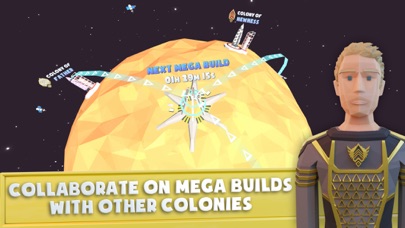
-Collaborate with other Colonies-
Together with other Colonies you can collaborate on building a Space Lift or other Mega Builds.
-Help your Citizen with Minigames-
Meet various Citizens of your Colony. Like Freddy the Mechanic, Luna the Scientist, Nura the Gardener or Yuri the Technician and help them with little Puzzles or fun Minigames.
-New Technologies-
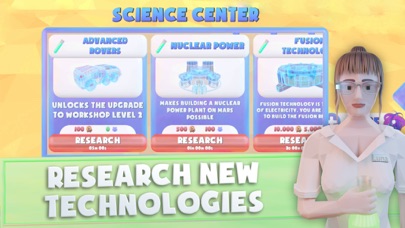
Research on new Technologies like Fusion Energy to unlock new Possibilities for your Colony and Humanity
-Build your own Colony-
Aluminum Mines, Water Pumps, Solar Power Plants, Residences, Nuclear Power Plants, Science Centers and many more Buildings. Build up a completely new Civilization on Mars.
Give it a try for yourself and enjoy creating the best Mars Colony of all!
- iPhone أو iPad بجيلبريك أو بدون جيلبريك.
- Sideloadly أو بدائلها.
- كمبيوتر يعمل بنظام Windows/macOS/Linux مع تثبيت iTunes.
الخطوة 1: قم بتنزيل ملف .IPA المعدّل مسبقًا من الرابط أعلاه إلى الكمبيوتر الخاص بك. للتنزيل من تطبيق iOSGods App، اطلع على دليل تنزيل IPA من تطبيق iOSGods App الذي يتضمن مثالًا بالفيديو.
الخطوة 2: قم بتنزيل Sideloadly وتثبيته على جهاز Windows أو Mac.
الخطوة 3: افتح Sideloadly على الكمبيوتر، ووصّل جهاز iOS الخاص بك، وانتظر حتى يظهر اسم جهازك داخل Sideloadly.
الخطوة 4: بمجرد التعرّف على جهاز iDevice الخاص بك، اسحب ملف .IPA المعدّل الذي قمت بتنزيله وأفلِته داخل تطبيق Sideloadly.
الخطوة 5: أدخل البريد الإلكتروني لحساب Apple Account الخاص بك، ثم اضغط على «Start». سيُطلب منك بعد ذلك إدخال كلمة المرور. تابع وأدخل المعلومات المطلوبة.
الخطوة 6: انتظر حتى ينتهي Sideloadly من تحميل/تثبيت ملف IPA المعدّل. في حال واجهت أي مشاكل أثناء التثبيت، يرجى قراءة الملاحظة أدناه.
الخطوة 7: بعد اكتمال التثبيت ورؤية التطبيق على الشاشة الرئيسية، انتقل إلى Settings → General → Profiles / VPN & Device Management. ثم اضغط على البريد الإلكتروني الذي أدخلته في الخطوة 6، ثم اضغط على «الوثوق بـ [email protected]».
الخطوة 8: الآن انتقل إلى الشاشة الرئيسية وافتح التطبيق الذي تم تثبيته للتو وسيعمل كل شيء بشكل صحيح. قد تحتاج إلى اتباع تعليمات إضافية خاصة بكل تطبيق داخل النافذة المنبثقة للتعديل أثناء اللعب.
ملاحظة: بدءًا من iOS/iPadOS 16 وما بعده، يجب تفعيل وضع المطور (Developer Mode). بالنسبة لحسابات Apple Developer المجانية، ستحتاج إلى تكرار هذه العملية كل 7 أيام. إذا كانت لديك أي أسئلة أو مشاكل، يرجى قراءة قسم الأسئلة الشائعة حول Sideloadly في الموضوع.