Login Required
Sign in with your iOSGods account to continue.
Sign in with your iOSGods account to continue.

YouTube Music Ultimate is a music streaming hack that unlocks premium features like ad-free listening, background playback, and an OLED dark theme on iOS, transforming your everyday listening into an uninterrupted experience.
Whether you're discovering new artists, creating collaborative playlists, or enjoying live performances and rare remixes, this Mod IPA removes the paywall so you can explore YouTube Music's full catalog without interruption, all the personalized recommendations and curated playlists, now completely free.
- Premium Features (No Ads, Background playback etc.) → removes ads and enables playback when the app is closed
- OLED Dark Theme → optimized display for OLED screens
- OLED Dark Keyboard → dark keyboard matching the theme
- Show Playback rate button → control playback speed during playback
- Text Selection for Lyrics → copy and share lyrics directly
- Remove Premium Button → hides upgrade prompts from the interface
- Low Contrast → reduces eye strain in low-light environments
- Volume Bar in player → quick volume adjustment in the player
If "Keep Plugins" fails use "Remove Plugins" to install :)
Download YouTube Music Ultimate modded IPA from the links above. Tap the install button and follow the on-screen instructions to install this iOS app hack on your iPhone, iPad, or Apple Silicon.
Need more help? Check out our iOSGods App Frequently Asked Questions for detailed answers and troubleshooting tips.
Connecting you to the world of music:
● Music content including live performances, covers, remixes and music content you can’t find elsewhere
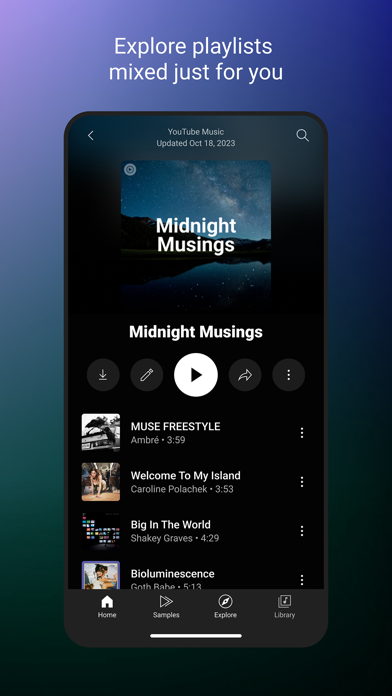
● Thousands of curated playlist across many genres and activities
Get personalized music, perfect for every moment:
● Personalized playlists and Mixes
● Activity mixes made for you
● Create playlists with song suggestions or collaborate with other music fans to create the perfect playlist
● Neatly organized Library to see all of your liked and added songs, playlists you created, and artists you subscribed to
Stay on top of the trend and discover new music:
● Check out new releases
● Discover music based genres (Hip Hop, Pop, Country, Dance & Electronic, Blues, Indie & Alternative, Jazz, Kpop, Latin, Rock, and more)
● Discover music based mood (Chill, Feel Good, Energy Booster, Sleep, Focus, Romance, Workout, Commute, Party)
● Explore top charts from all over the world
Enhanced your listening experience with unique features:
● Song lyrics so you can sing along to your favorites
● Upload songs from your devices so you can enjoy them in one place with YouTube Music
● Listen on your phone, desktop, smart speaker, smart TV, car, smart watch and within your favorite apps.
● Compatible with Google Maps, Waze, Google Assistant, and more.
Upgrade to Music Premium (available in select countries) to enjoy:
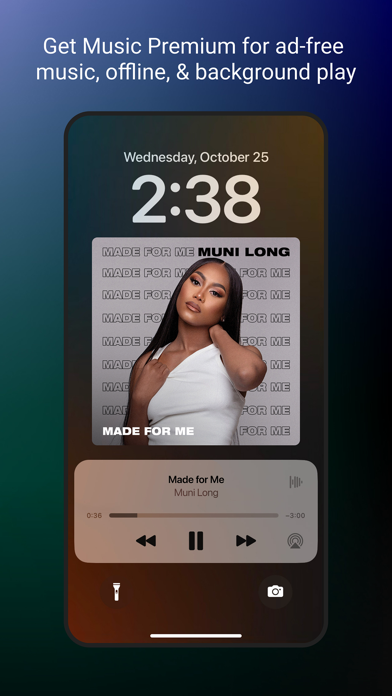
● Listen to music ad-free
● Play music in the background
● Switch seamlessly between song audio and music videos, only with YouTube Music
------------
If you subscribe via iTunes:
Payment will be charged to iTunes Account at confirmation of purchase. Subscription automatically renews unless auto-renew is turned off at least 24 hours before the end of the current period. Accounts will be charged for renewal within 24 hours prior to the end of the current period at the rate of the selected plan. Subscriptions and auto-renewal may be managed by going to Account Settings after purchase.
YouTube paid service terms: https://www.youtube.com/t/terms_paidservice
Privacy policy: https://www.google.com/policies/privacy
- Non-Jailbroken/Jailed or Jailbroken iPhone or iPad.
- Sideloadly or alternatives.
- Computer running Windows/macOS/Linux with iTunes installed.
STEP 1: Download the pre-hacked .IPA file from the link above to your computer. To download from the iOSGods App, see our iOSGods App IPA Download Tutorial which includes a video example.
STEP 2: Download Sideloadly and install it on your Windows or Mac.
STEP 3: Open Sideloadly on your computer, connect your iOS device, and wait until your device name appears in Sideloadly.
STEP 4: Once your iDevice is recognized, drag the modded .IPA file you downloaded and drop it into the Sideloadly application.
STEP 5: Enter your Apple Account email, then press “Start.” You’ll then be asked to enter your password. Go ahead and provide the required information.
STEP 6: Wait for Sideloadly to finish sideloading/installing the hacked IPA. If there are issues during installation, please read the note below.
STEP 7: Once the installation is complete and you see the app on your Home Screen, you will need to go to Settings → General → Profiles / VPN & Device Management. Once there, tap on the email you entered from step 6, and then tap on “Trust [email protected]”.
STEP 8: Now go to your Home Screen and open the newly installed app and everything should work fine. You may need to follow further per app instructions inside the hack's popup in-game.
NOTE: iOS/iPadOS 16 and later, you must enable Developer Mode. For free Apple Developer accounts, you will need to repeat this process every 7 days. If you have any questions or problems, read our Sideloadly FAQ section of the topic.