تسجيل الدخول مطلوب
سجّل الدخول بحساب iOSGods للمتابعة.
Hack Features:
يأتي هذا التطبيق مع iGameGod، مما يتيح لك الوصول إلى Auto Touch لأتمتة المهام المتكررة، وApp Speed Manager لضبط سرعة اللعب، وتعديل القيم عبر Memory Engine، والمزيد من أدوات ألعاب iOS القوية.
قم بتنزيل What's Cooking? - Mama Recipes Hack modded IPA من الروابط أعلاه. اضغط على زر التثبيت واتبع التعليمات لتثبيت هذا التعديل لـ iOS على iPhone أو iPad أو Apple Silicon.
هل تحتاج إلى مزيد من المساعدة؟ راجع الأسئلة الشائعة لتطبيق iOSGods للحصول على إجابات مفصلة ونصائح لاستكشاف الأخطاء.

Tie your apron and sharpen your knives – it’s time for a crazy cooking adventure in WHAT'S COOKING? - Tasty Chef! Starting as an amateur cook with a small kitchen, you’ll combine ingredients to create over 1000 recipes and serve delicious dishes to hungry customers. Customize your restaurant, upgrade your kitchen and improve your skills to become the world’s greatest master chef!
WHAT'S COOKING? – TASTY FEATURES
- Combine ingredients to discover and cook 1000+ recipes
- Customize your restaurant and kitchen with unique themes
- Level up your chef to unlock new ingredients and recipes
- Upgrade your kitchen with new equipment
- Visit the market and play mini-games to get common, rare or epic ingredients
- Cook your diners’ favorite dishes for extra rewards!
- Become a master of the kitchen and cook 5-star dishes!
SOURCE THE BEST INGREDIENTS
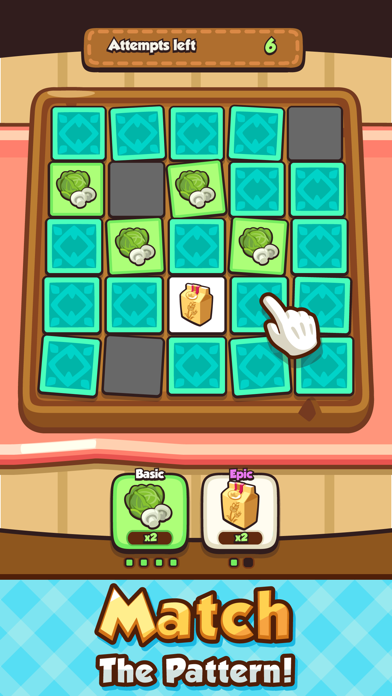
Part of any chef’s job is to find the highest quality ingredients available! To cook the best dishes you’ll have to visit the market. But there’s a catch - you’ll have to win your ingredients in a card game. You are given 10 attempts to flip over cards and discover the ingredients you want, try not to lose… you need ingredients to cook with!
COOK & DISCOVER OVER 1000 RECIPES
As you level up your chef you’ll unlock delicious new recipes and ingredients to find at the market. With so many combinations available, there are over 1000 amazing dishes to discover! Have fun to combine ingredients and discovering brand new dishes to serve to your hungry restaurant diners.
UPGRADE YOUR RESTAURANT
When you serve delicious food to your restaurant diners, you’ll earn coins – you run a business, after all! Why not spend these coins on upgrading your restaurant and kitchen? Unlock a variety of new kitchen tools to cook faster and better dishes, or customize your restaurant with new themes which give EXP bonuses to certain dishes!
BECOME A MASTER CHEF!
Level up your chef by earning EXP and cooking some amazing food in your bistro, or invest some coins in training. There are a total of 100 levels to master for each ingredient – the more expert levels you have, the better the dish will be! To become the world’s greatest master chef you need to master each ingredient and learn to cook 5-star food – are you ready for the challenge?
READY FOR A CRAZY COOKING ADVENTURE? DOWNLOAD WHAT'S COOKING? - TASTY CHEF TODAY!
Support
Are you having problems? Email us at [email protected] or contact us in game by going to Settings > Help and Support.
Privacy Policy:
http://www.pixio.co/file/PixioPrivacyPolicy.pdf
- iPhone أو iPad بجيلبريك أو بدون جيلبريك.
- Sideloadly أو بدائلها.
- كمبيوتر يعمل بنظام Windows/macOS/Linux مع تثبيت iTunes.
الخطوة 1: قم بتنزيل ملف .IPA المعدّل مسبقًا من الرابط أعلاه إلى الكمبيوتر الخاص بك. للتنزيل من تطبيق iOSGods App، اطلع على دليل تنزيل IPA من تطبيق iOSGods App الذي يتضمن مثالًا بالفيديو.
الخطوة 2: قم بتنزيل Sideloadly وتثبيته على جهاز Windows أو Mac.
الخطوة 3: افتح Sideloadly على الكمبيوتر، ووصّل جهاز iOS الخاص بك، وانتظر حتى يظهر اسم جهازك داخل Sideloadly.
الخطوة 4: بمجرد التعرّف على جهاز iDevice الخاص بك، اسحب ملف .IPA المعدّل الذي قمت بتنزيله وأفلِته داخل تطبيق Sideloadly.
الخطوة 5: أدخل البريد الإلكتروني لحساب Apple Account الخاص بك، ثم اضغط على «Start». سيُطلب منك بعد ذلك إدخال كلمة المرور. تابع وأدخل المعلومات المطلوبة.
الخطوة 6: انتظر حتى ينتهي Sideloadly من تحميل/تثبيت ملف IPA المعدّل. في حال واجهت أي مشاكل أثناء التثبيت، يرجى قراءة الملاحظة أدناه.
الخطوة 7: بعد اكتمال التثبيت ورؤية التطبيق على الشاشة الرئيسية، انتقل إلى Settings → General → Profiles / VPN & Device Management. ثم اضغط على البريد الإلكتروني الذي أدخلته في الخطوة 6، ثم اضغط على «الوثوق بـ [email protected]».
الخطوة 8: الآن انتقل إلى الشاشة الرئيسية وافتح التطبيق الذي تم تثبيته للتو وسيعمل كل شيء بشكل صحيح. قد تحتاج إلى اتباع تعليمات إضافية خاصة بكل تطبيق داخل النافذة المنبثقة للتعديل أثناء اللعب.
ملاحظة: بدءًا من iOS/iPadOS 16 وما بعده، يجب تفعيل وضع المطور (Developer Mode). بالنسبة لحسابات Apple Developer المجانية، ستحتاج إلى تكرار هذه العملية كل 7 أيام. إذا كانت لديك أي أسئلة أو مشاكل، يرجى قراءة قسم الأسئلة الشائعة حول Sideloadly في الموضوع.