Login Required
Sign in with your iOSGods account to continue.
Sign in with your iOSGods account to continue.

Download Car Parking Multiplayer iOS Mod IPA from the links above. Tap the install button and follow the on-screen instructions to install this iOS app hack on your iPhone, iPad, or Apple Silicon.
Need more help? Check out our iOSGods App Frequently Asked Questions for detailed answers and troubleshooting tips.
Car Parking Multiplayer: open-world multiplayer mode, 200+ cars, tuning, racing and free walking!
Thousands of players are waiting for you.
Join us!
Multiplayer open world mode
• Free walking.
• Free open world with real gas stations and car services.
• Compete against real players in the multiplayer racing.
• Exchange cars with real players.
• Thousands of real players every day.
• Friend list.
• Voice Chat.
• Police mode.
• Role Play: become a taxi, cargo or delivery driver.
• Drone Mode: explore the world and take stunning screenshots.
• Daily Tasks and Rewards: collect coins and presents by completing the tasks and joining the game.
• Character customization: variety of clothes and skins to choose.
• Animations: choose among dozens of animations and reactions.
Car customization
• Adjustable suspension, wheel angle and more.
• Engine tuning: swap engine, turbo, gearbox and exhaust.
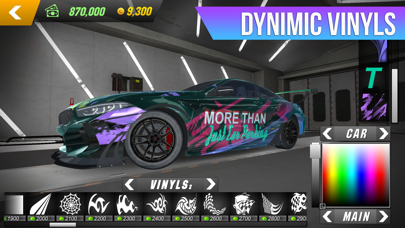
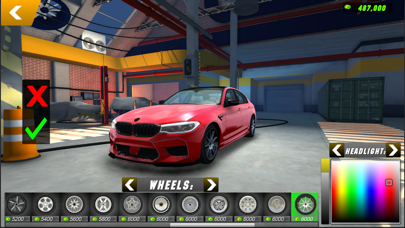
• Visual auto tunings: Dynamic vinyls, car body parts.
• Car Plate: choose among 6 plate types and customize it.
High-quality open world
• Highly-detailed environments
• 130+ cars with the real interior.
• Buildings with interior
Amazing gameplay
• 82 real-life parking and driving challenges.
• Different vehicles: Tow truck, pickup, trucks, sport and classic cars.
Privacy Policy: https://olzhass.net/Car_Parking_Multiplayer_Privacy_Policy.html
EULA: https://olzhass.net/Car_Parking_Multiplayer_EULA.html
- Non-Jailbroken/Jailed or Jailbroken iPhone or iPad.
- Sideloadly or alternatives.
- Computer running Windows/macOS/Linux with iTunes installed.
STEP 1: Download the pre-hacked .IPA file from the link above to your computer. To download from the iOSGods App, see our iOSGods App IPA Download Tutorial which includes a video example.
STEP 2: Download Sideloadly and install it on your Windows or Mac.
STEP 3: Open Sideloadly on your computer, connect your iOS device, and wait until your device name appears in Sideloadly.
STEP 4: Once your iDevice is recognized, drag the modded .IPA file you downloaded and drop it into the Sideloadly application.
STEP 5: Enter your Apple Account email, then press “Start.” You’ll then be asked to enter your password. Go ahead and provide the required information.
STEP 6: Wait for Sideloadly to finish sideloading/installing the hacked IPA. If there are issues during installation, please read the note below.
STEP 7: Once the installation is complete and you see the app on your Home Screen, you will need to go to Settings → General → Profiles / VPN & Device Management. Once there, tap on the email you entered from step 6, and then tap on “Trust [email protected]”.
STEP 8: Now go to your Home Screen and open the newly installed app and everything should work fine. You may need to follow further per app instructions inside the hack's popup in-game.
NOTE: iOS/iPadOS 16 and later, you must enable Developer Mode. For free Apple Developer accounts, you will need to repeat this process every 7 days. If you have any questions or problems, read our Sideloadly FAQ section of the topic.