Connexion requise
Connectez-vous avec votre compte iOSGods pour continuer.
Connectez-vous avec votre compte iOSGods pour continuer.
Eterspire: Fantasy MMORPG iOS Mod IPA vous offre des triche puissantes pour dominer les batailles fantastiques avec multiplicateur de dégâts, multiplicateur de défense et mode dieu pour une aventure inarrêtable.
- Multiplicateur de dégâts → amplifiez votre puissance d'attaque au combat
- Multiplicateur de défense → renforcez votre force défensive contre les ennemis
- Mode dieu → devenez invincible au combat
Cette app est également livrée avec iGameGod, qui vous donne accès à Auto Touch pour automatiser les tâches répétitives, App Speed Manager pour ajuster la vitesse de jeu, à l'édition de valeurs avec Memory Engine, et à d'autres outils puissants pour les jeux iOS.
Téléchargez Eterspire: Fantasy MMORPG iOS Mod IPA depuis les liens ci-dessus. Appuyez sur le bouton d'installation et suivez les instructions pour installer ce hack iOS sur votre iPhone, iPad ou Apple Silicon.
Besoin de plus d'aide ? Consultez notre FAQ de l'app iOSGods pour des réponses détaillées et des conseils de dépannage.
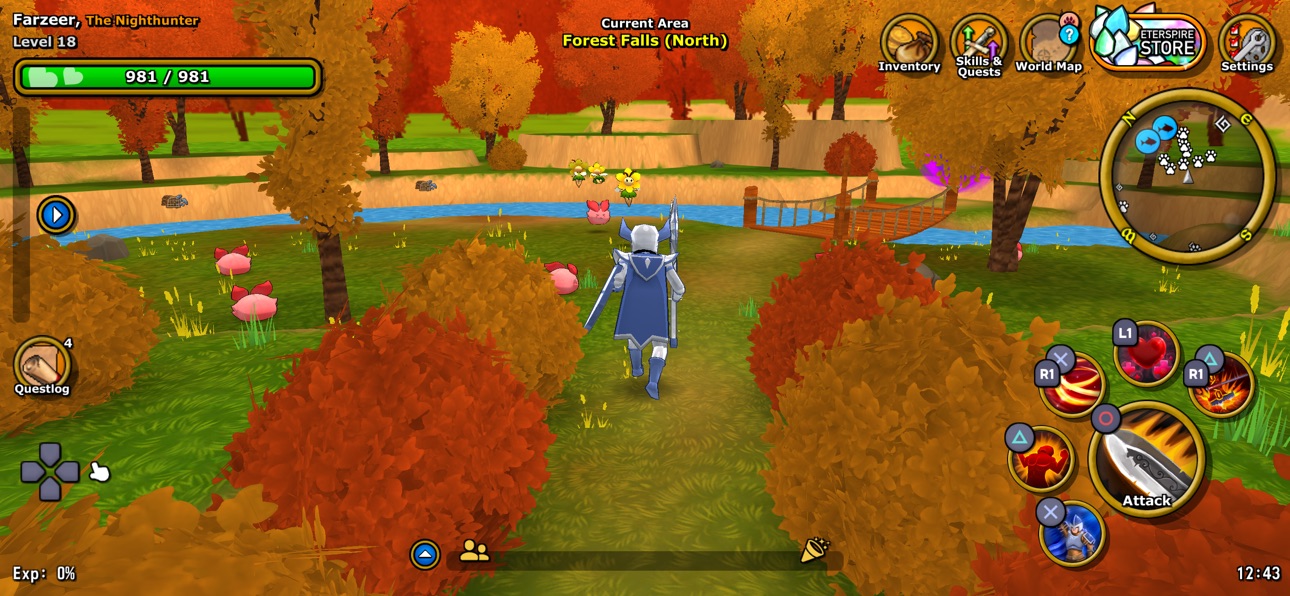
Eterspire est le meilleur MMORPG mobile indépendant. Sans auto-play, avec cross-play PC, une progression véritablement free-to-play et une prise en charge complète des manettes, il offre une véritable expérience MMO jouable partout.
Explorez un vaste monde fantastique rempli de personnages attachants, formez un groupe avec vos amis pour des combats coopératifs et progressez grâce à un vrai grinding. Rejoignez l’une des communautés les plus accueillantes du MMO et découvrez de nouvelles mises à jour de contenu toutes les deux semaines !
OBTENEZ DE L’ÉQUIPEMENT PAR L’EFFORT
Progressez en battant des monstres, en accomplissant des quêtes et en collectant du butin. Pas d’armes payantes de haut niveau ni de raccourcis : votre force dépend uniquement de votre stratégie, de votre dévouement et de votre compétence. C’est le MMORPG que l’on mérite.
MAÎTRISEZ LES ÉPREUVES PVE AVEC DES AMIS
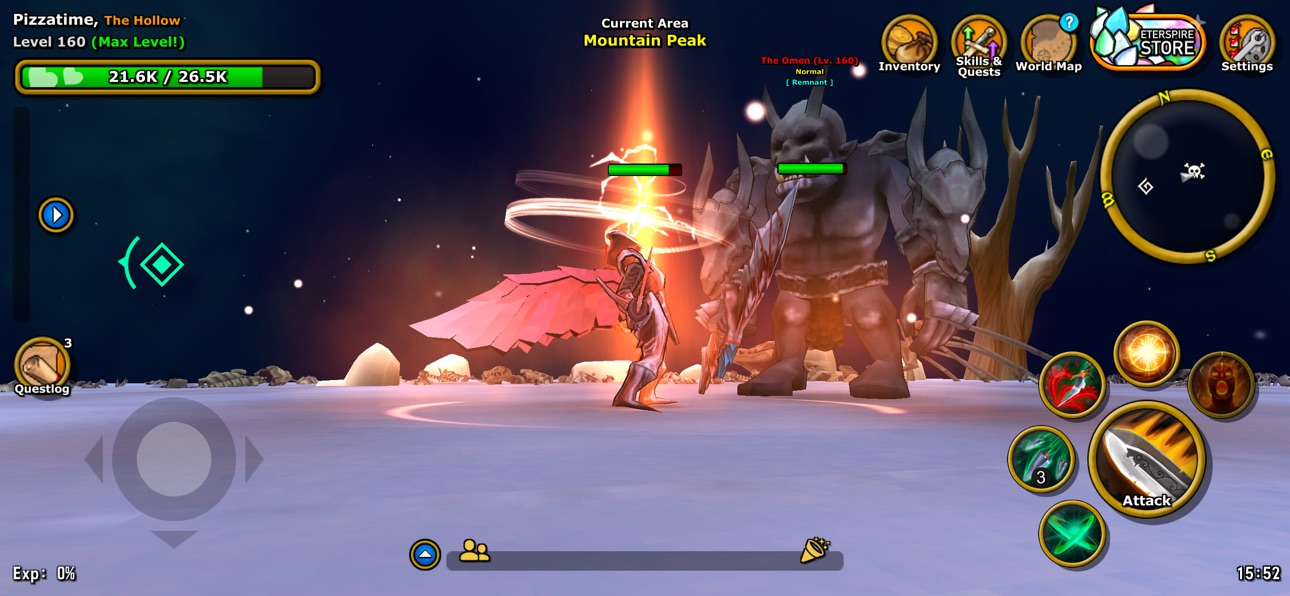
Formez des groupes jusqu’à 4 joueurs pour affronter les Épreuves : des défis JcE par vagues avec du butin rare, de l’EXP et de puissants boss. Coordonnez votre groupe, triomphez des défis les plus difficiles d’Aetera et empochez vos récompenses.
PERSONNALISEZ VOTRE AVENTURIER
Choisissez votre classe et définissez votre style. Utilisez l’artisanat pour transformer de l’équipement en apparence cosmétique et portez votre armure et vos armes préférées sans perdre de statistiques. Créez un style unique, peu importe votre manière de combattre.
DÉFIEZ LES RÉMANENTS POUR DES BUTINS ÉPIQUES
Affrontez les Rémanents, d’énormes monstres de fin de jeu qui laissent tomber de l’équipement EX, des familiers rares et des cosmétiques précieux. Avec la bonne stratégie et un vrai travail d’équipe, vous pourrez décrocher du butin légendaire ou un énorme gain de puissance.
JOUEZ PARTOUT AVEC LE CROSSPLAY
Que ce soit sur PC, Mac ou mobile, votre progression vous suit toujours. Eterspire prend en charge le crossplay complet et les manettes, offrant ainsi l’une des meilleures expériences MMORPG sur toutes les plateformes.
REJOIGNEZ UNE VÉRITABLE COMMUNAUTÉ MMORPG
Eterspire n’est pas seulement un RPG, c’est un monde de fantasy vivant et en constante évolution. Discutez, échangez, rejoignez des guildes et explorez avec des aventuriers du monde entier. Participez à des concours, à des événements en jeu et à des sessions de questions-réponses avec les développeurs sur Discord.
DÉCOUVREZ LE MONDE D’AETERA
Des vallées verdoyantes et forêts profondes aux ruines anciennes et toundras glacées, Aetera regorge de donjons, de secrets et de personnages inoubliables. Forgez votre propre légende en explorant ce vaste monde MMO.
DU NOUVEAU CONTENU TOUS LES 15 JOURS
Avec des mises à jour toutes les deux semaines, de nouvelles fonctionnalités et des événements réguliers, Eterspire évolue aux côtés de sa communauté. Chaque mise à jour apporte de nouvelles aventures, de nouveaux défis et de nouvelles récompenses.
Captures © leurs propriétaires respectifs · App Store


iOSGods n'est ni affilié à Apple Inc., Google LLC ou aux développeurs des applications listées ici, ni approuvé ou sponsorisé par eux. Apple, iOS et App Store sont des marques d'Apple Inc. Android et Google Play sont des marques de Google LLC. Tous les autres noms d'applications, icônes, visuels et marques appartiennent à leurs propriétaires respectifs.

- iPhone ou iPad avec ou sans Jailbreak.
- Sideloadly ou alternatives.
- Ordinateur sous Windows/macOS/Linux avec iTunes installé.
ÉTAPE 1: Téléchargez le fichier .IPA pré-modifié depuis le lien ci-dessus sur votre ordinateur. Pour le télécharger depuis l'iOSGods App, consultez notre Tutoriel de téléchargement de l'IPA depuis l'iOSGods App qui comprend un exemple en vidéo.
ÉTAPE 2: Téléchargez Sideloadly et installez-le sur votre Windows ou Mac.
ÉTAPE 3: Ouvrez Sideloadly sur votre ordinateur, connectez votre appareil iOS et attendez que le nom de votre appareil apparaisse dans Sideloadly.
ÉTAPE 4: Une fois votre iDevice reconnu, glissez le fichier .IPA modifié que vous avez téléchargé et déposez-le dans l'application Sideloadly.
ÉTAPE 5: Saisissez l'adresse e-mail de votre Apple Account, puis appuyez sur « Start ». Il vous sera ensuite demandé d'entrer votre mot de passe. Fournissez les informations requises.
ÉTAPE 6: Attendez que Sideloadly termine le sideloading/l'installation de l'IPA modifié. En cas de problème durant l'installation, veuillez lire la remarque ci-dessous.
ÉTAPE 7: Une fois l'installation terminée et l'app visible sur votre écran d'accueil, vous devez aller dans Réglages → Général → Profils / VPN et gestion de l'appareil. Là, appuyez sur l'adresse e-mail saisie à l'étape 6, puis appuyez sur « Faire confiance à [email protected] ».
ÉTAPE 8: Allez maintenant sur votre écran d'accueil et ouvrez l'app nouvellement installée ; tout devrait fonctionner correctement. Vous devrez peut-être suivre des instructions supplémentaires propres à chaque app, dans la fenêtre du hack en jeu.
REMARQUE : À partir d'iOS/iPadOS 16, vous devez activer le mode Développeur. Pour les comptes Apple Developer gratuits, vous devrez répéter ce processus tous les 7 jours. Pour toute question ou problème, lisez notre section FAQ Sideloadly du sujet.
Game Name iOS Mod IPA is an action adventure game enhanced with powerful gameplay boosts and quality-of-life improvements. Win battles faster, earn rewards quicker, and enjoy uninterrupted play without ads.
- Unlimited Gold - spend freely to unlock premium content
- Damage Multiplier - deal significantly more damage in combat
- Defense Multiplier - take less damage and survive longer
- Reward Multiplier - earn more loot from every battle
- Max Level - instantly reach the highest player rank
- No Ads - play without interruptions or advertisements
This app also comes with iGameGod, giving you access to Auto Touch to automate repetitive tasks, App Speed Manager for adjustable gameplay speed, Memory Engine value editing, and more powerful iOS game tools.
Téléchargez Game Name Mod IPA depuis les liens ci-dessus. Appuyez sur le bouton d'installation et suivez les instructions pour installer ce hack iOS sur votre iPhone, iPad ou Apple Silicon.
Besoin de plus d'aide Consultez notre FAQ de l'app iOSGods pour des réponses détaillées et des conseils de dépannage.
----------------------------------------------------------
--------------------------------------------------