Anmeldung erforderlich
Melde dich mit deinem iOSGods-Konto an, um fortzufahren.
Melde dich mit deinem iOSGods-Konto an, um fortzufahren.

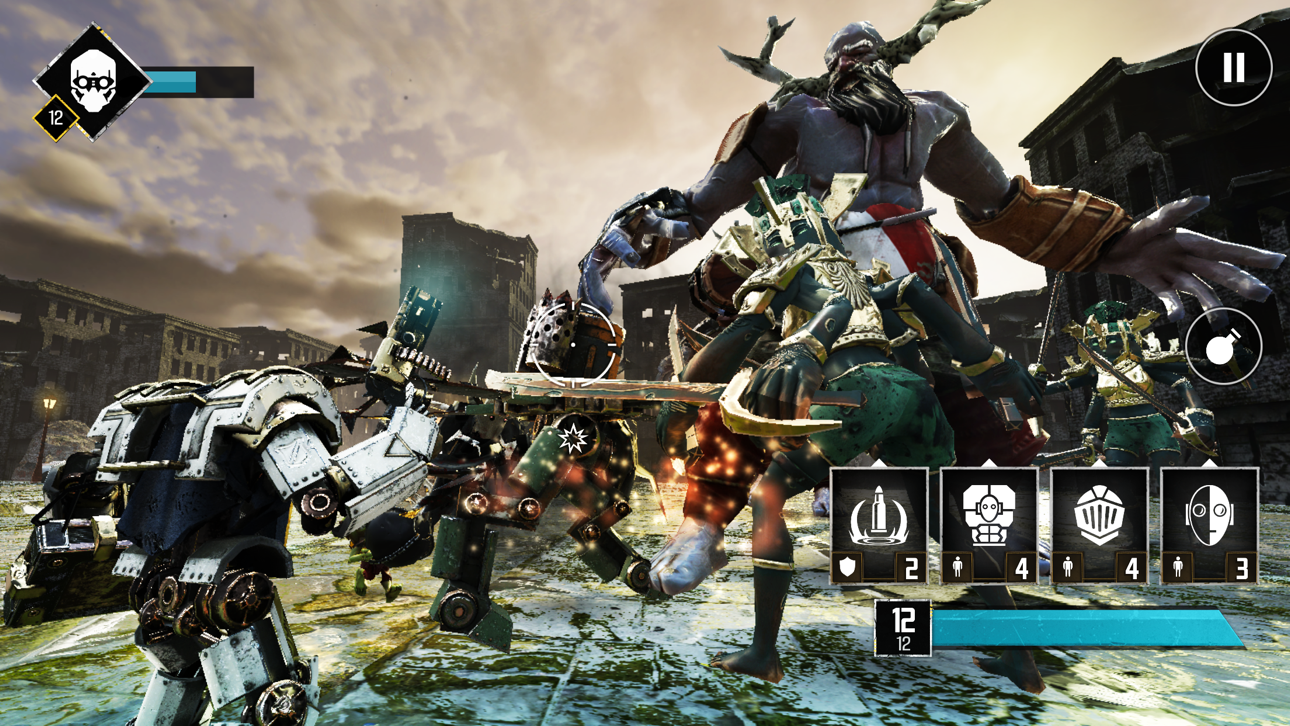
Befehlige deine Fraktion in einem post-apokalyptischen Krieg zwischen Magie und Maschinen in diesem Hybrid aus Echtzeit-Strategie und Third-Person-Shooter. Magic vs Metal Hack gibt dir unbegrenzte Mana, um verheerende Kräfte ohne Grenzen freizusetzen, damit du Kämpfe mit unerbittlichem Zauberwirken und taktischer Armeebeherrschung in intensiven PvP- und Kampagnenmissionen dominierst.
- Unbegrenzte Mana (Verwendung) → Zauber ohne Ressourcenlimits wirken
Diese App wird zusätzlich mit iGameGod geliefert und bietet dir Zugriff auf Auto Touch zur Automatisierung sich wiederholender Aufgaben, App Speed Manager für eine anpassbare Spielgeschwindigkeit, Memory Engine zur Wertbearbeitung und weitere leistungsstarke iOS-Spielwerkzeuge.
Lade Magic vs Metal Hack modded IPA über die obigen Links herunter. Tippe auf den Installations-Button und folge den Anweisungen, um diese iOS-App auf deinem iPhone, iPad oder Apple Silicon zu installieren.
Brauchst du mehr Hilfe? In unseren iOSGods App häufig gestellten Fragen findest du ausführliche Antworten und Tipps zur Fehlerbehebung.
Jahrhunderte nach einem Meteoriteneinschlag, der die Menschheit fast ausgelöscht hatte, haben sich zwei Fraktionen gebildet – eine biologische und eine mechanische. Jetzt befinden sich beide in einem erbitterten Krieg ums Überleben. Wähle deinen Helden, versammle eine unaufhaltsame Armee, entfessle zerstörerische Kräfte und lösche den Gegner aus in diesem actiongeladenen Echtzeit-Strategiespiel.
--------------------------------------------
ECHTZEITSTRATEGIE (RTS) ODER THIRD-PERSON-SHOOTER (TPS)
Wähle deine Fraktion, wähle deinen Helden und ziehe in den Krieg. Spiele mit einer Hand und befehlige das Geschehen auf dem Schlachtfeld von oben oder beteilige dich an den Kämpfen in einem actiongeladenen Third-Person-Shooter – du hast die Wahl!
RIESIGE KAMPAGNE
Führe Krieg in einer postapokalyptischen Welt dieser riesigen Einzelspielerkampagne, greife deine Gegner an und wehre ihre Angriffe ab.
MÄCHTIGE ZAUBER & HELDEN
Wähle einen von sechs einzigartigen Helden, die alle mit haufenweise mächtigen Zaubern ausgestattet sind, um diese in der Schlacht anzuwenden. Zerschmettere deine Gegner mit dem Berserker, vernichte sie mit dem Nova, überwältige sie mit den Armeen des Nekromanten und mehr!
STELLE MÄCHTIGE GEGENSTÄNDE HER
Sammle Gegenstände und benutze sie, um seltene und mächtige Artefakte herzustellen, die deine Helden, Zauber und Truppen verstärken!
GRAFIK
Erlebe eine unglaubliche 3D-Grafik, dynamische Beleuchtung und detaillierte Partikel-Effekte. Tauche vollkommen in diese dunkle, vom Krieg erschütterte Fantasy-Welt ein!
FANTASY TRIFFT AUF SCI-FI
Beschwöre Fantasie-Kreaturen oder baue Sci-Fi-Kriegsmaschinen. Wirke Zauber oder setze Feuerkraft ein. Nutze Magie oder Technologie, um den Krieg zu gewinnen – du hast die Wahl in dieser einzigartigen Genre-Zusammenführung!
SOZIALE MEDIEN
Du findest uns (@FoursakenMedia) auf Discord, Twitter oder Facebook, um immer auf dem Laufenden zu bleiben!
Screenshots © der jeweiligen Inhaber · App Store



iOSGods ist nicht mit Apple Inc., Google LLC oder den Entwicklern der hier aufgeführten Apps verbunden und wird von ihnen weder unterstützt noch gesponsert. Apple, iOS und App Store sind Marken von Apple Inc. Android und Google Play sind Marken von Google LLC. Alle weiteren App-Namen, Symbole, Grafiken und Marken gehören ihren jeweiligen Inhabern.
- Nicht-Jailbroken/Jailed oder Jailbroken iPhone oder iPad.
- Sideloadly oder Alternativen.
- Computer mit Windows/macOS/Linux und installiertem iTunes.
SCHRITT 1: Lade die vorinstallierte .IPA-Datei über den obigen Link auf deinen Computer herunter. Zum Herunterladen aus der iOSGods-App siehe unser iOSGods App IPA Download-Tutorial mit Videobeispiel.
SCHRITT 2: Lade Sideloadly herunter und installiere es auf deinem Windows oder Mac.
SCHRITT 3: Öffne Sideloadly auf deinem Computer, verbinde dein iOS-Gerät und warte, bis dein Gerätename in Sideloadly erscheint.
SCHRITT 4: Sobald dein iDevice erkannt wird, ziehe die heruntergeladene gemoddete .IPA-Datei in die Sideloadly-Anwendung.
SCHRITT 5: Gib deine Apple-Account-E-Mail ein und drücke „Start". Du wirst dann nach deinem Passwort gefragt. Gib die erforderlichen Informationen ein.
SCHRITT 6: Warte, bis Sideloadly das Sideloading/Installieren der gehackten IPA abgeschlossen hat. Bei Problemen während der Installation lies bitte den Hinweis unten.
SCHRITT 7: Sobald die Installation abgeschlossen ist und die App auf deinem Home-Bildschirm angezeigt wird, musst du zu Einstellungen → Allgemein → Profile / VPN & Geräteverwaltung gehen. Tippe dort auf die E-Mail, die du in Schritt 6 eingegeben hast, und dann auf „Trust [email protected]".
SCHRITT 8: Gehe nun zu deinem Home-Bildschirm und öffne die neu installierte App – alles sollte einwandfrei funktionieren. Möglicherweise musst du weitere App-spezifische Anweisungen im Hack-Popup im Spiel befolgen.
HINWEIS: iOS/iPadOS 16 und höher: Du musst den Entwicklermodus aktivieren. Bei kostenlosen Apple Developer-Accounts musst du diesen Vorgang alle 7 Tage wiederholen. Bei Fragen oder Problemen lies bitte unsere Sideloadly-FAQ-Sektion im Thema.
Game Name iOS Mod IPA is an action adventure game enhanced with powerful gameplay boosts and quality-of-life improvements. Win battles faster, earn rewards quicker, and enjoy uninterrupted play without ads.
- Unlimited Gold - spend freely to unlock premium content
- Damage Multiplier - deal significantly more damage in combat
- Defense Multiplier - take less damage and survive longer
- Reward Multiplier - earn more loot from every battle
- Max Level - instantly reach the highest player rank
- No Ads - play without interruptions or advertisements
This app also comes with iGameGod, giving you access to Auto Touch to automate repetitive tasks, App Speed Manager for adjustable gameplay speed, Memory Engine value editing, and more powerful iOS game tools.
Lade Game Name Mod IPA über die obigen Links herunter. Tippe auf den Installations-Button und folge den Anweisungen, um diese iOS-App auf deinem iPhone, iPad oder Apple Silicon zu installieren.
Brauchst du mehr Hilfe In unseren iOSGods App häufig gestellten Fragen findest du ausführliche Antworten und Tipps zur Fehlerbehebung.
----------------------------------------------------------
--------------------------------------------------