Anmeldung erforderlich
Melde dich mit deinem iOSGods-Konto an, um fortzufahren.
Melde dich mit deinem iOSGods-Konto an, um fortzufahren.
Enemy Miss (God Mode) macht dich in Beat Arena unverwundbar, einem rhythmusbasierten RPG Hack, in dem du dich durch Kämpfe tippst, ohne Schaden zu nehmen. Diese Mod IPA lässt dich dich rein auf die Musik und Strategie konzentrieren, während die Angriffe deiner Gegner harmlos vorbeigehen und dir den Vorteil geben, jede Arena im Flute Valley zu erobern.
- Enemy Miss (God Mode) → weiche allen eingehenden Angriffen aus
Diese App wird zusätzlich mit iGameGod geliefert und bietet dir Zugriff auf Auto Touch zur Automatisierung sich wiederholender Aufgaben, App Speed Manager für eine anpassbare Spielgeschwindigkeit, Memory Engine zur Wertbearbeitung und weitere leistungsstarke iOS-Spielwerkzeuge.
Lade Beat Arena Hack modded IPA über die obigen Links herunter. Tippe auf den Installations-Button und folge den Anweisungen, um diese iOS-App auf deinem iPhone, iPad oder Apple Silicon zu installieren.
Brauchst du mehr Hilfe? In unseren iOSGods App häufig gestellten Fragen findest du ausführliche Antworten und Tipps zur Fehlerbehebung.
Vorsicht, Rhythmus-Ritter!
Tritt in eine Welt ein, in der du dafür geboren bist, die tödlichsten Gegenspieler mit der allermächtigsten Waffen zu besiegen ... der inneren Musik.
Wecke deine Kämpferseele mit Rhythm Realms: In diesem neuen Rollenspiel trittst du als Fremder in eine völlig neue Welt und tippst dich im Rhythmus zum Sieg.
Eine mysteriöse dunkle Magie stürzt das Flötental ins Ungleichgewicht, und in sämtlichen Reichen der Königin des Rhythmus waltet das Chaos. Weshalb ist die Harmonie der Welt verlorengegangen? Vielleicht kann bloß ein Fremder wie du die Wahrheit ans Licht kehren.
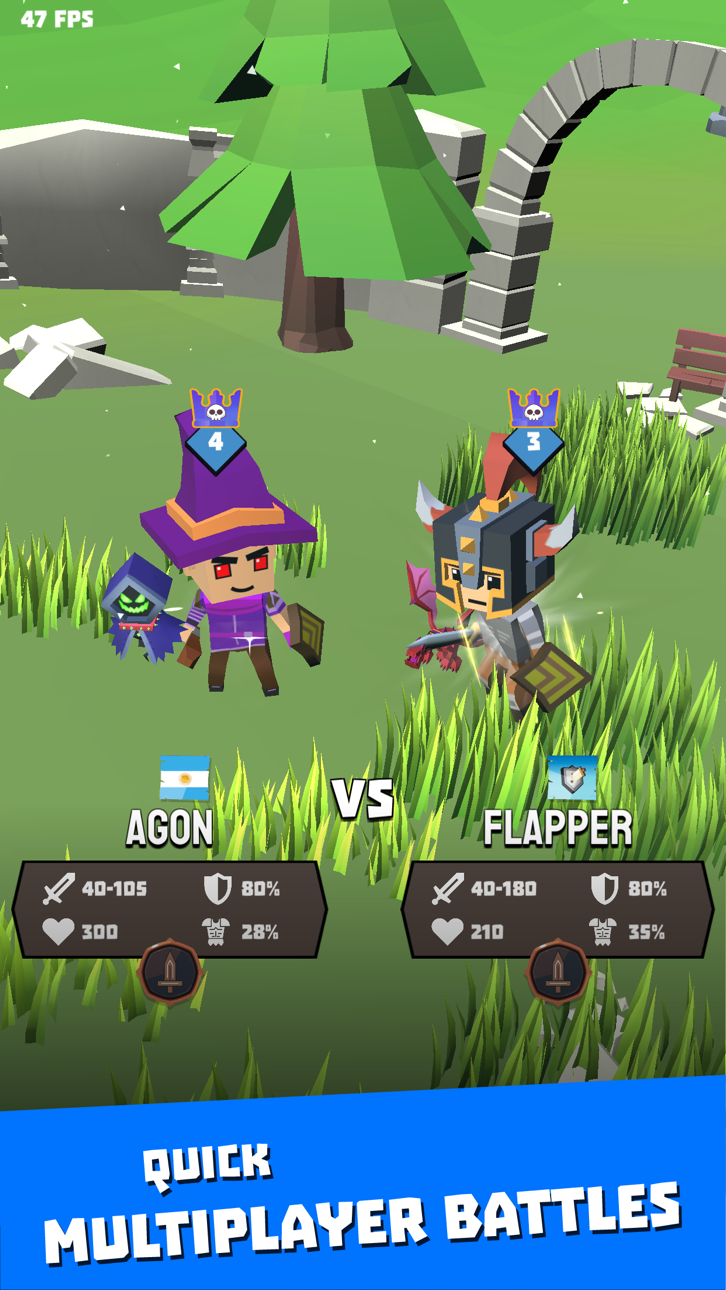
Werde der beste Rhythmus-Ritter und erobere die Arenen, um den Multiplayer-Modus zu erreichen und gegen Freunde und Feinde zu kämpfen!
KÄMPFE IN RHYTHMISCHEN GEFECHTEN GEGEN MENSCHEN UND EPISCHE MONSTER
- Du kannst unglaubliche Waffen, Haustiere und Schilde gewinnen, wie die Kriegsaxt aus Mithril, die Schwarze Krähe und den Verhexten Schild.
- Lerne den Rhythmus deiner Waffen und werde eins mit ihnen, um wertvolle Schätze zu heben. So wirst du zum besten Rhythmus-Ritter, den die Königin des Rhythmus je gesehen hat!
- Entdecke eine epische Welt voller tödlicher Kreaturen und schonungsloser Gegner wie die Gorgo, der Knochendrache und die NecroDancer.
- Nutze einmalige Karten wie den Dämonentöter oder den Engelshelm zum Vergiften, Anzünden, Lähmen und mehr.
TAUCH EIN IN EINE EPISCHE GESCHICHTE
- Folge den Kampagnen der Königin des Rhythmus durch verhexte Täler, unbarmherzige Wüsten, unbetretene Urwälder und unermesslichen Grotten.
- Tritt in eine Welt ein, wo außergewöhnliche Kräfte auf unerklärliche Weise die wahrhaftige Harmonie der Natur gestört haben.
- Triff erbarmungslose Feinde und mächtige Verbündete, und stell dich den Rätseln und Wendungen einer aus dem Gleichgewicht gebrachten Welt.
- Werde zum persönlichen Ritter der Königin des Rhythmus und decke alle Geheimnisse auf, die hinter dem Ungleichgewicht des Reichs stecken.
FORDERE DEINE FREUNDE IN MULTIPLAYER-ARENEN HERAUS
- Spiele online im Multiplayer-Modus, bis du sie alle besiegt hast.
- Man hat dich herausgefordert? Zeige ihnen, wer der Beste ist. Tippe die Buttons im Rhythmus des Ruhms an und beweise, dass kein Rhythmus-Ritter besseren Gebrauch von den Waffen macht als du.
- Lade neue Spieler ein und zeig ihnen, dass du der wahre Eroberer der Arenen bist.
- Spiele im Wettbewerbsmodus, um in die höchsten Ligen zu gelangen und gewinne unerreichte Preise.
PERSONALISIERE DEINE FIGUR
- Personalisiere deinen Ritter von Kopf bis Fuß, um zu dem Rhythmus-Ritter zu werden, der wirklich in dir steckt.
- Zeige deinen Freunden und Feinden in der Arena deine epische Ausrüstung mit Stolz. Lege einzigartige magische Ausrüstung an und sieh, wie alle große Augen machen.
- Gewinne neue legendäre Rüstungen mit unglaublichen Kräften, sodass dein Style deine Leidenschaft für den Kampf zeigt!
Screenshots © der jeweiligen Inhaber · App Store



iOSGods ist nicht mit Apple Inc., Google LLC oder den Entwicklern der hier aufgeführten Apps verbunden und wird von ihnen weder unterstützt noch gesponsert. Apple, iOS und App Store sind Marken von Apple Inc. Android und Google Play sind Marken von Google LLC. Alle weiteren App-Namen, Symbole, Grafiken und Marken gehören ihren jeweiligen Inhabern.
- Nicht-Jailbroken/Jailed oder Jailbroken iPhone oder iPad.
- Sideloadly oder Alternativen.
- Computer mit Windows/macOS/Linux und installiertem iTunes.
SCHRITT 1: Lade die vorinstallierte .IPA-Datei über den obigen Link auf deinen Computer herunter. Zum Herunterladen aus der iOSGods-App siehe unser iOSGods App IPA Download-Tutorial mit Videobeispiel.
SCHRITT 2: Lade Sideloadly herunter und installiere es auf deinem Windows oder Mac.
SCHRITT 3: Öffne Sideloadly auf deinem Computer, verbinde dein iOS-Gerät und warte, bis dein Gerätename in Sideloadly erscheint.
SCHRITT 4: Sobald dein iDevice erkannt wird, ziehe die heruntergeladene gemoddete .IPA-Datei in die Sideloadly-Anwendung.
SCHRITT 5: Gib deine Apple-Account-E-Mail ein und drücke „Start". Du wirst dann nach deinem Passwort gefragt. Gib die erforderlichen Informationen ein.
SCHRITT 6: Warte, bis Sideloadly das Sideloading/Installieren der gehackten IPA abgeschlossen hat. Bei Problemen während der Installation lies bitte den Hinweis unten.
SCHRITT 7: Sobald die Installation abgeschlossen ist und die App auf deinem Home-Bildschirm angezeigt wird, musst du zu Einstellungen → Allgemein → Profile / VPN & Geräteverwaltung gehen. Tippe dort auf die E-Mail, die du in Schritt 6 eingegeben hast, und dann auf „Trust [email protected]".
SCHRITT 8: Gehe nun zu deinem Home-Bildschirm und öffne die neu installierte App – alles sollte einwandfrei funktionieren. Möglicherweise musst du weitere App-spezifische Anweisungen im Hack-Popup im Spiel befolgen.
HINWEIS: iOS/iPadOS 16 und höher: Du musst den Entwicklermodus aktivieren. Bei kostenlosen Apple Developer-Accounts musst du diesen Vorgang alle 7 Tage wiederholen. Bei Fragen oder Problemen lies bitte unsere Sideloadly-FAQ-Sektion im Thema.
Game Name iOS Mod IPA is an action adventure game enhanced with powerful gameplay boosts and quality-of-life improvements. Win battles faster, earn rewards quicker, and enjoy uninterrupted play without ads.
- Unlimited Gold - spend freely to unlock premium content
- Damage Multiplier - deal significantly more damage in combat
- Defense Multiplier - take less damage and survive longer
- Reward Multiplier - earn more loot from every battle
- Max Level - instantly reach the highest player rank
- No Ads - play without interruptions or advertisements
This app also comes with iGameGod, giving you access to Auto Touch to automate repetitive tasks, App Speed Manager for adjustable gameplay speed, Memory Engine value editing, and more powerful iOS game tools.
Lade Game Name Mod IPA über die obigen Links herunter. Tippe auf den Installations-Button und folge den Anweisungen, um diese iOS-App auf deinem iPhone, iPad oder Apple Silicon zu installieren.
Brauchst du mehr Hilfe In unseren iOSGods App häufig gestellten Fragen findest du ausführliche Antworten und Tipps zur Fehlerbehebung.
----------------------------------------------------------
--------------------------------------------------