تسجيل الدخول مطلوب
سجّل الدخول بحساب iOSGods للمتابعة.
Hack Features:
- One Hit Kill
- God Mode
قم بتنزيل Stickman of Wars: RPG Shooters Hack modded IPA من الروابط أعلاه. اضغط على زر التثبيت واتبع التعليمات لتثبيت هذا التعديل لـ iOS على iPhone أو iPad أو Apple Silicon.
هل تحتاج إلى مزيد من المساعدة؟ راجع الأسئلة الشائعة لتطبيق iOSGods للحصول على إجابات مفصلة ونصائح لاستكشاف الأخطاء.

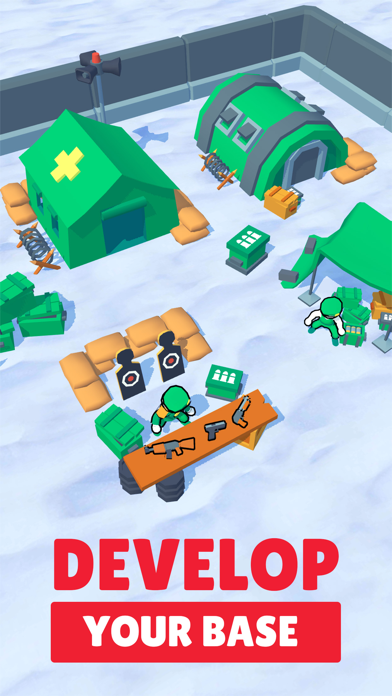
Peacekeepers At War is an RPG shooter game that takes mobile war games to the next level. Join the battle full of unparalleled action to claim your ground and defeat the enemy!
Of all war online games out there, Peacekeepers At War is the game that doesn’t cease to surprise players with its military game stylistics and plenty of shooting. Never before have army games on mobile platforms been so entertaining and full of battle fun. Join the battle as a one-man army to shoot the enemies, upgrade your base and soldier, collect resources, and do everything else you want to do in a casual online shooter.
SIMPLE & INTUITIVE GAMEPLAY
As soon as you launch Peacekeepers At War online battle game, you join the army battle.
· Collect resources in a casual mode;
· Use the collected resources build and upgrade your war battle base;
· Build and collect equipment to improve your shooting capabilities;
· Use and upgrade your equipment and firearms like in the most classic action RPGs;
· Attack the enemy’s idle army to get coins and other resources, while exploring the map;
· Attack the army in the Dungeon to get bonus resources, equipment, and weapons;
· Become stronger as you take on more and more powerful idle army enemies.
MULTIPLE RESOURCES
All action RPG games are known to feature a wide range of resources, and Peacekeepers At War is no different even though it’s an online shooter:
· Chop the wood to build the base and upgrade your skills;
· Extract technical resources to build equipment and weapons crucial for your war RPG success;
· Get ammunition to upgrade your weapons and equipment to shoot more effectively and absorb less damage;
· Defeat enemies to collect golden coins that you can use to upgrade your RPG online game base elements.
A WIDE RANGE OF WEAPONS AND EQUIPMENT
SUBSCRIPTION PRICING AND TERMS
Subscription options
In Peacekeepers At War game we offer you the following subscription option:
Weekly VIP Membership offers a weekly subscription for $4.99. Gives 5 Free Spin, 50 Green Cartridges and 100 Crystals everyday.
Monthly VIP Membership offers a monthly subscription for $14.99. Gives 5 Free Spin, 50 Green Cartridges and 100 Crystals everyday.
Annual VIP Membership offers a annual subscription for $99.99. Gives 5 Free Spin, 50 Green Cartridges and 100 Crystals everyday.
End of trial period and subscription renewal
This price is established for United States customers. Pricing in other countries may vary and actual charges may be converted to your local currency depending on the country of residence.
Payment will be charged to your iTunes Account at confirmation of purchase.
Subscription automatically renews unless auto-renew is turned off at least 24-hours before the end of the current period.
Account will be charged for renewal within 24-hours prior to the end of the current period, and identify the cost of the renewal.
Subscriptions may be managed by the user and auto-renewal may be turned off by going to the user’s Account Settings after purchase.
Any unused portion of a free trial period, if offered, will be forfeited when the user purchases a subscription to that publication, where applicable.
Canceling trial period or subscription
You can turn off the auto-renew for the subscription whenever you want in the settings if your iTunes account. Check https://support.apple.com/HT202039.
When your current trial/subscription period expires, you will be unsubscribed. The current active subscription period cannot be canceled. After your subscription expires, you will no longer be able to use elements offered in your chosen Subscription Option.
If you have any questions or comments, feel free to contact us at https://multicastgames.com/#rec304924494 or mail: [email protected]
Privacy Policy: https://multicastgames.com/privacy.html
Terms of Use: https://multicastgames.com/termofuse.html
- iPhone أو iPad بجيلبريك أو بدون جيلبريك.
- Sideloadly أو بدائلها.
- كمبيوتر يعمل بنظام Windows/macOS/Linux مع تثبيت iTunes.
الخطوة 1: قم بتنزيل ملف .IPA المعدّل مسبقًا من الرابط أعلاه إلى الكمبيوتر الخاص بك. للتنزيل من تطبيق iOSGods App، اطلع على دليل تنزيل IPA من تطبيق iOSGods App الذي يتضمن مثالًا بالفيديو.
الخطوة 2: قم بتنزيل Sideloadly وتثبيته على جهاز Windows أو Mac.
الخطوة 3: افتح Sideloadly على الكمبيوتر، ووصّل جهاز iOS الخاص بك، وانتظر حتى يظهر اسم جهازك داخل Sideloadly.
الخطوة 4: بمجرد التعرّف على جهاز iDevice الخاص بك، اسحب ملف .IPA المعدّل الذي قمت بتنزيله وأفلِته داخل تطبيق Sideloadly.
الخطوة 5: أدخل البريد الإلكتروني لحساب Apple Account الخاص بك، ثم اضغط على «Start». سيُطلب منك بعد ذلك إدخال كلمة المرور. تابع وأدخل المعلومات المطلوبة.
الخطوة 6: انتظر حتى ينتهي Sideloadly من تحميل/تثبيت ملف IPA المعدّل. في حال واجهت أي مشاكل أثناء التثبيت، يرجى قراءة الملاحظة أدناه.
الخطوة 7: بعد اكتمال التثبيت ورؤية التطبيق على الشاشة الرئيسية، انتقل إلى Settings → General → Profiles / VPN & Device Management. ثم اضغط على البريد الإلكتروني الذي أدخلته في الخطوة 6، ثم اضغط على «الوثوق بـ [email protected]».
الخطوة 8: الآن انتقل إلى الشاشة الرئيسية وافتح التطبيق الذي تم تثبيته للتو وسيعمل كل شيء بشكل صحيح. قد تحتاج إلى اتباع تعليمات إضافية خاصة بكل تطبيق داخل النافذة المنبثقة للتعديل أثناء اللعب.
ملاحظة: بدءًا من iOS/iPadOS 16 وما بعده، يجب تفعيل وضع المطور (Developer Mode). بالنسبة لحسابات Apple Developer المجانية، ستحتاج إلى تكرار هذه العملية كل 7 أيام. إذا كانت لديك أي أسئلة أو مشاكل، يرجى قراءة قسم الأسئلة الشائعة حول Sideloadly في الموضوع.