ログインが必要
iOSGodsアカウントでサインインして続けてください。
iOSGodsアカウントでサインインして続けてください。
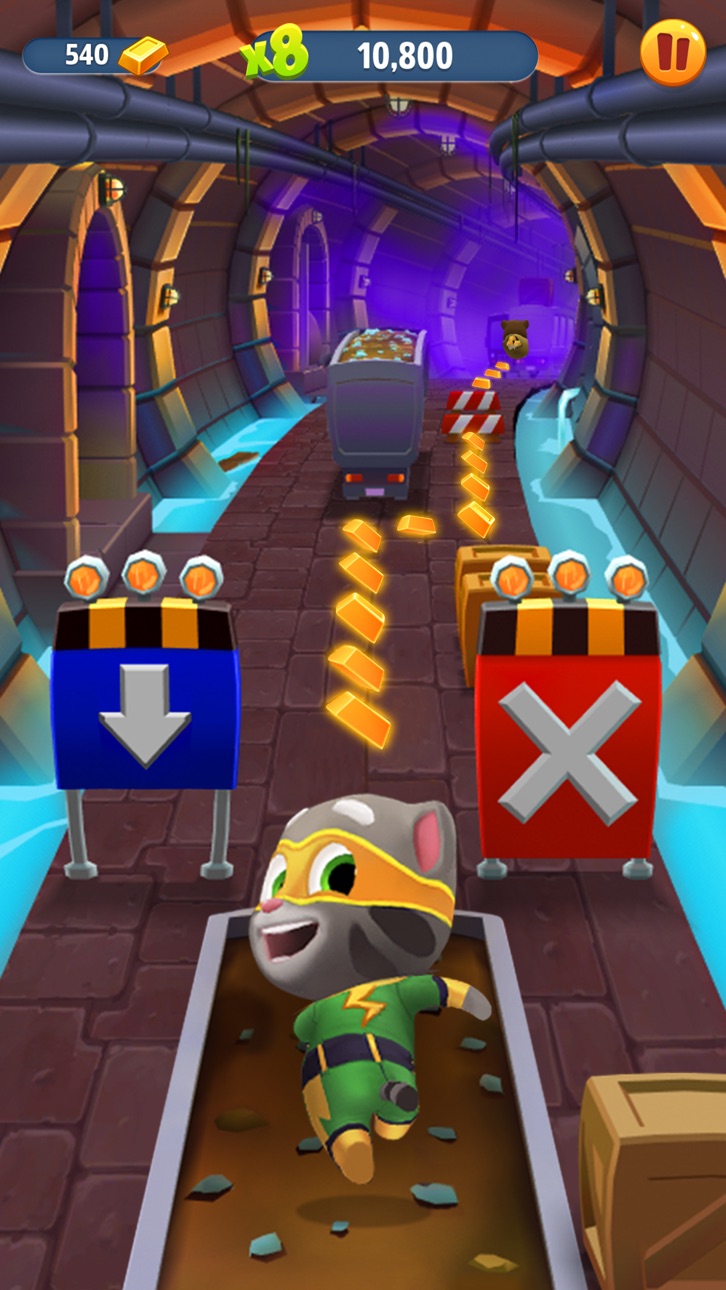
このTalking Tom Gold Run - Free Hackで16Mのすべての通貨を即座に獲得し、無制限のリソースでワールドをアンロックしてエンドレスランナーを支配しましょう。この無料のMod IPAはグラインドを排除し、コインの蓄積を待つことなく、泥棒を追いかけてボス戦をマスターすることに集中できます。
- 無制限通貨 → 獲得して16Mのすべての通貨を受け取る
このアプリにはiGameGodも搭載されており、繰り返し作業を自動化するAuto Touch、ゲーム速度を調整できるApp Speed Manager、Memory Engineによる値の編集など、強力なiOSゲーム用ツールをご利用いただけます。
Talking Tom Gold Run - Free Hack modded IPAを上のリンクからダウンロードします。インストールボタンをタップし、画面の指示に従ってiPhone、iPad、Apple SiliconにこのiOSアプリハックをインストールします。
さらにヘルプが必要ですか? 詳しい回答とトラブルシューティングはiOSGodsアプリ よくある質問をご覧ください。
Corra e derrote o Roy Rakoon no Talking Tom: Corrida do Ouro!
Junte-se ao Talking Tom e a seus amigos numa aventura de corrida sem fim com perseguições emocionantes, mundos épicos e diversão que não acaba mais. Ajude o Talking Tom a correr, desviar de obstáculos e recuperar o ouro roubado em lugares vibrantes como Veneza, o País das Maravilhas de Inverno e o Mundo do Dragão Chinês!
Desbloqueie amigos e personalize personagens
Jogue com a Talking Angela, o Ginger, o Ben, o Hank e a Becca, cada um com estilos exclusivos e roupas superlegais. Pegue o ouro e as fichas para construir e melhorar as casas dos sonhos deles e deixar cada corrida do seu jeito!
Impulsione suas corridas com poderes épicos
Use mochilas a jato, skates, ímãs e muito mais para correr mais rápido, pular mais alto e marcar mais pontos. Enfrente o Roy Rakoon em fases do chefão empolgantes e eventos especiais repletos de recompensas exclusivas!
Desbloqueie e personalize personagens
Desbloqueie seus amigos preferidos, incluindo a Talking Angela, o Ginger, o Hank, o Ben e a Becca. Pegue o ouro e as fichas para construir e melhorar as casas dos sonhos deles e personalizá-los com roupas superlegais!
Modo de corrida competitiva
Desafie outros jogadores para corridas empolgantes! Bata novos recordes, suba nas classificações e prove que é o corredor mais rápido do pedaço.
Preparar, apontar, CORRA! Perfeito para crianças e famílias que gostam de jogos de corrida sem fim! Curta toda a ação e diversão do Talking Tom: Corrida do Ouro, o melhor jogo de corrida com gatos!
Produzido pela Outfit7, criadora de Meu Talking Tom, Minha Talking Angela, Meu Talking Tom: Amigos e Talking Tom Hero Dash.
Este app contém:
- Promoção de produtos e publicidade da Outfit7;
- Links que direcionam os clientes para os sites e outros aplicativos da Outfit7;
- Personalização do conteúdo para incentivar os usuários a jogar o aplicativo novamente;
- Opção de realizar compras no app;
- Itens para comprar (disponíveis por diferentes preços) usando moeda virtual, dependendo do progresso do jogador; e
- Opções alternativas para acessar todas as funcionalidades do aplicativo sem efetuar nenhuma compra no aplicativo com dinheiro real.
Observe que nós não processamos todos os dados divulgados na etiqueta para usuários menores da idade de consentimento digital. Para mais informações, consulte nossa Política de Privacidade.
Termos de uso: https://talkingtomandfriends.com/eula/en/
Política de Privacidade para jogos: https://talkingtomandfriends.com/privacy-policy-games/en
Suporte ao Cliente: [email protected]
スクリーンショット © 各権利者 · App Store


iOSGods は Apple Inc.、Google LLC、および掲載アプリの開発者と提携しておらず、承認や協賛も受けていません。Apple、iOS、App Store は Apple Inc. の商標です。Android および Google Play は Google LLC の商標です。その他のアプリ名、アイコン、画像、商標はすべて各権利者に帰属します。

- 脱獄/Jailed済みまたは脱獄済みのiPhoneまたはiPad。
- Sideloadlyまたは代替手段。
- iTunesがインストールされているWindows/macOS/Linuxを実行しているコンピュータ。
ステップ1: 上のリンクから事前にハックされた.IPAファイルをコンピュータにダウンロードします。iOSGodsアプリからダウンロードする方法は、ビデオ例付きのiOSGodsアプリIPAダウンロードチュートリアルをご覧ください。
ステップ2: SideloadlyをダウンロードしてWindowsまたはMacにインストールします。
ステップ3: コンピュータでSideloadlyを開き、iOSデバイスを接続して、デバイス名がSideloadlyに表示されるまで待ちます。
ステップ4: iDeviceが認識されたら、ダウンロードしたModされた.IPAファイルをSideloadlyアプリにドラッグ&ドロップします。
ステップ5: Apple Accountのメールアドレスを入力し、「Start」を押します。次にパスワードの入力を求められます。必要な情報を入力してください。
ステップ6: Sideloadlyがハックされたipaのサイドロード/インストールを完了するのを待ちます。インストール中に問題が発生した場合は、以下の注意事項をお読みください。
ステップ7: インストールが完了し、ホーム画面にアプリが表示されたら、設定 → 一般 → プロファイル / VPNとデバイス管理に移動する必要があります。そこで、ステップ6で入力したメールをタップし、「Trust [email protected]」をタップします。
ステップ8: ホーム画面に戻り、新しくインストールされたアプリを開けば、すべて正常に動作するはずです。ゲーム内のハックのポップアップで、アプリごとの追加指示に従う必要がある場合があります。
注意: iOS/iPadOS 16以降では、デベロッパモードを有効にするが必要です。無料のApple Developerアカウントの場合、このプロセスを7日ごとに繰り返す必要があります。質問や問題がある場合は、トピックのSideloadly FAQセクションをお読みください。
Game Name iOS Mod IPA is an action adventure game enhanced with powerful gameplay boosts and quality-of-life improvements. Win battles faster, earn rewards quicker, and enjoy uninterrupted play without ads.
- Unlimited Gold - spend freely to unlock premium content
- Damage Multiplier - deal significantly more damage in combat
- Defense Multiplier - take less damage and survive longer
- Reward Multiplier - earn more loot from every battle
- Max Level - instantly reach the highest player rank
- No Ads - play without interruptions or advertisements
This app also comes with iGameGod, giving you access to Auto Touch to automate repetitive tasks, App Speed Manager for adjustable gameplay speed, Memory Engine value editing, and more powerful iOS game tools.
Game Name Mod IPAを上のリンクからダウンロードします。インストールボタンをタップし、画面の指示に従ってiPhone、iPad、Apple SiliconにこのiOSアプリハックをインストールします。
さらにヘルプが必要ですか 詳しい回答とトラブルシューティングはiOSGodsアプリ よくある質問をご覧ください。
----------------------------------------------------------
--------------------------------------------------