تسجيل الدخول مطلوب
سجّل الدخول بحساب iOSGods للمتابعة.
This app has iGameGod Jailed enabled so you can use the iOS Cheat Engine, Speed Hack Manager or Auto Touch Recorder to your liking! If you would like to add iGameGod Jailed to your app, you can do so by following the instructions in the official topic!
For tutorials, videos & examples on how to use iGameGod, please visit: https://iosgods.com/tags/iGameGod/
قم بتنزيل NBA 2K24 Arcade Edition Hack modded IPA من الروابط أعلاه. اضغط على زر التثبيت واتبع التعليمات لتثبيت هذا التعديل لـ iOS على iPhone أو iPad أو Apple Silicon.
هل تحتاج إلى مزيد من المساعدة؟ راجع الأسئلة الشائعة لتطبيق iOSGods للحصول على إجابات مفصلة ونصائح لاستكشاف الأخطاء.

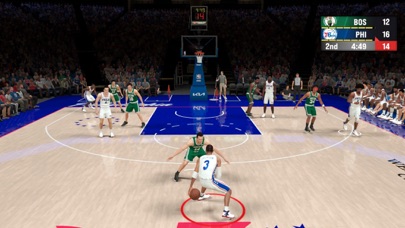
Enjoy new ways to play at home and on the go with the latest installment of the world-renowned NBA 2K franchise, exclusively available on Apple Arcade!
Step into the shoes of your very own NBA Superstar with MyCAREER, play games to earn fans and unlock endorsements with iconic brands such as Nike, Jordan, or Adidas.
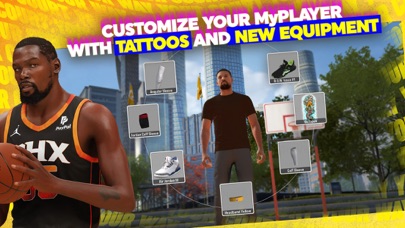
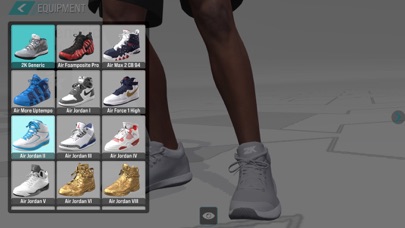
Unlock NBA Legends to join your streetball squad and take on the AI and earn VCs that you can use to unlock new shoes, accessories, outfits, and tattoos for the first time on Apple Arcade.
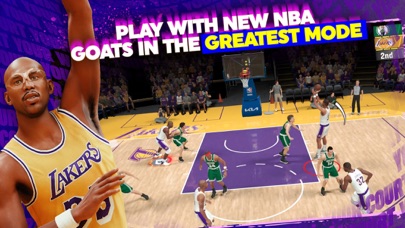
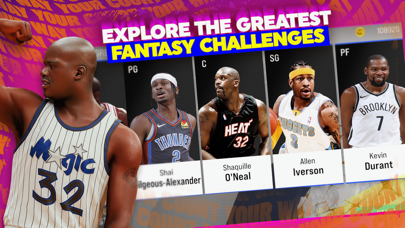
Challenge new GOATs in the Greatest mode and unlock a whole new lineup of NBA Superstars and Legends. Build the team of your wildest dreams and take on other GOAT squads in the ultimate showdown with the greatest fantasy team challenge.
Think you've got what it takes to call the shots? Put your head coach skills to the test in Association mode with SimCast Live. Oversee your team's strategy and lead your NBA franchise to victory!
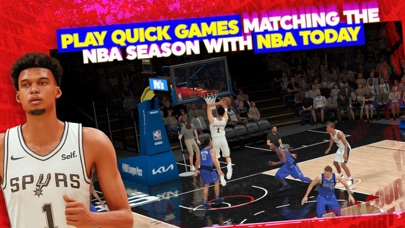
Sit courtside with Spectator mode, or play games matching the NBA season with NBA Today.
And here's the kicker – it's not just about the game; it's also about your style! You can now customize your indoor MyCOURT, hone your skills, and then invite your friends via Game Center to witness your greatness!
Looking for more reason to jump in NBA 2K24 Arcade Edition? We got you covered:
- MyCAREER: Start your NBA journey, from a young rookie to an NBA legend. Create your player and choose physical characteristics like height, wingspan, weight, playstyle, & more
Choose your position and play on your favorite NBA team. Modify your stats and build
- The Association: Become the GM and Head Coach of your favorite NBA Franchise and build your NBA dream team in The Association. Manage your NBA roster and make trades, sign free agents, scout up-and-coming prospects, and control your team’s finances.
- Quick Match Modes: Test your skill with authentic basketball gameplay, pick your favorite NBA team and play against rivals from around the NBA in 5v5 basketball games. Select your favorite players and play street basketball in 1v1, 3v3, or 5v5 on blacktop court.
- Online Multiplayer Mode: Choose one of the 30 NBA teams and compete real-time head-to-head with a friend in 3v3 street basketball in Blacktop mode against a friend.
- Cross-Platform Gameplay: Play on your own or against friends via iCloud–on your iPhone, iPad, Mac, or Apple TV.
- Compatibility with Xbox or PS DualShock controllers.
NBA 2K24 Arcade Edition is the authentic Apple Arcade experience for the NBA 2K basketball game.
Do Not Sell My Personal Information: https://www.take2games.com/ccpa
- iPhone أو iPad بجيلبريك أو بدون جيلبريك.
- Sideloadly أو بدائلها.
- كمبيوتر يعمل بنظام Windows/macOS/Linux مع تثبيت iTunes.
الخطوة 1: قم بتنزيل ملف .IPA المعدّل مسبقًا من الرابط أعلاه إلى الكمبيوتر الخاص بك. للتنزيل من تطبيق iOSGods App، اطلع على دليل تنزيل IPA من تطبيق iOSGods App الذي يتضمن مثالًا بالفيديو.
الخطوة 2: قم بتنزيل Sideloadly وتثبيته على جهاز Windows أو Mac.
الخطوة 3: افتح Sideloadly على الكمبيوتر، ووصّل جهاز iOS الخاص بك، وانتظر حتى يظهر اسم جهازك داخل Sideloadly.
الخطوة 4: بمجرد التعرّف على جهاز iDevice الخاص بك، اسحب ملف .IPA المعدّل الذي قمت بتنزيله وأفلِته داخل تطبيق Sideloadly.
الخطوة 5: أدخل البريد الإلكتروني لحساب Apple Account الخاص بك، ثم اضغط على «Start». سيُطلب منك بعد ذلك إدخال كلمة المرور. تابع وأدخل المعلومات المطلوبة.
الخطوة 6: انتظر حتى ينتهي Sideloadly من تحميل/تثبيت ملف IPA المعدّل. في حال واجهت أي مشاكل أثناء التثبيت، يرجى قراءة الملاحظة أدناه.
الخطوة 7: بعد اكتمال التثبيت ورؤية التطبيق على الشاشة الرئيسية، انتقل إلى Settings → General → Profiles / VPN & Device Management. ثم اضغط على البريد الإلكتروني الذي أدخلته في الخطوة 6، ثم اضغط على «الوثوق بـ [email protected]».
الخطوة 8: الآن انتقل إلى الشاشة الرئيسية وافتح التطبيق الذي تم تثبيته للتو وسيعمل كل شيء بشكل صحيح. قد تحتاج إلى اتباع تعليمات إضافية خاصة بكل تطبيق داخل النافذة المنبثقة للتعديل أثناء اللعب.
ملاحظة: بدءًا من iOS/iPadOS 16 وما بعده، يجب تفعيل وضع المطور (Developer Mode). بالنسبة لحسابات Apple Developer المجانية، ستحتاج إلى تكرار هذه العملية كل 7 أيام. إذا كانت لديك أي أسئلة أو مشاكل، يرجى قراءة قسم الأسئلة الشائعة حول Sideloadly في الموضوع.