Login Required
Sign in with your iOSGods account to continue.
Sign in with your iOSGods account to continue.
Skip the ad interruptions and keep your resources locked in place with this free Mod IPA for Colony Flow, a relaxing ant colony puzzle where strategic planning meets colorful block-clearing gameplay.
Once the hack is active, you'll eliminate forced ad watches, freeze your coins and lives to prevent accidental spending, and lock your boosters in place so you can focus purely on solving puzzles at your own pace without resource pressure.
- Auto ADS NO → removes forced ad interruptions
- Freeze Coins → prevents coin depletion
- Freeze Lives → keeps your lives intact
- Freeze Booster → locks booster usage
This app also comes with iGameGod, giving you access to Auto Touch to automate repetitive tasks, App Speed Manager for adjustable gameplay speed, Memory Engine value editing, and more powerful iOS game tools.
Download Colony Flow! iOS Mod IPA from the links above. Tap the install button and follow the on-screen instructions to install this iOS app hack on your iPhone, iPad, or Apple Silicon.
Need more help? Check out our iOSGods App Frequently Asked Questions for detailed answers and troubleshooting tips.
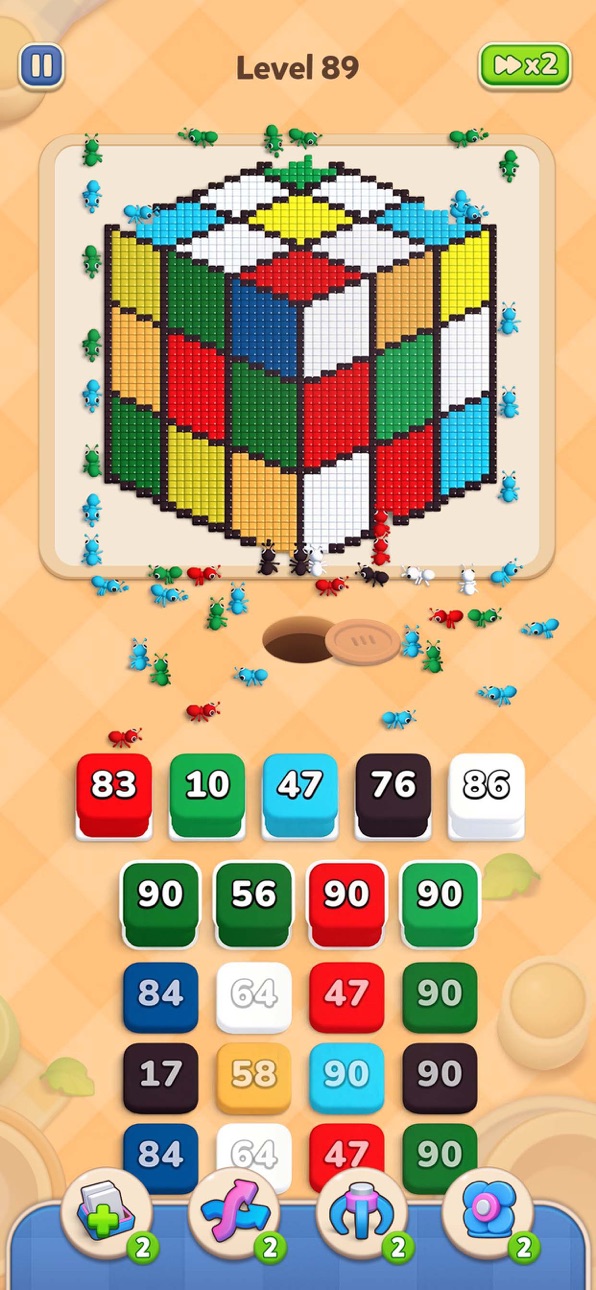
Welcome to Colony Flow — a relaxing ant colony puzzle where every tiny ant has a job to do! Tap a box, watch the workers pour out, and send them marching up to the pixel picture to carry colorful blocks back to the nest, one busy trip at a time.
Each level gives you a stack of ant boxes and just five open slots. Tap a box and it slides into a slot, releasing a swarm of ants in that color — they'll haul away every matching block in the picture. Clear a box and the slot frees up for the next one.
That's where the thinking starts. Open a color that has nothing left to carry and that slot stays clogged. Fill all five and your colony grinds to a halt. Read the picture, count what's left, and choose your boxes in the right order to keep the ants flowing.
COMMAND YOUR COLONY
- Tap a box to send its ants marching
- Watch workers haul matching blocks back to the nest
- Manage your five slots — don't let them clog
- Unlock the boxes buried further down the stack
- Clear every block to finish the puzzle
EASY TO LEARN, SATISFYING TO SOLVE
- One-tap controls — start playing in seconds
- Puzzles that grow from cozy to genuinely clever
- No timers, no lives, no pressure — take as long as you like
- Watch trails of ants stream across the board as your plan pays off
- Every solved board reveals the picture hiding underneath
DISCOVER PIXEL ART
Complete hundreds of colorful levels with themes like animals, fruit, food, flowers, nature, festivals, toys, rockets, castles, and plenty more surprises. Every puzzle you finish adds another piece of pixel art to your collection, so there's always one more picture waiting to be uncovered.
With adorable ants, satisfying animations, soothing music, and no time pressure, Colony Flow is easy to pick up and gentle to play — the kind of game that fits into a coffee break, a commute, or a quiet evening on the couch. But clearing every level will take some clever planning.
Tap the right boxes, guide your ants, clear the blocks, and uncover beautiful pixel art. Your colony is waiting!
Screenshots © their respective owners · App Store


iOSGods is not affiliated with, endorsed by, or sponsored by Apple Inc., Google LLC, or the developers of the apps listed here. Apple, iOS and App Store are trademarks of Apple Inc. Android and Google Play are trademarks of Google LLC. All other app names, icons, artwork and trademarks belong to their respective owners.

- Non-Jailbroken/Jailed or Jailbroken iPhone or iPad.
- Sideloadly or alternatives.
- Computer running Windows/macOS/Linux with iTunes installed.
STEP 1: Download the pre-hacked .IPA file from the link above to your computer. To download from the iOSGods App, see our iOSGods App IPA Download Tutorial which includes a video example.
STEP 2: Download Sideloadly and install it on your Windows or Mac.
STEP 3: Open Sideloadly on your computer, connect your iOS device, and wait until your device name appears in Sideloadly.
STEP 4: Once your iDevice is recognized, drag the modded .IPA file you downloaded and drop it into the Sideloadly application.
STEP 5: Enter your Apple Account email, then press “Start.” You’ll then be asked to enter your password. Go ahead and provide the required information.
STEP 6: Wait for Sideloadly to finish sideloading/installing the hacked IPA. If there are issues during installation, please read the note below.
STEP 7: Once the installation is complete and you see the app on your Home Screen, you will need to go to Settings → General → Profiles / VPN & Device Management. Once there, tap on the email you entered from step 6, and then tap on “Trust [email protected]”.
STEP 8: Now go to your Home Screen and open the newly installed app and everything should work fine. You may need to follow further per app instructions inside the hack's popup in-game.
NOTE: iOS/iPadOS 16 and later, you must enable Developer Mode. For free Apple Developer accounts, you will need to repeat this process every 7 days. If you have any questions or problems, read our Sideloadly FAQ section of the topic.
Game Name iOS Mod IPA is an action adventure game enhanced with powerful gameplay boosts and quality-of-life improvements. Win battles faster, earn rewards quicker, and enjoy uninterrupted play without ads.
- Unlimited Gold - spend freely to unlock premium content
- Damage Multiplier - deal significantly more damage in combat
- Defense Multiplier - take less damage and survive longer
- Reward Multiplier - earn more loot from every battle
- Max Level - instantly reach the highest player rank
- No Ads - play without interruptions or advertisements
This app also comes with iGameGod, giving you access to Auto Touch to automate repetitive tasks, App Speed Manager for adjustable gameplay speed, Memory Engine value editing, and more powerful iOS game tools.
Download Game Name Mod IPA from the links above. Tap the install button and follow the on-screen instructions to install this iOS app hack on your iPhone, iPad, or Apple Silicon.
Need more help Check out our iOSGods App Frequently Asked Questions for detailed answers and troubleshooting tips.
----------------------------------------------------------
--------------------------------------------------