ต้องเข้าสู่ระบบ
เข้าสู่ระบบด้วยบัญชี iOSGods เพื่อดำเนินการต่อ
เข้าสู่ระบบด้วยบัญชี iOSGods เพื่อดำเนินการต่อ
ติดตามโภคนาการ แคลอรี่ แมโครและเป้าหมายฟิตเนสของคุณด้วย MyFitnessPal: Calorie Counter iOS Mod IPA ซึ่งเป็นแอปติดตามสุขภาพและฟิตเนสที่ครอบคลุมพร้อมฟีเจอร์พรีเมียมปลดล็อก แอปนี้ช่วยให้คุณเข้าถึงชุดเครื่องมือติดตามแบบเต็ม การโค้ชส่วนบุคคล และการบันทึกการออกกำลังกายโดยไม่มีข้อจำกัดการสมัครสมาชิก
- พรีเมียม → เข้าถึงฟีเจอร์ที่เสียเงินทั้งหมดได้เต็มที่
- เมนูผู้พัฒนา → ไปที่การตั้งค่า เลื่อนลงมา (Dev Config) ค้นหา Entitlement Overrides เปิดใช้งานทั้งหมด เพิ่มฟีเจอร์ทั้งหมด บันทึก สำหรับการเปลี่ยนแปลง Entitlement แต่ละรายการเป็น entitled และรีสตาร์ทแอป
ดาวน์โหลด MyFitnessPal: Calorie Counter iOS Mod IPA จากลิงก์ด้านบน แตะปุ่มติดตั้งและทำตามคำแนะนำบนหน้าจอเพื่อติดตั้งแฮ็กแอป iOS นี้บน iPhone, iPad หรือ Apple Silicon
ต้องการความช่วยเหลือเพิ่มเติม? ดู คำถามที่พบบ่อยของแอป iOSGods สำหรับคำตอบโดยละเอียดและเคล็ดลับการแก้ไขปัญหา
Achieve your nutrition, calorie, macro, and fitness goals with MyFitnessPal. MyFitnessPal is a comprehensive food and fitness tracker, with everything you need to reach your goals. Seamlessly track macros, workouts, food, and calories – all in one place.
Change your habits with fitness and food. Automatically sync your steps, calorie burn, and weight with our food and fitness tracker! Download our health and nutrition app and start your free Premium trial today. With MyFitnessPal, you have access to exclusive food inspiration, an intermittent fasting tracker, fitness logging tools, expert guidance, and the calorie tracker. Discover why MyFitnessPal is the #1 nutrition and food tracking app in the U.S. and has been featured in the New York Times, Forbes, the Today Show, and U.S. News & World Report.
Monitor your health beyond calorie tracking and journalling your food. Monitor your health and fitness progress within the app.
MYFITNESSPAL FEATURES
Calorie, Macros, and Food Tracker
■ Food tracker- Log over 20.5 million foods (including restaurant dishes) from one of the largest food databases available
■ Macro tracker lets you see carbs, fat, & protein breakdown—no need for a separate app! Set goals for macros, protein, sodium, fibre, and more
■ Water tracker- Easily log your water intake to ensure you stay hydrated
Fitness – Track Workouts, Weight, and Progress
■ Activity Tracker – Add workouts and steps with the integrated fitness tracker
■ Fitness Tracker – Log your activities, or analyse the details of your diet, macros, and calories
■ Stay Inspired – Fitness tracking is right at your fingertips. Keep your diet and fitness routine exciting with workouts and food inspiration
■ Exercise and Count Calories – See how your workouts, fitness, and diet affect daily calorie goals
■ Tracker that’s integrated with Wear OS – Calorie counter, water tracker, and macro tracker– all on your watch. Easily track different nutrients at a glance.
Workouts & Meal Plans, Tailored to You
■ Customise your goals for health & fitness – Weight loss, weight gain, weight maintenance, fitness, calories, and macros
■ Personalised dashboards – Fitness, health, and diet stats are all in one place to easily see and track your progress
■ Add Your Own Meals/Food Tracker – Save recipes and meals for quick logging and keep tabs on your diet
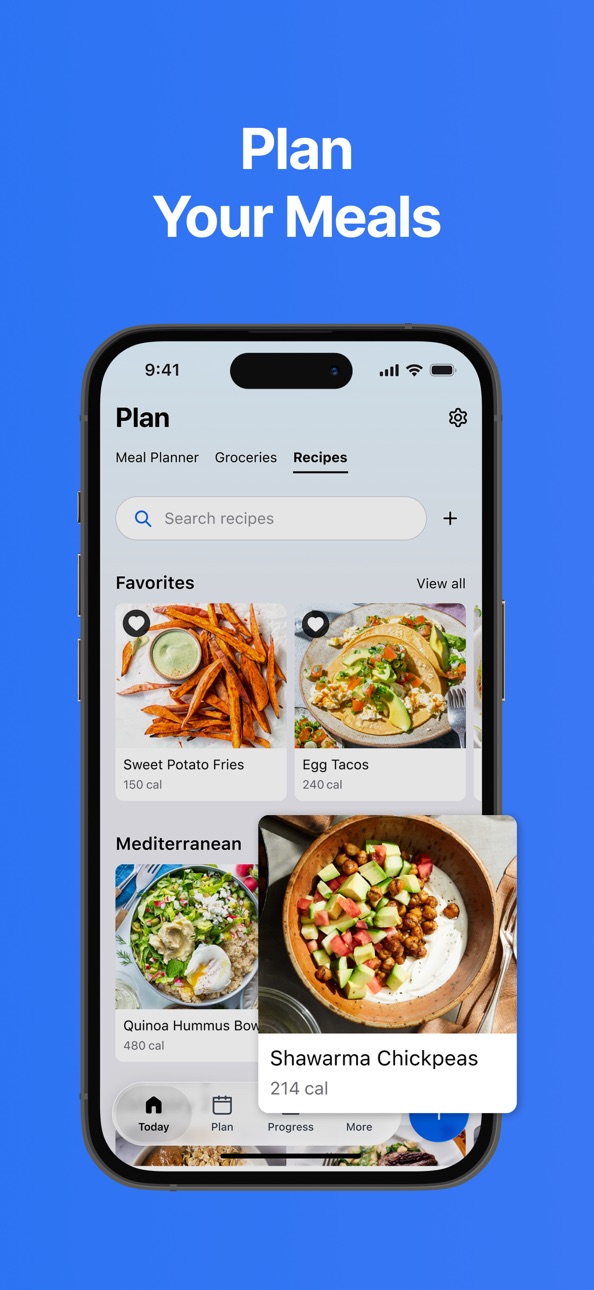
■ Follow the new easy meal planner to simplify tracking and help hit your goals
■ Connect 40+ Apps & Devices – From smartwatches, fitness trackers, and other health and fitness apps, track your intake and activity through your watch with Wear OS
■ Get Connected – Find friends and motivation in our active MyFitnessPal forums
Premium
■ Reach your goals with barcode scan, meal scan, and voice logging
■ Customise macros and set custom goals
■ Enjoy ad-free food logging with insights and comparisons built into Premium
■ Net Carbs Mode/Carb Tracker – Keep track of your low-carb or keto diet, view net carbs in your food
Premium Plus - Expanded Features to Help Hit Your Goals
■ All of the Premium features, like barcode scanning now available with meal planning
■ Personalised meal plans, integrated grocery delivery, and smart meal tracking tools
■ Your one-stop shop for meal planning, grocery shopping, food logging, and nutrition insights to help you reach your goals
■ 1000s of healthy recipes to help you reach your goals
MyFitnessPal is the leading health and nutrition app that helps you learn about your food habits, monitor your diet and conquer your health goals.
Download Today and Start Your Free Premium Trial
View our terms & conditions and privacy policy:
https://www.myfitnesspal.com/terms-of-service
https://www.myfitnesspal.com/privacy-policy
ภาพหน้าจอ © เจ้าของแต่ละราย · App Store


iOSGods ไม่มีความเกี่ยวข้อง ไม่ได้รับการรับรอง และไม่ได้รับการสนับสนุนจาก Apple Inc., Google LLC หรือผู้พัฒนาแอปที่แสดงไว้ที่นี่ Apple, iOS และ App Store เป็นเครื่องหมายการค้าของ Apple Inc. Android และ Google Play เป็นเครื่องหมายการค้าของ Google LLC ชื่อแอป ไอคอน ภาพ และเครื่องหมายการค้าอื่นทั้งหมดเป็นทรัพย์สินของเจ้าของแต่ละราย
- iPhone หรือ iPad ที่ไม่ได้เจลเบรก/ไม่ได้เจลเบรก หรือเจลเบรกแล้ว
- Sideloadly หรือทางเลือกอื่น
- คอมพิวเตอร์ที่ใช้ Windows/macOS/Linux และติดตั้ง iTunes ไว้
ขั้นตอนที่ 1: ดาวน์โหลดไฟล์ .IPA ที่แฮกไว้ล่วงหน้าจากลิงก์ด้านบนลงในคอมพิวเตอร์ของคุณ หากต้องการดาวน์โหลดจากแอป iOSGods โปรดดู วิธีดาวน์โหลด IPA ในแอป iOSGods ซึ่งมีตัวอย่างวิดีโอประกอบ
ขั้นตอนที่ 2: ดาวน์โหลด Sideloadly แล้วติดตั้งบน Windows หรือ Mac ของคุณ
ขั้นตอนที่ 3: เปิด Sideloadly บนคอมพิวเตอร์ เชื่อมต่ออุปกรณ์ iOS แล้วรอจนกว่าชื่ออุปกรณ์ของคุณจะปรากฏใน Sideloadly
ขั้นตอนที่ 4: เมื่อ iDevice ของคุณถูกตรวจพบแล้ว ให้ลากไฟล์ .IPA ที่ม็อดมาวางลงในโปรแกรม Sideloadly
ขั้นตอนที่ 5: กรอกอีเมล Apple Account ของคุณ จากนั้นกด "Start" ระบบจะถามรหัสผ่าน กรอกข้อมูลที่จำเป็นให้เรียบร้อย
ขั้นตอนที่ 6: รอจนกว่า Sideloadly จะ sideload/ติดตั้งไฟล์ IPA ที่แฮกเสร็จ หากเกิดปัญหาระหว่างติดตั้ง โปรดอ่านหมายเหตุด้านล่าง
ขั้นตอนที่ 7: เมื่อการติดตั้งเสร็จสิ้นและเห็นแอปบนหน้าจอหลักแล้ว ให้ไปที่ การตั้งค่า → ทั่วไป → โปรไฟล์ / VPN และการจัดการอุปกรณ์ จากนั้นแตะที่อีเมลที่คุณกรอกในขั้นตอนที่ 6 แล้วแตะ "เชื่อถือ [email protected]"
ขั้นตอนที่ 8: จากนั้นไปที่หน้าจอหลักและเปิดแอปที่ติดตั้งใหม่ ทุกอย่างควรทำงานได้ปกติ คุณอาจต้องทำตามคำแนะนำเพิ่มเติมเฉพาะแอปในป๊อปอัปของม็อดในเกม
หมายเหตุ: สำหรับ iOS/iPadOS 16 ขึ้นไป คุณต้อง เปิดโหมดนักพัฒนา (Developer Mode) สำหรับบัญชี Apple Developer แบบฟรี คุณต้องทำขั้นตอนนี้ซ้ำทุก 7 วัน หากมีคำถามหรือพบปัญหา โปรดอ่าน หัวข้อ FAQ ของ Sideloadly ในกระทู้
Game Name iOS Mod IPA is an action adventure game enhanced with powerful gameplay boosts and quality-of-life improvements. Win battles faster, earn rewards quicker, and enjoy uninterrupted play without ads.
- Unlimited Gold - spend freely to unlock premium content
- Damage Multiplier - deal significantly more damage in combat
- Defense Multiplier - take less damage and survive longer
- Reward Multiplier - earn more loot from every battle
- Max Level - instantly reach the highest player rank
- No Ads - play without interruptions or advertisements
This app also comes with iGameGod, giving you access to Auto Touch to automate repetitive tasks, App Speed Manager for adjustable gameplay speed, Memory Engine value editing, and more powerful iOS game tools.
ดาวน์โหลด Game Name Mod IPA จากลิงก์ด้านบน แตะปุ่มติดตั้งและทำตามคำแนะนำบนหน้าจอเพื่อติดตั้งแฮ็กแอป iOS นี้บน iPhone, iPad หรือ Apple Silicon
ต้องการความช่วยเหลือเพิ่มเติม ดู คำถามที่พบบ่อยของแอป iOSGods สำหรับคำตอบโดยละเอียดและเคล็ดลับการแก้ไขปัญหา
----------------------------------------------------------
--------------------------------------------------