Login Required
Sign in with your iOSGods account to continue.
Sign in with your iOSGods account to continue.
This idle RPG hack for Steelborn: Tank Idle RPG amplifies your tank's combat power with damage and defence multipliers, letting you dominate the PvP ladder and craft legendary gear at an accelerated pace without grinding for hours.
Once the mod is active, your tank becomes a force to reckon with, whether you're pushing timed dungeon raids, climbing ranked battles, or letting the workshop auto-forge while you're away. The speedup transforms idle progression into something you can actually feel.
- Damage Multiplier → boost your tank's offensive output
- Defence Multiplier → reduce incoming damage significantly
- God Mode → become nearly invulnerable in combat
- AutoCraft Speedup Enabled → accelerate gear forging in the workshop
This app also comes with iGameGod, giving you access to Auto Touch to automate repetitive tasks, App Speed Manager for adjustable gameplay speed, Memory Engine value editing, and more powerful iOS game tools.
Download Steelborn: Tank Idle RPG iOS Mod IPA from the links above. Tap the install button and follow the on-screen instructions to install this iOS app hack on your iPhone, iPad, or Apple Silicon.
Need more help? Check out our iOSGods App Frequently Asked Questions for detailed answers and troubleshooting tips.
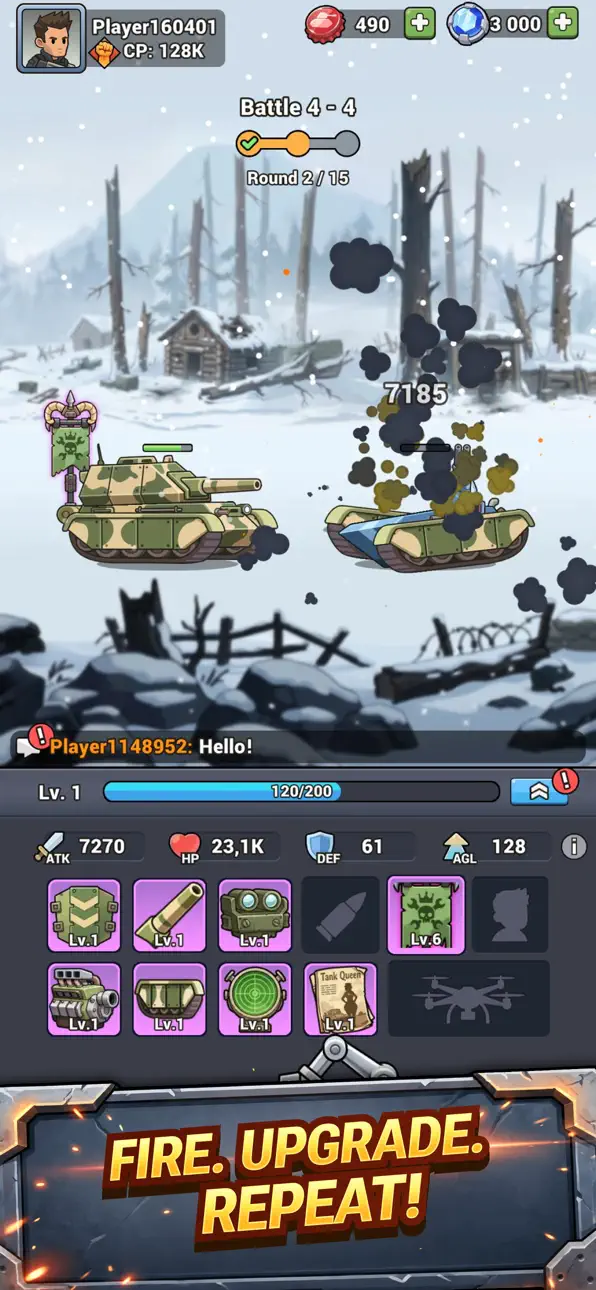
Gear up for tank battles in Steelborn: Tank Idle RPG, the ultimate build your tank game! Equip your warrior tank and duke it out in world of warriors duels as you explore dungeons and win big in the PVP arena.
This idle tank building game allows you to forge equipment to deck out your tank, starting from the lowly raw junk category all the way up to transcendent. Along the way you’ll be able to engage in regular battles as well as take part in dungeon raids and participate in PvP arena fights.
► BUILD YOUR TANK PART BY PART
Heat up the forge and roll out equipment that carries your ride from scrapyard leftovers to a transcendent war machine. Choose the stats that match your style, stack the right bonuses and shape a loadout nobody else in the world is running. Your tank, your build, your call.
► DUELS AND TANK BATTLES
Push through campaign stages for loot, test yourself in world of warriors duels, then enter the PvP arena where the biggest prizes sit. Read your rival's setup, swap the modules that counter it and time your attack - brute stats alone never take the crown.
► DUNGEON RAIDS
Keep an eye out for a rare key. It unlocks the dungeon gates, and if your armor holds to the last room, you drag home a fortune in resources. A short adventure, a heavy payday, an honest check on your build.
► THE FORGE WORKS FOR YOU
Reach level 3 and crafting goes automatic. Set the parameters you want, auto-sell the parts you don't and watch the arsenal grow in the background while you focus on fighting. Idle progress plus hands-on strategy — no reason to pick just one.
► MAKE IT UNMISTAKABLE
Repaint the hull, pick your colors and raise a custom battle banner so every opponent in the arena recognizes you before the first shot lands.
► WHAT YOU GET
• Deep idle RPG progression - your tank gains power around the clock
• Arena fights, one-on-one duels and boss-heavy dungeon expeditions
• Hundreds of items to forge, upgrade and combine
• Strategy that rewards clever thinking over raw numbers
• Short sessions for the bus, long-term goals for the weekend
• Simple controls, generous loot, zero waiting
Love slow-burn idle games? Prefer sharp, tactical fighting games? Steelborn hands you both: your machine levels up while you sleep, then you grab the controls and prove your plan in live combat. It's a new age of armored warfare, and the ranking table has room at the top.
► The battlefield is loading...
Download Steelborn: Tank Idle RPG, build your war machine and win the campaign one duel at a time!
Download Steelborn: Tank Idle RPG and start building your empire today!
Screenshots © their respective owners · App Store


iOSGods is not affiliated with, endorsed by, or sponsored by Apple Inc., Google LLC, or the developers of the apps listed here. Apple, iOS and App Store are trademarks of Apple Inc. Android and Google Play are trademarks of Google LLC. All other app names, icons, artwork and trademarks belong to their respective owners.
- Non-Jailbroken/Jailed or Jailbroken iPhone or iPad.
- Sideloadly or alternatives.
- Computer running Windows/macOS/Linux with iTunes installed.
STEP 1: Download the pre-hacked .IPA file from the link above to your computer. To download from the iOSGods App, see our iOSGods App IPA Download Tutorial which includes a video example.
STEP 2: Download Sideloadly and install it on your Windows or Mac.
STEP 3: Open Sideloadly on your computer, connect your iOS device, and wait until your device name appears in Sideloadly.
STEP 4: Once your iDevice is recognized, drag the modded .IPA file you downloaded and drop it into the Sideloadly application.
STEP 5: Enter your Apple Account email, then press “Start.” You’ll then be asked to enter your password. Go ahead and provide the required information.
STEP 6: Wait for Sideloadly to finish sideloading/installing the hacked IPA. If there are issues during installation, please read the note below.
STEP 7: Once the installation is complete and you see the app on your Home Screen, you will need to go to Settings → General → Profiles / VPN & Device Management. Once there, tap on the email you entered from step 6, and then tap on “Trust [email protected]”.
STEP 8: Now go to your Home Screen and open the newly installed app and everything should work fine. You may need to follow further per app instructions inside the hack's popup in-game.
NOTE: iOS/iPadOS 16 and later, you must enable Developer Mode. For free Apple Developer accounts, you will need to repeat this process every 7 days. If you have any questions or problems, read our Sideloadly FAQ section of the topic.
Game Name iOS Mod IPA is an action adventure game enhanced with powerful gameplay boosts and quality-of-life improvements. Win battles faster, earn rewards quicker, and enjoy uninterrupted play without ads.
- Unlimited Gold - spend freely to unlock premium content
- Damage Multiplier - deal significantly more damage in combat
- Defense Multiplier - take less damage and survive longer
- Reward Multiplier - earn more loot from every battle
- Max Level - instantly reach the highest player rank
- No Ads - play without interruptions or advertisements
This app also comes with iGameGod, giving you access to Auto Touch to automate repetitive tasks, App Speed Manager for adjustable gameplay speed, Memory Engine value editing, and more powerful iOS game tools.
Download Game Name Mod IPA from the links above. Tap the install button and follow the on-screen instructions to install this iOS app hack on your iPhone, iPad, or Apple Silicon.
Need more help Check out our iOSGods App Frequently Asked Questions for detailed answers and troubleshooting tips.
----------------------------------------------------------
--------------------------------------------------