Accesso richiesto
Accedi con il tuo account iOSGods per continuare.
Mod Features
- Unlimited Coins
- No ads
Scarica Swords of Fin Mod APK dal pulsante sopra. Una volta toccato download, segui le istruzioni per installare l'APK modificato sul tuo dispositivo Android o emulatore.
Hai bisogno di aiuto? Consulta le nostre Domande frequenti su Android per risposte dettagliate e consigli per la risoluzione dei problemi.
*** SAVE THE PRINCESS ***
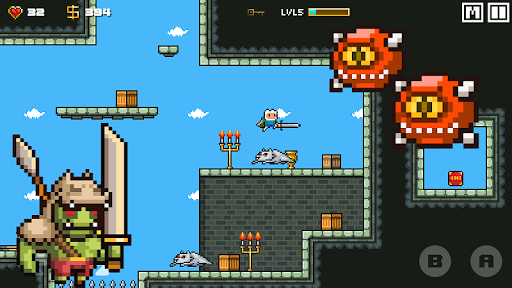
Become a Legendary Hero and explore a vast world of fantasy adventure in Swords of Finest: Heroes! The Kingdom of ICE Wizard has fallen prey to the fiendish Finn and it's up to the Heroes of the world to defeat him. Collect incredible gear and forge new items as you set out on a journey through rolling hills, cryptic caves, shrouded forests and more! Only the mightiest of Heroes will become legend.
Features:
• Create and customize your Hero!
• Unlock and Dash as an Finnman the legend swordmen!
• Power up your Hero with over 200 skills across 50 levels
• More than 40 unique magical abilities with unique animations!
• Fight epic boss battles!
• Complete Quests for unique rewards!
• Craft, acquire and enhance loot with forging, legendary drops and gear perks!
• Retro inspired levels, music and sound effects!
Capturing the spirit of RPG adventure classics from the 16-bit era. Swords of Finest is the much-awaited follow up to the award-winning game, Swords of Finest.
The fate of the world rests in your hands - if you dare to Dash!
Notes:
Swords of Finest do not requires an active internet connection to play. It is Totally FREE.
- iPhone o iPad non jailbroken/jailed oppure jailbroken.
- Sideloadly o alternative.
- Computer con Windows/macOS/Linux con iTunes installato.
PASSO 1: Scarica il file .IPA pre-modificato dal link sopra sul tuo computer. Per scaricarlo dall'iOSGods App, consulta il nostro Tutorial download IPA dell'iOSGods App, che include un esempio video.
PASSO 2: Scarica Sideloadly e installalo sul tuo Windows o Mac.
PASSO 3: Apri Sideloadly sul tuo computer, collega il tuo dispositivo iOS e attendi finché il nome del dispositivo non appare in Sideloadly.
PASSO 4: Una volta riconosciuto il tuo iDevice, trascina il file .IPA moddato che hai scaricato e rilascialo nell'applicazione Sideloadly.
PASSO 5: Inserisci l'email del tuo Apple Account, poi premi “Start”. Ti verrà quindi chiesto di inserire la password. Procedi e fornisci le informazioni richieste.
PASSO 6: Attendi che Sideloadly completi il sideload/installazione dell'IPA modificata. Se ci sono problemi durante l'installazione, leggi la nota qui sotto.
PASSO 7: Una volta completata l'installazione e vista l'app sulla schermata Home, dovrai andare in Impostazioni → Generali → Profili / Gestione VPN e dispositivi. Una volta lì, tocca l'email inserita al passo 6 e poi tocca “Autorizza [email protected]”.
PASSO 8: Ora vai sulla schermata Home e apri l'app appena installata: tutto dovrebbe funzionare correttamente. Potrebbe essere necessario seguire ulteriori istruzioni specifiche all'interno del popup dell'hack nel gioco.
NOTA: Per iOS/iPadOS 16 e versioni successive, devi attivare la Modalità sviluppatore. Per gli account Apple Developer gratuiti, dovrai ripetere questa procedura ogni 7 giorni. Se hai domande o problemi, leggi la nostra sezione FAQ Sideloadly del topic.