تسجيل الدخول مطلوب
سجّل الدخول بحساب iOSGods للمتابعة.
سجّل الدخول بحساب iOSGods للمتابعة.
هذا التهكير للعبة الألغاز Mahjong Crimes يزيل الملل بفتح أرواح غير محدودة ومفاتيح وأدوات تعزيز وجميع مظاهر البلاط، حتى تتمكن من التركيز على حل اللغز وراء جريمة أجاثا كريستي في قطار الشرق السريع دون انتظار إعادة تعبئة الطاقة.
سواء كنت من محبي الألغاز العاديين أو من عشاق حل الجرائم، فإن هذا الـ Mod IPA المعدل يتيح لك اللعب عبر أكثر من 250 مستوى بسرعتك الخاصة، وتجربة استراتيجيات مختلفة ومجموعات بلاط دون الاصطدام بجدران التقدم المعتادة التي تبطئ الألعاب المجانية.
- أرواح غير محدودة → العب بدون حدود طاقة
- مفاتيح غير محدودة → افتح جميع محتوى الألغاز
- جميع المظاهر مفتوحة → احصل على كل مجموعة بلاط من البداية
- أدوات تعزيز غير محدودة → استخدم المميزات الإضافية بحرية في أي مستوى
يأتي هذا التطبيق أيضًا مع iGameGod، مما يتيح لك الوصول إلى Auto Touch لأتمتة المهام المتكررة، وApp Speed Manager لضبط سرعة اللعب، وتعديل القيم عبر Memory Engine، والمزيد من أدوات ألعاب iOS القوية.
قم بتنزيل Mahjong Crimes Hack modded IPA من الروابط أعلاه. اضغط على زر التثبيت واتبع التعليمات لتثبيت هذا التعديل لـ iOS على iPhone أو iPad أو Apple Silicon.
هل تحتاج إلى مزيد من المساعدة؟ راجع الأسئلة الشائعة لتطبيق iOSGods للحصول على إجابات مفصلة ونصائح لاستكشاف الأخطاء.
PLAY MAHJONG AND SOLVE CRIMES
Unravel the mystery behind Agatha Christie’s renowned Murder on the Orient Express in Mahjong Crimes!
- Play 250+ captivating Mahjong levels!
- Experience fresh new puzzle mechanics!
- Dive into “Murder on the Orient Express” by Agatha Christie!
- Use boosters to crush tricky Mahjong puzzles!
- Collect cool looking tile sets!
- Play anytime, anywhere! No Wi-fi needed!
PLAY MAHJONG
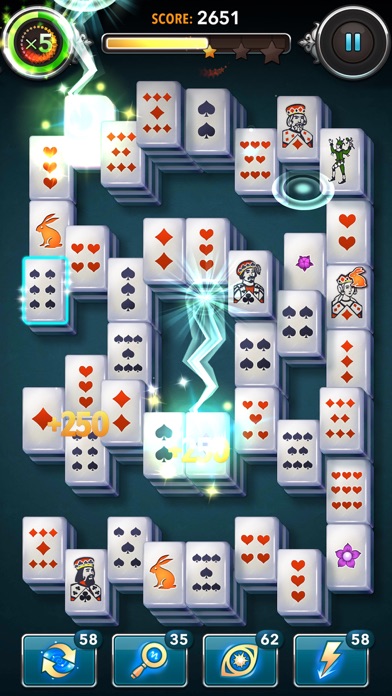
Mahjong Crimes is an addictive puzzle game where you pair tiles to reveal hidden clues, essential to solving crime cases. You’ll need a sharp eye to spot the identical tiles and connect them to clear the board to progress. Use power-ups to help you get past tricky time-based levels and collect amazing awards along the way.
SOLVE CRIMES
This unparalleled Mahjong game is all about solving crimes! Climb aboard the Orient Express with its elegant compartments and affluent travelers, where opulence is just a cover up for the crimes taking place behind the Mahjong tiles. Match tiles to investigate crimes, defeat thugs, and untangle the obscure mysteries! Embark on a fun adventure that will have you glued to your devices from the very first tile you pair!
Do you have what it takes to solve these captivating Mahjong puzzles and mysterious crimes?

- iPhone أو iPad بجيلبريك أو بدون جيلبريك.
- Sideloadly أو بدائلها.
- كمبيوتر يعمل بنظام Windows/macOS/Linux مع تثبيت iTunes.
الخطوة 1: قم بتنزيل ملف .IPA المعدّل مسبقًا من الرابط أعلاه إلى الكمبيوتر الخاص بك. للتنزيل من تطبيق iOSGods App، اطلع على دليل تنزيل IPA من تطبيق iOSGods App الذي يتضمن مثالًا بالفيديو.
الخطوة 2: قم بتنزيل Sideloadly وتثبيته على جهاز Windows أو Mac.
الخطوة 3: افتح Sideloadly على الكمبيوتر، ووصّل جهاز iOS الخاص بك، وانتظر حتى يظهر اسم جهازك داخل Sideloadly.
الخطوة 4: بمجرد التعرّف على جهاز iDevice الخاص بك، اسحب ملف .IPA المعدّل الذي قمت بتنزيله وأفلِته داخل تطبيق Sideloadly.
الخطوة 5: أدخل البريد الإلكتروني لحساب Apple Account الخاص بك، ثم اضغط على «Start». سيُطلب منك بعد ذلك إدخال كلمة المرور. تابع وأدخل المعلومات المطلوبة.
الخطوة 6: انتظر حتى ينتهي Sideloadly من تحميل/تثبيت ملف IPA المعدّل. في حال واجهت أي مشاكل أثناء التثبيت، يرجى قراءة الملاحظة أدناه.
الخطوة 7: بعد اكتمال التثبيت ورؤية التطبيق على الشاشة الرئيسية، انتقل إلى Settings → General → Profiles / VPN & Device Management. ثم اضغط على البريد الإلكتروني الذي أدخلته في الخطوة 6، ثم اضغط على «الوثوق بـ [email protected]».
الخطوة 8: الآن انتقل إلى الشاشة الرئيسية وافتح التطبيق الذي تم تثبيته للتو وسيعمل كل شيء بشكل صحيح. قد تحتاج إلى اتباع تعليمات إضافية خاصة بكل تطبيق داخل النافذة المنبثقة للتعديل أثناء اللعب.
ملاحظة: بدءًا من iOS/iPadOS 16 وما بعده، يجب تفعيل وضع المطور (Developer Mode). بالنسبة لحسابات Apple Developer المجانية، ستحتاج إلى تكرار هذه العملية كل 7 أيام. إذا كانت لديك أي أسئلة أو مشاكل، يرجى قراءة قسم الأسئلة الشائعة حول Sideloadly في الموضوع.