تسجيل الدخول مطلوب
سجّل الدخول بحساب iOSGods للمتابعة.
سجّل الدخول بحساب iOSGods للمتابعة.
Hack Features:
- Infinite Hints
- All Chapters Unlocked
يأتي هذا التطبيق أيضًا مع iGameGod، مما يتيح لك الوصول إلى Auto Touch لأتمتة المهام المتكررة، وApp Speed Manager لضبط سرعة اللعب، وتعديل القيم عبر Memory Engine، والمزيد من أدوات ألعاب iOS القوية.
قم بتنزيل Hitman GO Hack modded IPA من الروابط أعلاه. اضغط على زر التثبيت واتبع التعليمات لتثبيت هذا التعديل لـ iOS على iPhone أو iPad أو Apple Silicon.
هل تحتاج إلى مزيد من المساعدة؟ راجع الأسئلة الشائعة لتطبيق iOSGods للحصول على إجابات مفصلة ونصائح لاستكشاف الأخطاء.
Get your daily fix of Agent 47 with this elegant, strategy-based Hitman game!
5/5 Slide to Play: "…this is one to check out."
4/5 Joystiq: "Hitman GO is an impressive debut for Square Enix Montreal.”
4/5 Pocket Gamer - SILVER AWARD: "Hitman GO is a clever and refreshingly original puzzle game"
4/5 Polygon: "Hitman GO is a great minimalist take on the series' big ideas"
5/5 Pocket-lint: "Hitman GO is a clever and intelligent way of bringing a much-loved franchise to a mobile platform"
BEST GAME DESIGN - 2014 Canadian Videogame Awards
BEST IOS GAME - 2014 Canadian Videogame Awards
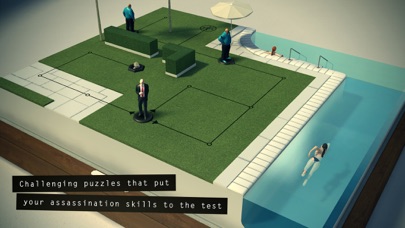
Hitman GO is an award-winning turn-based strategy game with beautifully rendered diorama-style set pieces. You will strategically navigate fixed spaces on a grid to avoid enemies and take out your target or infiltrate well-guarded locations. You really have to think about each move and all the Hitman tools of the trade you would expect are included; disguises, distractions, sniper rifles and even 47’s iconic Silverballers.
With Hitman GO, you’ll experience:
• Challenging puzzles that put your assassination skills to the test
• Beautiful scale model-style visuals
• Environments with secret passageways and off-limit areas
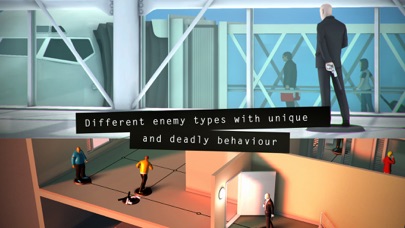
• Agent 47’s tools of the trade: Distractions, disguises, hiding spots, sniper rifles and even the iconic Silverballers
• Different enemy types with unique and deadly behaviours
• Different ways of completing each level, silently or forcefully
Please note:
** THIS GAME IS INCOMPATIBLE WITH THE iPod Touch 4th GENERATION **
Hitman GO minimum requirements: iPad 2 and above, iPad Mini, iPhone 4 and above, iPod Touch 5th generation and above.

- iPhone أو iPad بجيلبريك أو بدون جيلبريك.
- Sideloadly أو بدائلها.
- كمبيوتر يعمل بنظام Windows/macOS/Linux مع تثبيت iTunes.
الخطوة 1: قم بتنزيل ملف .IPA المعدّل مسبقًا من الرابط أعلاه إلى الكمبيوتر الخاص بك. للتنزيل من تطبيق iOSGods App، اطلع على دليل تنزيل IPA من تطبيق iOSGods App الذي يتضمن مثالًا بالفيديو.
الخطوة 2: قم بتنزيل Sideloadly وتثبيته على جهاز Windows أو Mac.
الخطوة 3: افتح Sideloadly على الكمبيوتر، ووصّل جهاز iOS الخاص بك، وانتظر حتى يظهر اسم جهازك داخل Sideloadly.
الخطوة 4: بمجرد التعرّف على جهاز iDevice الخاص بك، اسحب ملف .IPA المعدّل الذي قمت بتنزيله وأفلِته داخل تطبيق Sideloadly.
الخطوة 5: أدخل البريد الإلكتروني لحساب Apple Account الخاص بك، ثم اضغط على «Start». سيُطلب منك بعد ذلك إدخال كلمة المرور. تابع وأدخل المعلومات المطلوبة.
الخطوة 6: انتظر حتى ينتهي Sideloadly من تحميل/تثبيت ملف IPA المعدّل. في حال واجهت أي مشاكل أثناء التثبيت، يرجى قراءة الملاحظة أدناه.
الخطوة 7: بعد اكتمال التثبيت ورؤية التطبيق على الشاشة الرئيسية، انتقل إلى Settings → General → Profiles / VPN & Device Management. ثم اضغط على البريد الإلكتروني الذي أدخلته في الخطوة 6، ثم اضغط على «الوثوق بـ [email protected]».
الخطوة 8: الآن انتقل إلى الشاشة الرئيسية وافتح التطبيق الذي تم تثبيته للتو وسيعمل كل شيء بشكل صحيح. قد تحتاج إلى اتباع تعليمات إضافية خاصة بكل تطبيق داخل النافذة المنبثقة للتعديل أثناء اللعب.
ملاحظة: بدءًا من iOS/iPadOS 16 وما بعده، يجب تفعيل وضع المطور (Developer Mode). بالنسبة لحسابات Apple Developer المجانية، ستحتاج إلى تكرار هذه العملية كل 7 أيام. إذا كانت لديك أي أسئلة أو مشاكل، يرجى قراءة قسم الأسئلة الشائعة حول Sideloadly في الموضوع.




![[The Battle Cats JP] にゃんこ大戦争 iOS Mod IPA](https://is1-ssl.mzstatic.com/image/thumb/Purple221/v4/d5/5d/5e/d55d5ecc-9bbd-3446-2092-56eef81db097/AppIcon-0-0-1x_U007epad-0-1-85-220.png/100x100bb.jpg)


