تسجيل الدخول مطلوب
سجّل الدخول بحساب iOSGods للمتابعة.
سجّل الدخول بحساب iOSGods للمتابعة.
افتح قائمة الغش مع المكافآت الفورية في Drive Ahead! Sports Mod IPA، اضغط على زر الخلل الأزرق للحصول على العملات والطاقة وفتح جميع السيارات والمستويات وترقيات الحد الأقصى والتحكم في نتائج البطولة على الفور.
سواء كنت تعمل بجد نحو سيارة معينة أو تختبر تجميعات شخصيات مختلفة أو تريد فقط تخطي عملية فتح القفل والقفز مباشرة إلى فوضى اللعب الجماعي مع الأصدقاء، فإن هذا التعديل يتيح لك تخصيص تقدمك. التذاكر غير المحدودة تعني مباريات لا نهاية لها بدون انتظار ملء الطاقة، حتى تتمكن من التركيز على إتقان مهارات كرة السيارة الخاصة بك والهيمنة على لوحات الترتيب.
- قائمة الغش (اضغط على زر الخلل الأزرق للفتح) → الوصول إلى جميع الغش من قائمة واحدة مريحة
- +1000 عملة → دفعة عملة فورية
- +10 طاقة → إعادة ملء القدرة على التحمل لمزيد من المباريات
- فوز مباراة البطولة → ضمان النصر في أي بطولة
- خسارة مباراة البطولة → الخسارة المتعمدة عند الحاجة
- اكسب 1000 نقطة نجمة → التقدم السريع نحو المكافآت
- فتح جميع السيارات والمستويات → فتح القائمة الكاملة على الفور
- ترقيات الحد الأقصى → زيادة قوة الشخصية على الفور
- إعادة تعيين السيارات والمستويات ونقاط الترقية → ابدأ من جديد أو تراجع عن التغييرات
- إعادة تعيين صعوبة الذكاء الاصطناعي → اضبط مستوى تحدي الخصم
- إعادة تعيين العملات → امسح رصيد العملة الخاص بك
- IAP مجاني (يحتوي على أخطاء نوعاً ما، جرب قائمة الغش لمعرفة كيفية استخدامه) → تجاوز عمليات الشراء داخل التطبيق مع بعض التجربة والخطأ
- تذاكر غير محدودة → العب مباريات لا نهاية لها بدون انتظار
يأتي هذا التطبيق أيضًا مع iGameGod، مما يتيح لك الوصول إلى Auto Touch لأتمتة المهام المتكررة، وApp Speed Manager لضبط سرعة اللعب، وتعديل القيم عبر Memory Engine، والمزيد من أدوات ألعاب iOS القوية.
قم بتنزيل Drive Ahead! Sports - Free Hack modded IPA من الروابط أعلاه. اضغط على زر التثبيت واتبع التعليمات لتثبيت هذا التعديل لـ iOS على iPhone أو iPad أو Apple Silicon.
هل تحتاج إلى مزيد من المساعدة؟ راجع الأسئلة الشائعة لتطبيق iOSGods للحصول على إجابات مفصلة ونصائح لاستكشاف الأخطاء.
Cars! Sports! Explosions! Become the star of the playfield! Will you be number 1?!
Drive Ahead! Sports takes the original Drive Ahead! craziness to the next level with competitive sports, unique characters and exclusive outfits.
-- Play against your friends --
Challenge friends or family members to crazy matches in local multiplayer mode.
Who knew mom was such a technician on the field!?
-- Climb the seasonal tournament ladder--
Compete in the tournaments to unlock exclusive, limited time rewards. Seasons will be over before you know it, so better get to it!
-- Win epic rewards --
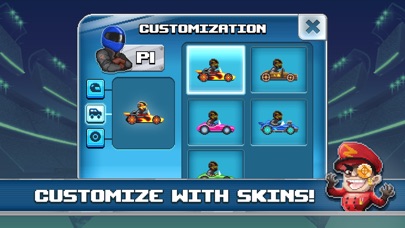
Keep unlocking new and unique skins and make the competition green with envy.
Fashionista-on-wheels, anyone?
-- Master all the different sports --
Ace at american football? Breathtaking at basketball? Incredible at ice hockey? Whatever your forte may be, we got you covered in multiple game modes. Play on your own or with your friends!
Enjoying Drive Ahead! Sports as it is or feel something needs to be improved? Drop our team a line or review and let us hear how you're enjoying Drive Ahead! Sports!
You can email us at driveaheadsports [at] dodreams [dot] com. Here is our Privacy Policy: http://dodreams.com/pdf/dodreams_policy.pdf.

- iPhone أو iPad بجيلبريك أو بدون جيلبريك.
- Sideloadly أو بدائلها.
- كمبيوتر يعمل بنظام Windows/macOS/Linux مع تثبيت iTunes.
الخطوة 1: قم بتنزيل ملف .IPA المعدّل مسبقًا من الرابط أعلاه إلى الكمبيوتر الخاص بك. للتنزيل من تطبيق iOSGods App، اطلع على دليل تنزيل IPA من تطبيق iOSGods App الذي يتضمن مثالًا بالفيديو.
الخطوة 2: قم بتنزيل Sideloadly وتثبيته على جهاز Windows أو Mac.
الخطوة 3: افتح Sideloadly على الكمبيوتر، ووصّل جهاز iOS الخاص بك، وانتظر حتى يظهر اسم جهازك داخل Sideloadly.
الخطوة 4: بمجرد التعرّف على جهاز iDevice الخاص بك، اسحب ملف .IPA المعدّل الذي قمت بتنزيله وأفلِته داخل تطبيق Sideloadly.
الخطوة 5: أدخل البريد الإلكتروني لحساب Apple Account الخاص بك، ثم اضغط على «Start». سيُطلب منك بعد ذلك إدخال كلمة المرور. تابع وأدخل المعلومات المطلوبة.
الخطوة 6: انتظر حتى ينتهي Sideloadly من تحميل/تثبيت ملف IPA المعدّل. في حال واجهت أي مشاكل أثناء التثبيت، يرجى قراءة الملاحظة أدناه.
الخطوة 7: بعد اكتمال التثبيت ورؤية التطبيق على الشاشة الرئيسية، انتقل إلى Settings → General → Profiles / VPN & Device Management. ثم اضغط على البريد الإلكتروني الذي أدخلته في الخطوة 6، ثم اضغط على «الوثوق بـ [email protected]».
الخطوة 8: الآن انتقل إلى الشاشة الرئيسية وافتح التطبيق الذي تم تثبيته للتو وسيعمل كل شيء بشكل صحيح. قد تحتاج إلى اتباع تعليمات إضافية خاصة بكل تطبيق داخل النافذة المنبثقة للتعديل أثناء اللعب.
ملاحظة: بدءًا من iOS/iPadOS 16 وما بعده، يجب تفعيل وضع المطور (Developer Mode). بالنسبة لحسابات Apple Developer المجانية، ستحتاج إلى تكرار هذه العملية كل 7 أيام. إذا كانت لديك أي أسئلة أو مشاكل، يرجى قراءة قسم الأسئلة الشائعة حول Sideloadly في الموضوع.