Inloggen vereist
Log in met je iOSGods-account om door te gaan.
Log in met je iOSGods-account om door te gaan.

Onbeperkte valuta's die toenemen in plaats van afnemen, plus gratis in-app aankopen, geven je onweerstaanbare progressie in deze idle RPG hack. Epic Stickman: RPG Idle War Mod IPA laat je stickman-held sterker worden zonder te grinden voor middelen, zodat je je kunt concentreren op de strijd terwijl het spel je eindeloos beloont.
- Onbeperkte valuta's → Zullen toenemen in plaats van afnemen
- Gratis in-app aankopen (Toggle via iGMenu) → Toegang tot premiuminhoud zonder uit te geven
Deze app bevat ook iGameGod, waarmee je toegang krijgt tot Auto Touch om repetitieve taken te automatiseren, App Speed Manager voor een aanpasbare spelsnelheid, het bewerken van waarden met Memory Engine en andere krachtige iOS-gametools.
Download Epic Stickman: RPG Idle War iOS Mod IPA via de bovenstaande links. Tik op de installatieknop en volg de instructies om deze iOS-app-hack op je iPhone, iPad of Apple Silicon te installeren.
Meer hulp nodig? Bekijk onze Veelgestelde vragen over de iOSGods-app voor uitgebreide antwoorden en probleemoplossingstips.
Epic Stickman: Unleash Your Inner Legend in the Shadow Realm
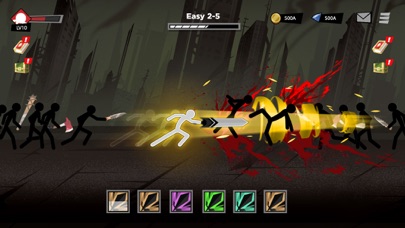
Epic Stickman: Idle RPG War is a thrilling idle RPG adventure where darkness reigns and your stickman hero fights even while you’re offline. In this AFK auto-battle game, your legend never sleeps — only grows stronger. The realm of shadows is calling. Are you ready to answer?
◈ Idle RPG Action That Never Stops
Battle through hordes of monsters and earn epic rewards — even when you're away. Enjoy seamless auto-battle mechanics that let your Stickman progress on his own.
◈ Class-Based RPG System
Choose your path: become a fearless warrior, a shadowy rogue, a mystical mage, or a summoner of forgotten beasts. Each class offers unique idle skills, combat strategies, and upgrade paths.
◈ Epic Upgrades & Gears
Collect powerful weapons, legendary armor, and rare loot. Upgrade your stickman hero and unlock devastating skills for AFK dominance.
◈ Explore the Shadow Realm
Dive into a dark fantasy world filled with secrets, bosses, and treasures. Survive wave after wave of enemies in this action-packed roleplaying adventure.
◈ Customize and Evolve
Personalize your hero’s look, fighting style, and gear. Build your dream stickman champion and take down every foe in your way. Whether you're into idle RPGs, AFK clickers, stickman games, or auto-fight adventures, this game delivers it all. It’s time to claim your place among the legends.
Join Epic Stickman community at: https://discord.com/invite/bJxa4amcda
Download Epic Stickman: Idle RPG War now and begin your shadow-fueled journey to greatness!
- Niet-jailbroken/jailed of jailbroken iPhone of iPad.
- Sideloadly of alternatieven.
- Computer met Windows/macOS/Linux en iTunes geïnstalleerd.
STAP 1: Download het vooraf gehackte .IPA-bestand via de link hierboven naar uw computer. Om het te downloaden vanuit de iOSGods App, bekijk onze iOSGods App IPA-downloadhandleiding met een videovoorbeeld.
STAP 2: Download Sideloadly en installeer het op uw Windows of Mac.
STAP 3: Open Sideloadly op uw computer, sluit uw iOS-apparaat aan en wacht tot de naam van uw apparaat in Sideloadly verschijnt.
STAP 4: Zodra uw iDevice is herkend, sleept u het gedownloade gemodde .IPA-bestand naar de Sideloadly-applicatie.
STAP 5: Voer het e-mailadres van uw Apple Account in en druk op “Start”. U wordt vervolgens gevraagd om uw wachtwoord in te voeren. Geef de gevraagde informatie op.
STAP 6: Wacht tot Sideloadly het sideloaden/installeren van de gehackte IPA heeft voltooid. Als er problemen zijn tijdens de installatie, lees dan onderstaande opmerking.
STAP 7: Zodra de installatie is voltooid en u de app op uw beginscherm ziet, gaat u naar Instellingen → Algemeen → Profielen / VPN- en apparaatbeheer. Tik daar op het e-mailadres dat u in stap 6 hebt ingevoerd en tik vervolgens op “Vertrouw [email protected]”.
STAP 8: Ga nu naar uw beginscherm en open de zojuist geïnstalleerde app; alles zou correct moeten werken. Mogelijk moet u verdere app-specifieke instructies volgen in de hack-popup in het spel.
OPMERKING: Op iOS/iPadOS 16 en later moet u Ontwikkelaarsmodus inschakelen. Voor gratis Apple Developer-accounts moet u dit proces elke 7 dagen herhalen. Als u vragen of problemen hebt, lees dan onze Sideloadly FAQ-sectie van het onderwerp.






![Rapid Reload Hack [ Debug Menu ]](https://is1-ssl.mzstatic.com/image/thumb/Purple221/v4/f4/5c/11/f45c11ef-0768-05ba-6234-25d148c3949e/AppIcon-0-0-1x_U007emarketing-0-8-0-85-220.png/100x100bb.jpg)


![Rodeo Stampede: Sky Zoo Safari Hack [ Debug Menu ]](https://is1-ssl.mzstatic.com/image/thumb/Purple221/v4/32/8a/99/328a99b2-9372-5b9d-f4ca-7deb90c39225/AppIcon-1x_U007emarketing-0-8-0-85-220-0.png/100x100bb.jpg)


