需要登入
請使用您的 iOSGods 帳戶登入以繼續。
請使用您的 iOSGods 帳戶登入以繼續。
使用此 Bazaart AI Photo Editor Mod IPA 解鎖高級設計和照片編輯工具,讓您即時存取所有付費功能,不受限制。Bazaart 是一款直覺的 AI 驅動編輯器,用於建立專業產品照片、社群媒體內容、拼貼和自訂設計,無需設計經驗。此修改版本移除付費牆,讓您在影片編輯、AI 增強和設計範本中獲得完整的創意控制。
- 高級版解鎖 → 存取所有付費功能和工具
從上方連結下載 Bazaart AI Photo Editor Design iOS Mod IPA。點選安裝按鈕並依照畫面指示在 iPhone、iPad 或 Apple Silicon 上安裝此 iOS 應用程式修改版。
需要更多協助?請查看我們的 iOSGods 應用程式常見問題 以獲得詳細解答與疑難排解。
百色特是一款好上手的 AI 照片編輯、影片編輯與設計 App。無需設計背景。用於網路販售、數位行銷與社群媒體,創作更快。立即獲取你的設計超能力吧!
你可以製作
商務用途:
產品照、模特兒照片、房屋刊登、大頭貼、標誌、傳單、廣告、海報。
社群用途:
Reels、TikTok 影片、限時動態、貼文、投影片、縮圖、定格動畫。
日常生活:
拼貼、卡片、邀請函、迷因、WhatsApp 貼圖、背景、桌布、GIF、藝術作品。
AI 工具
• 使用 AI 進行編輯:用簡單提示變更或替換照片中的任何元素
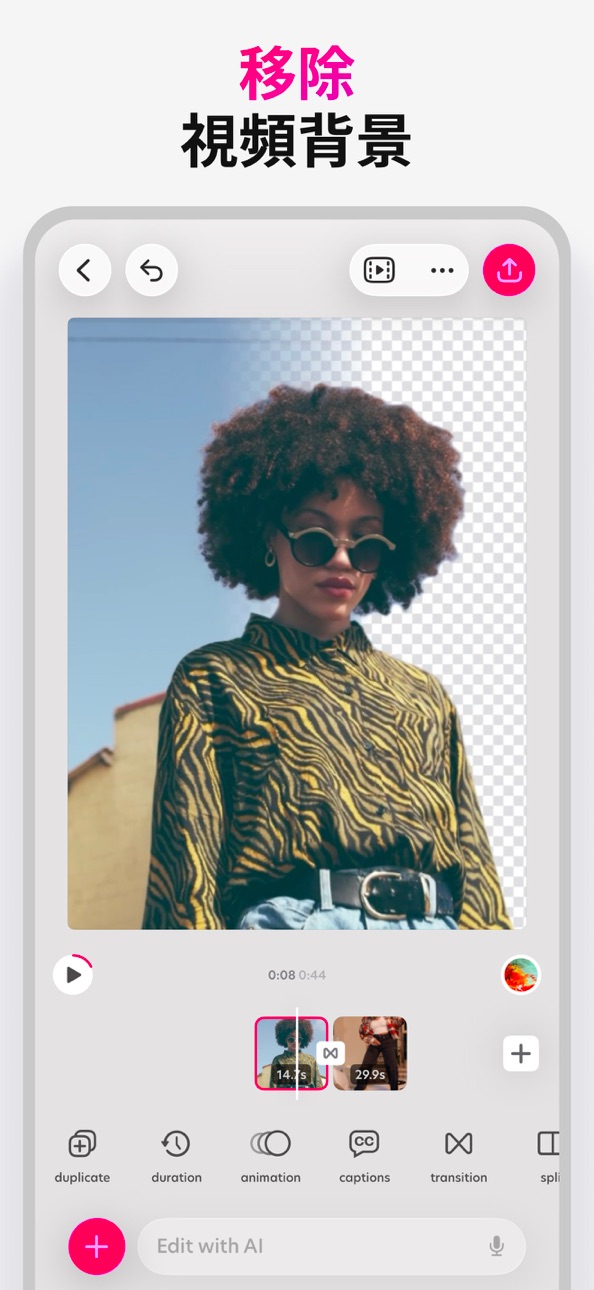
• 移除背景:相片與影片的一鍵去背
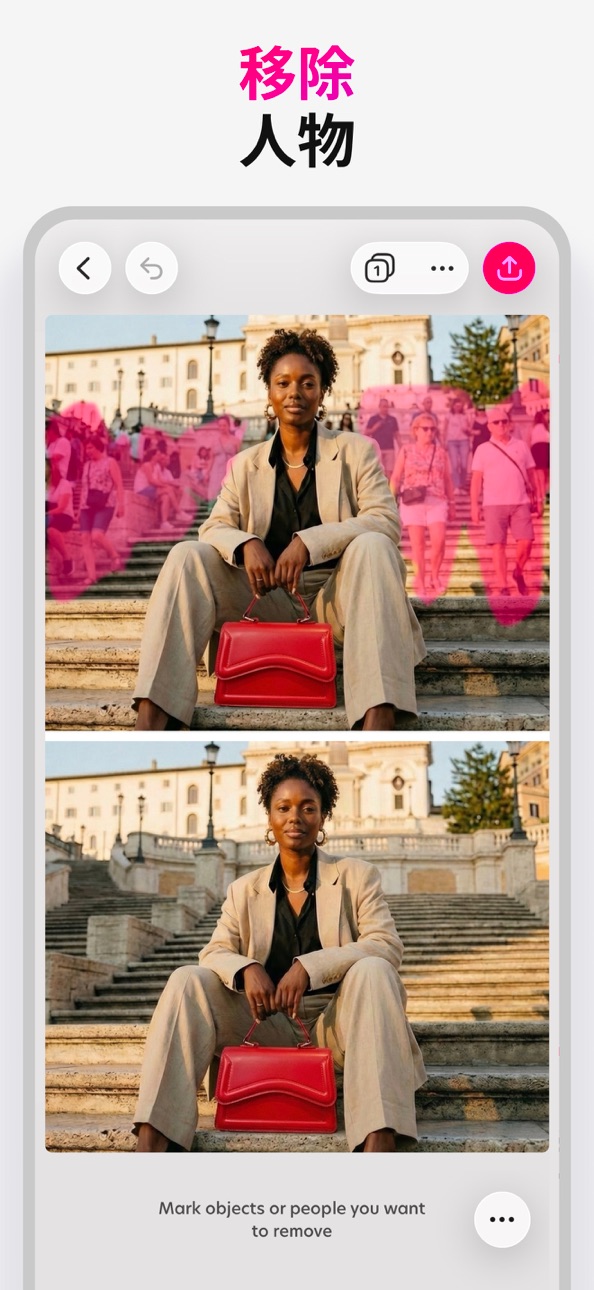
• 移除:移除照片中的物體與人物
• AI模特:生成上身產品圖
• AI影片:把產品照片變成影片
• 魔法背景:為商品與人像生成符合品牌風格的 AI 場景
• AI 圖像:將文字提示變成影像
• AI 風格重塑:一鍵換風格(從商品試穿到創意造型)
• 魔法編輯:選取區域並用提示替換
• 美化:一鍵提升照片品質
• 縮放:將照片延展為任意尺寸
• 升降:擷取主體、移動並調整大小
照片與影片編輯工具
• 裁切、剪刀、橡皮擦、形狀去背
• 調整曝光、對比、飽和、鮮豔、色溫、色調、陰影、高光、褪色、銳利與模糊
• 以外框與陰影讓元素更突出
• 以混合模式合成照片與影片
• 批次編輯,加速處理多張照片
• 模糊背景,打造人像景深
設計工具
• 自訂尺寸與熱門預設
• 自由素描與繪圖
• 文字沿弧形與圓形排版
• 文字樣式快速預設
• 精調對齊、字距與行距
• 自動貼齊,完美對準
• 微調工具,精準定位
• 圖層作業;每一步都可復原
• 以資料夾整理專案
• 專案存雲端,隨時同步
加速你的創作
• 設計師打造的精美範本
• 數千種背景、圖形、形狀與動畫圖形
• 照片與影片特效
• 豐富字型庫,亦可加入自備字型
• 可使用相簿、相機、檔案或素材庫中的照片與影片
匯出與分享
• 另存為 JPG 或具透明背景的 PNG
• 儲存影片或動態 GIF
• 匯出為 PDF
• 隨處分享
升級你的設計體驗
百色特高級版
解鎖AI工具與素材,更多AI用量,無浮水印儲存,VIP支援。
百色特超級(適合小型企業)
包含高級版 的一切,AI用量提升4倍,解鎖AI影片。
服務條款: https://www.bazaart.com/terms
隱私政策: https://www.bazaart.com/terms#privacy
需要協助?來信 [email protected],我們會盡快回覆。
BAZAART是Bazaart有限公司的一個註冊商標。
螢幕截圖 © 各自所有者 · App Store


iOSGods 與 Apple Inc.、Google LLC 及此處列出應用程式的開發者並無關聯,亦未獲其認可或贊助。Apple、iOS 與 App Store 為 Apple Inc. 的商標。Android 與 Google Play 為 Google LLC 的商標。其他所有應用程式名稱、圖示、圖片與商標均屬其各自所有者。

- 未越獄/受限或已越獄的 iPhone 或 iPad。
- Sideloadly 或替代方案。
- 執行 Windows/macOS/Linux 且已安裝 iTunes 的電腦。
步驟 1: 透過上方連結將已破解的 .IPA 檔案下載到您的電腦。若要從 iOSGods App 下載,請參閱我們的 iOSGods App IPA 下載教學,其中包含影片範例。
步驟 2: 下載 Sideloadly 並將其安裝在您的 Windows 或 Mac 上。
步驟 3: 在電腦上開啟 Sideloadly,連接您的 iOS 裝置,並等待裝置名稱出現在 Sideloadly 中。
步驟 4: 當 Sideloadly 辨識到您的 iOS 裝置後,將下載好的修改版 .IPA 檔案拖曳並放到 Sideloadly 應用程式中。
步驟 5: 輸入您的 Apple Account 電子郵件,然後按下「Start」。系統會要求您輸入密碼,請依指示提供所需資訊。
步驟 6: 等待 Sideloadly 完成已破解 IPA 的旁載/安裝。如果安裝過程中發生問題,請閱讀下方的注意事項。
步驟 7: 安裝完成並在主畫面上看到該應用程式後,您需要前往 設定 → 一般 → 描述檔 / VPN 與裝置管理。進入後,點選您在步驟 6 中輸入的電子郵件,然後點選「信任 [email protected]」。
步驟 8: 現在回到主畫面並開啟新安裝的應用程式,一切應該都能正常運作。您可能需要依照遊戲內破解彈出視窗中的進一步指示操作。
注意: 在 iOS/iPadOS 16 及更新版本上,您必須 啟用開發者模式。若使用免費的 Apple Developer 帳號,您將需要每 7 天重複此程序。如有任何疑問或問題,請閱讀我們的 主題中的 Sideloadly 常見問題區段。
Game Name iOS Mod IPA is an action adventure game enhanced with powerful gameplay boosts and quality-of-life improvements. Win battles faster, earn rewards quicker, and enjoy uninterrupted play without ads.
- Unlimited Gold - spend freely to unlock premium content
- Damage Multiplier - deal significantly more damage in combat
- Defense Multiplier - take less damage and survive longer
- Reward Multiplier - earn more loot from every battle
- Max Level - instantly reach the highest player rank
- No Ads - play without interruptions or advertisements
This app also comes with iGameGod, giving you access to Auto Touch to automate repetitive tasks, App Speed Manager for adjustable gameplay speed, Memory Engine value editing, and more powerful iOS game tools.
從上方連結下載 Game Name Mod IPA。點選安裝按鈕並依照畫面指示在 iPhone、iPad 或 Apple Silicon 上安裝此 iOS 應用程式修改版。
需要更多協助請查看我們的 iOSGods 應用程式常見問題 以獲得詳細解答與疑難排解。
----------------------------------------------------------
--------------------------------------------------