Login Required
Sign in with your iOSGods account to continue.
Sign in with your iOSGods account to continue.

Hack Features:
- Never Die
- 1 Hit Kill
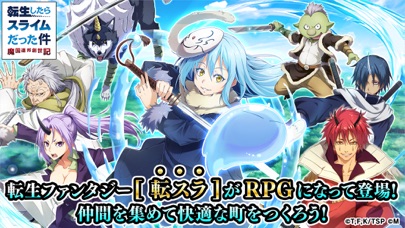
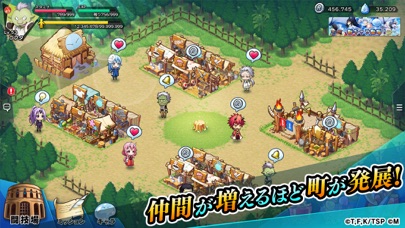
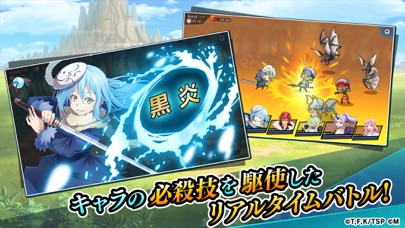
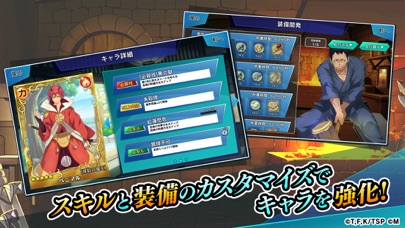
Download 転生したらスライムだった件 ~魔国連邦創世記~ (That time I Got Reincarnated as a Slime) Hack modded IPA from the links above. Tap the install button and follow the on-screen instructions to install this iOS app hack on your iPhone, iPad, or Apple Silicon.
Need more help? Check out our iOSGods App Frequently Asked Questions for detailed answers and troubleshooting tips.
- Non-Jailbroken/Jailed or Jailbroken iPhone or iPad.
- Sideloadly or alternatives.
- Computer running Windows/macOS/Linux with iTunes installed.
STEP 1: Download the pre-hacked .IPA file from the link above to your computer. To download from the iOSGods App, see our iOSGods App IPA Download Tutorial which includes a video example.
STEP 2: Download Sideloadly and install it on your Windows or Mac.
STEP 3: Open Sideloadly on your computer, connect your iOS device, and wait until your device name appears in Sideloadly.
STEP 4: Once your iDevice is recognized, drag the modded .IPA file you downloaded and drop it into the Sideloadly application.
STEP 5: Enter your Apple Account email, then press “Start.” You’ll then be asked to enter your password. Go ahead and provide the required information.
STEP 6: Wait for Sideloadly to finish sideloading/installing the hacked IPA. If there are issues during installation, please read the note below.
STEP 7: Once the installation is complete and you see the app on your Home Screen, you will need to go to Settings -> General -> Profiles / VPN & Device Management. Once there, tap on the email you entered from step 6, and then tap on 'Trust [email protected]'.
STEP 8: Now go to your Home Screen and open the newly installed app and everything should work fine. You may need to follow further per app instructions inside the hack's popup in-game.
NOTE: iOS/iPadOS 16 and later, you must enable Developer Mode. For free Apple Developer accounts, you will need to repeat this process every 7 days. If you have any questions or problems, read our Sideloadly FAQ section of the topic.

![[ Kyoutou Kotoba RPG: Kotodaman ] コトダマン-共闘ことばRPG Hack](https://is1-ssl.mzstatic.com/image/thumb/Purple126/v4/1a/00/95/1a009543-5a2c-8f8e-8c58-3ac74d754a1e/AppIcon-1x_U007emarketing-0-7-0-85-220.png/100x100bb.jpg)

![[ Danmachi JP ] ダンまち〜メモリア・フレーゼ〜 Hack](https://is5-ssl.mzstatic.com/image/thumb/Purple116/v4/94/09/5c/94095c34-4f3f-dbee-803d-f410ead37226/AppIcon-0-0-1x_U007emarketing-0-0-0-8-0-0-sRGB-0-0-0-GLES2_U002c0-512MB-85-220-0-0.png/100x100bb.jpg)
![[ Heaven Burns Red ] ヘブンバーンズレッド Hack](https://is5-ssl.mzstatic.com/image/thumb/Purple116/v4/ba/d1/48/bad148af-6c8f-005a-4c49-4e03fe972795/AppIcon-1x_U007emarketing-0-7-0-85-220.png/100x100bb.jpg)




![[ White Cat Tennis ] 白猫テニス Hack](https://is1-ssl.mzstatic.com/image/thumb/Purple112/v4/c2/b9/29/c2b929cc-cdc4-4c97-16a9-72022b5817d3/AppIcon-0-0-1x_U007emarketing-0-0-0-7-0-0-sRGB-0-0-0-GLES2_U002c0-512MB-85-220-0-0.png/100x100bb.jpg)

![[ The Quintessential Quintuplets JP ] 五等分の花嫁 五つ子ちゃんはパズルを五等分できない。 Hack](https://is1-ssl.mzstatic.com/image/thumb/Purple122/v4/60/ce/b7/60ceb702-7ca2-4383-af6a-d1cd31cf3032/AppIcon-0-0-1x_U007emarketing-0-0-0-7-0-0-sRGB-0-0-0-GLES2_U002c0-512MB-85-220-0-0.png/100x100bb.jpg)


![[ Rent-a-Girlfriend: Heroine All Stars JP ] 彼女、お借りします ヒロインオールスターズ Hack](https://is4-ssl.mzstatic.com/image/thumb/Purple126/v4/cb/4f/60/cb4f60e0-f459-2929-d706-dafb7ed81486/source/100x100bb.jpg)
![[ Gate of Nightmares ] ゲートオブナイトメア Hack](https://is2-ssl.mzstatic.com/image/thumb/Purple116/v4/e0/be/e5/e0bee5fa-b566-afdd-e677-c00cf2fecb9a/source/100x100bb.jpg)
![[ My Hero Academia Ultra Impact ] 僕のヒーローアカデミア ULTRA IMPACT Hack](https://is5-ssl.mzstatic.com/image/thumb/Purple126/v4/82/15/44/8215445b-358c-a0d0-de5d-e288e370a352/source/100x100bb.jpg)
![[ Project Sekai JP ] プロジェクトセカイ カラフルステージ! feat. 初音ミク Hack](https://is2-ssl.mzstatic.com/image/thumb/Purple126/v4/54/9f/6a/549f6abc-52fd-e194-68f6-a54de0b5890a/source/100x100bb.jpg)

![[ Kingdom Dash!! ] キングダムDASH!! Hack](https://is4-ssl.mzstatic.com/image/thumb/Purple116/v4/ea/bc/09/eabc0922-b753-cb8e-1a8a-195d202e8a6a/source/100x100bb.jpg)


![[ Fantasia Rebuild ] ファンタジア・リビルド Hack](https://is5-ssl.mzstatic.com/image/thumb/Purple125/v4/b0/c1/a8/b0c1a8a9-3d4f-e307-71b9-dec3ae43fd03/source/100x100bb.jpg)

![[ The Rise of the Shield Hero ] 盾の勇者の成り上がり RERISE Hack](https://is2-ssl.mzstatic.com/image/thumb/Purple115/v4/ed/45/63/ed4563bd-ec4b-e28e-9ed4-47290cb4f3e3/source/100x100bb.jpg)

![[ Mushoku Tensei ] 無職転生 ~ゲームになっても本気だす~ Hack](https://is1-ssl.mzstatic.com/image/thumb/Purple125/v4/5e/1d/1c/5e1d1cc2-4aed-dd78-f691-39b788fcb3c5/source/100x100bb.jpg)
![[ JoJo’s Pitter-Patter Pop! ] ジョジョのピタパタポップ Hack](https://is3-ssl.mzstatic.com/image/thumb/Purple125/v4/92/44/ef/9244efb7-f132-9d52-712c-06b7180dffd3/source/100x100bb.jpg)