تسجيل الدخول مطلوب
سجّل الدخول بحساب iOSGods للمتابعة.
سجّل الدخول بحساب iOSGods للمتابعة.
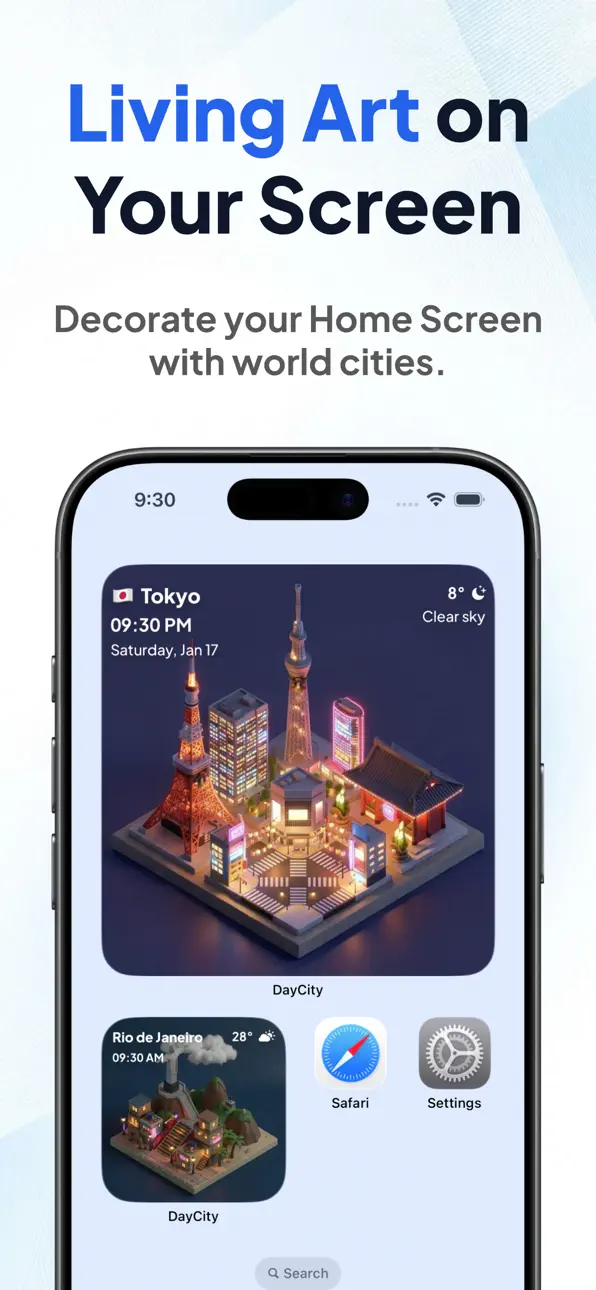
DayCity هو تطبيق ساعة الطقس الذي يحول شاشتك الرئيسية إلى مدن متساوية القياس حية تعكس الطقس الفعلي والوقت المحلي عبر أجمل وجهات العالم. يفتح هذا Mod IPA المجاني الميزات المتقدمة، مما يتيح لك تزيين هاتفك بمدن عالمية منتقاة ومشاهدتها تتغير كل ساعة بينما تشاهد الغروب في باريس أو صباحات ممطرة في طوكيو.
- متقدم → جميع الميزات المتقدمة مفتوحة
قم بتنزيل DayCity: Weather Clock Widget iOS Mod IPA من الروابط أعلاه. اضغط على زر التثبيت واتبع التعليمات لتثبيت هذا التعديل لـ iOS على iPhone أو iPad أو Apple Silicon.
هل تحتاج إلى مزيد من المساعدة؟ راجع الأسئلة الشائعة لتطبيق iOSGods للحصول على إجابات مفصلة ونصائح لاستكشاف الأخطاء.
The World in Your Hand.
DayCity is a weather clock app that lets you enjoy the world's "now" as living art. Decorate your Home Screen with your favorite cities, and watch them transform. The isometric cityscapes change hourly to reflect the local weather and time, adding a touch of global atmosphere right on your phone.
Glimpse a Parisian sunset during your break, or wake up to a rainy morning in Tokyo.
Discover a new world every day. Enrich your daily life with DayCity.
【Key Features】
■ World Cities on Your Widget
Curated world cities line up. Place beautiful isometric illustrations that reflect real-time local weather and time directly on your Home Screen.
■ Craft Your Own World
Use your own words to generate a unique, personalized diorama. Link it with your current location, and watch your custom cityscape change in real-time according to your local weather and time. Transform your everyday surroundings into a special piece of art.
■ A Unique World, Every Day
Sunny, rainy, snowy. Dawn, day, dusk, night. The graphics update every hour.
Powered by AI generation, the scenery evolves daily—you'll never see the exact same city twice. Keep an eye out for special seasonal decorations, like on Christmas.
■ Collect the Moments
"This view is beautiful!" Save these ephemeral moments as snapshots. Build your own collection of world scenery to look back on anytime.
■ Designed for Your Life
Designed to be unobtrusive yet captivating—art meant to be displayed perfectly on your device.
Bring the World Closer.
Download DayCity now and find your favorite city.
【Terms of Service】
https://theday.city/terms
【Privacy Policy】
https://theday.city/privacy
لقطات الشاشة © لأصحابها · App Store


iOSGods ليست تابعة لشركة Apple Inc. أو Google LLC أو مطوّري التطبيقات المدرجة هنا، وليست معتمدة أو مدعومة منهم. Apple وiOS وApp Store علامات تجارية لشركة Apple Inc. وAndroid وGoogle Play علامتان تجاريتان لشركة Google LLC. أما بقية أسماء التطبيقات والأيقونات والصور والعلامات التجارية فهي ملك لأصحابها.

- iPhone أو iPad بجيلبريك أو بدون جيلبريك.
- Sideloadly أو بدائلها.
- كمبيوتر يعمل بنظام Windows/macOS/Linux مع تثبيت iTunes.
الخطوة 1: قم بتنزيل ملف .IPA المعدّل مسبقًا من الرابط أعلاه إلى الكمبيوتر الخاص بك. للتنزيل من تطبيق iOSGods App، اطلع على دليل تنزيل IPA من تطبيق iOSGods App الذي يتضمن مثالًا بالفيديو.
الخطوة 2: قم بتنزيل Sideloadly وتثبيته على جهاز Windows أو Mac.
الخطوة 3: افتح Sideloadly على الكمبيوتر، ووصّل جهاز iOS الخاص بك، وانتظر حتى يظهر اسم جهازك داخل Sideloadly.
الخطوة 4: بمجرد التعرّف على جهاز iDevice الخاص بك، اسحب ملف .IPA المعدّل الذي قمت بتنزيله وأفلِته داخل تطبيق Sideloadly.
الخطوة 5: أدخل البريد الإلكتروني لحساب Apple Account الخاص بك، ثم اضغط على «Start». سيُطلب منك بعد ذلك إدخال كلمة المرور. تابع وأدخل المعلومات المطلوبة.
الخطوة 6: انتظر حتى ينتهي Sideloadly من تحميل/تثبيت ملف IPA المعدّل. في حال واجهت أي مشاكل أثناء التثبيت، يرجى قراءة الملاحظة أدناه.
الخطوة 7: بعد اكتمال التثبيت ورؤية التطبيق على الشاشة الرئيسية، انتقل إلى Settings → General → Profiles / VPN & Device Management. ثم اضغط على البريد الإلكتروني الذي أدخلته في الخطوة 6، ثم اضغط على «الوثوق بـ [email protected]».
الخطوة 8: الآن انتقل إلى الشاشة الرئيسية وافتح التطبيق الذي تم تثبيته للتو وسيعمل كل شيء بشكل صحيح. قد تحتاج إلى اتباع تعليمات إضافية خاصة بكل تطبيق داخل النافذة المنبثقة للتعديل أثناء اللعب.
ملاحظة: بدءًا من iOS/iPadOS 16 وما بعده، يجب تفعيل وضع المطور (Developer Mode). بالنسبة لحسابات Apple Developer المجانية، ستحتاج إلى تكرار هذه العملية كل 7 أيام. إذا كانت لديك أي أسئلة أو مشاكل، يرجى قراءة قسم الأسئلة الشائعة حول Sideloadly في الموضوع.
Game Name iOS Mod IPA is an action adventure game enhanced with powerful gameplay boosts and quality-of-life improvements. Win battles faster, earn rewards quicker, and enjoy uninterrupted play without ads.
- Unlimited Gold - spend freely to unlock premium content
- Damage Multiplier - deal significantly more damage in combat
- Defense Multiplier - take less damage and survive longer
- Reward Multiplier - earn more loot from every battle
- Max Level - instantly reach the highest player rank
- No Ads - play without interruptions or advertisements
This app also comes with iGameGod, giving you access to Auto Touch to automate repetitive tasks, App Speed Manager for adjustable gameplay speed, Memory Engine value editing, and more powerful iOS game tools.
قم بتنزيل Game Name Mod IPA من الروابط أعلاه. اضغط على زر التثبيت واتبع التعليمات لتثبيت هذا التعديل لـ iOS على iPhone أو iPad أو Apple Silicon.
هل تحتاج إلى مزيد من المساعدة؟ راجع الأسئلة الشائعة لتطبيق iOSGods للحصول على إجابات مفصلة ونصائح لاستكشاف الأخطاء.
----------------------------------------------------------
--------------------------------------------------